Why Your AI Rendering Prompt Matters More Than the Tool You Use

💡 Pro Tip
Before writing any prompt, open a reference image that matches the mood and quality you want. Study it for 30 seconds and identify three specific elements: the dominant material, the lighting direction, and the camera height. Use those three observations as the backbone of your prompt. This single habit eliminates most “not what I expected” results.
How to Structure an AI Prompt for Architectural Rendering

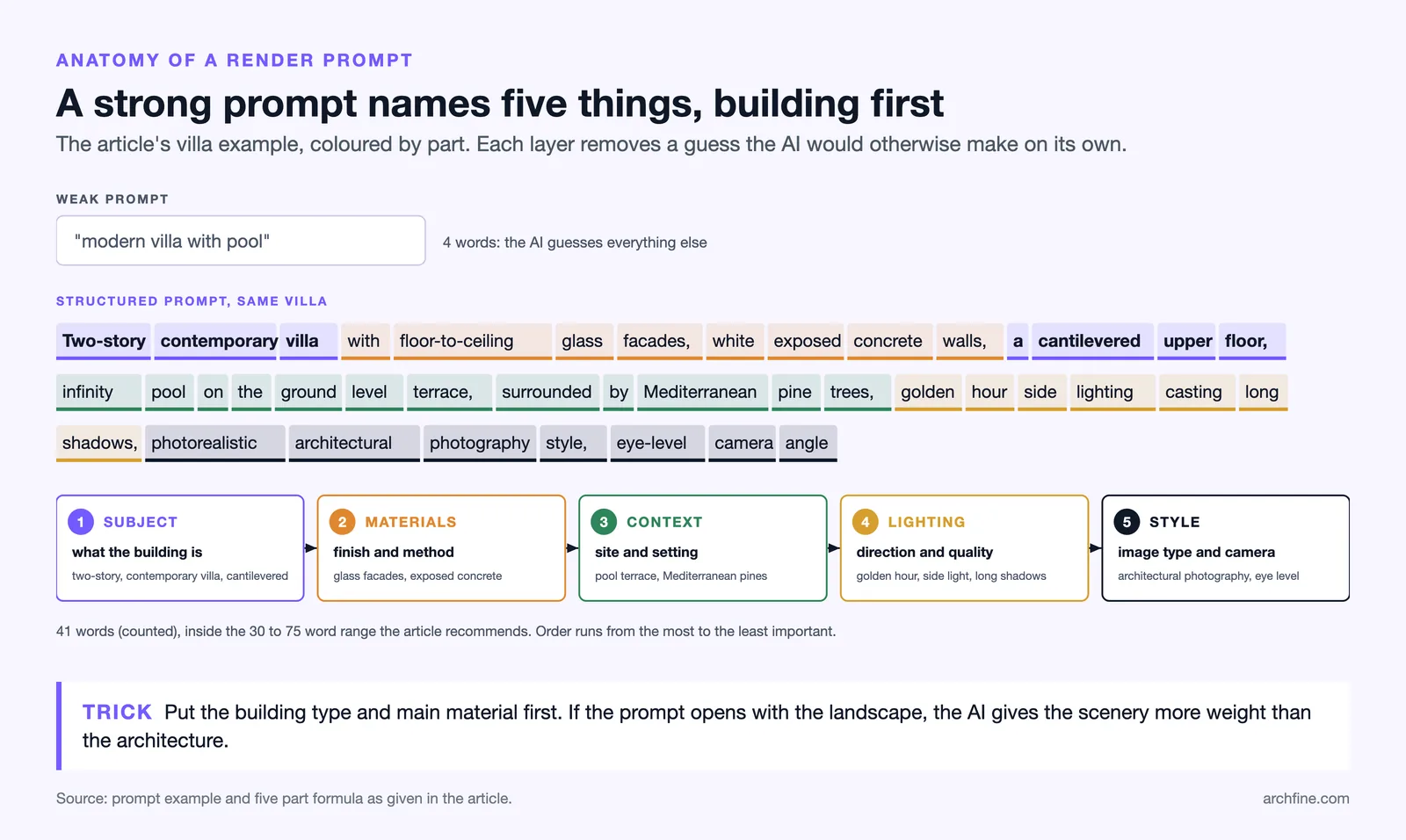
The Five-Part Prompt Formula

Order Matters: Front-Loading Key Details

⚠️ Common Mistake to Avoid
Many architects write prompts in the same way they describe a project verbally, starting with context and ending with the building. AI prompts work best in reverse: start with the building, then add context. Writing “a sunny Mediterranean hillside with olive trees where a modern villa sits” puts the landscape first and the architecture second. Flip it to “modern villa on a Mediterranean hillside, olive tree landscaping, clear sunny sky” for better results.
Choosing the Right Architectural Vocabulary

How to Specify Materials and Finishes in Your Prompt

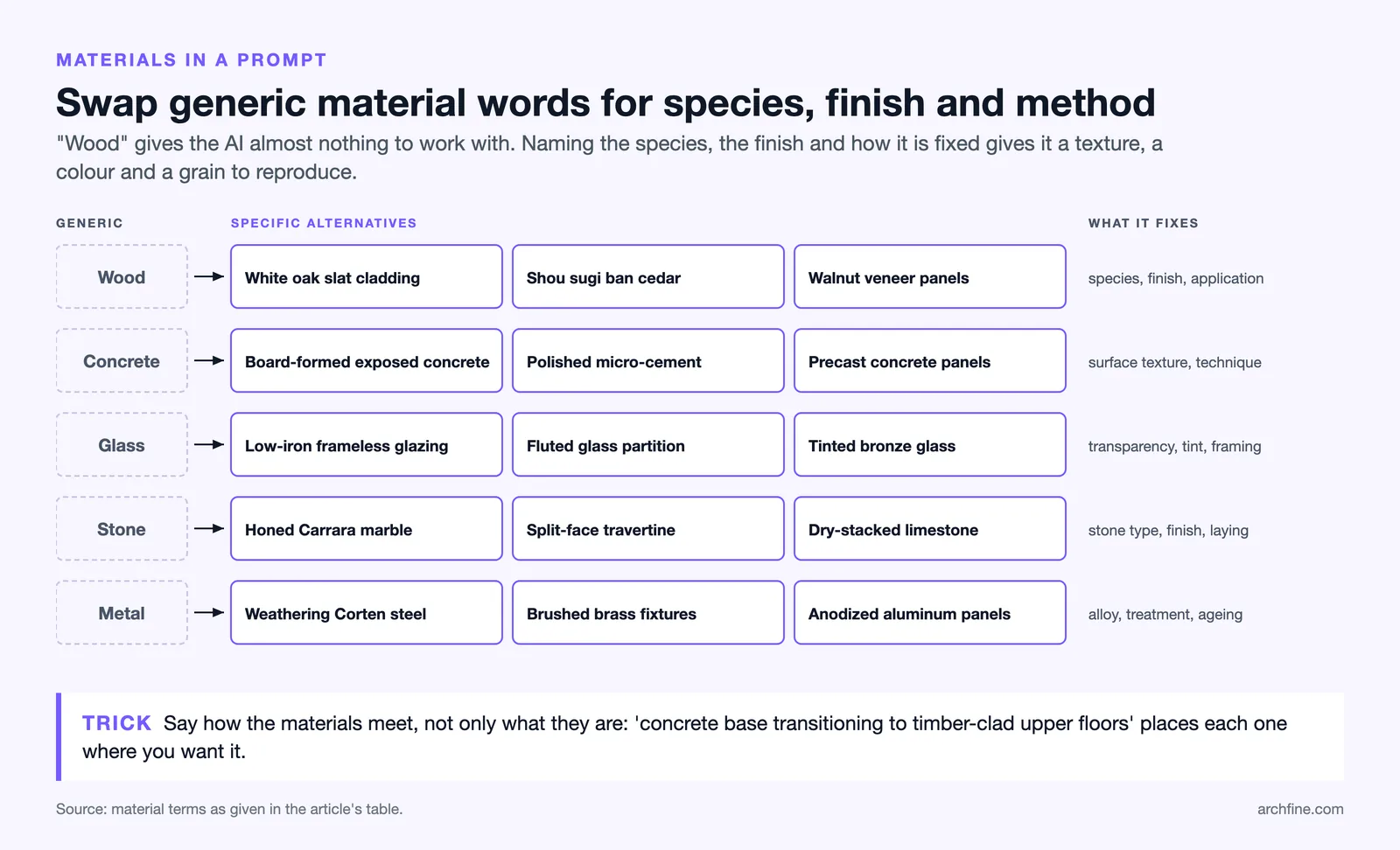
| Generic Term | Specific Alternative | Why It Works Better |
|---|---|---|
| Wood | White oak slat cladding / Shou sugi ban cedar / Walnut veneer panels | Specifies species, finish, and application method |
| Concrete | Board-formed exposed concrete / Polished micro-cement / Precast concrete panels | Defines surface texture and construction technique |
| Glass | Low-iron frameless glazing / Fluted glass partition / Tinted bronze glass | Controls transparency, color tint, and framing |
| Stone | Honed Carrara marble / Split-face travertine / Dry-stacked limestone | Specifies stone type, finish level, and installation |
| Metal | Weathering Corten steel / Brushed brass fixtures / Anodized aluminum panels | Identifies alloy, surface treatment, and aging |
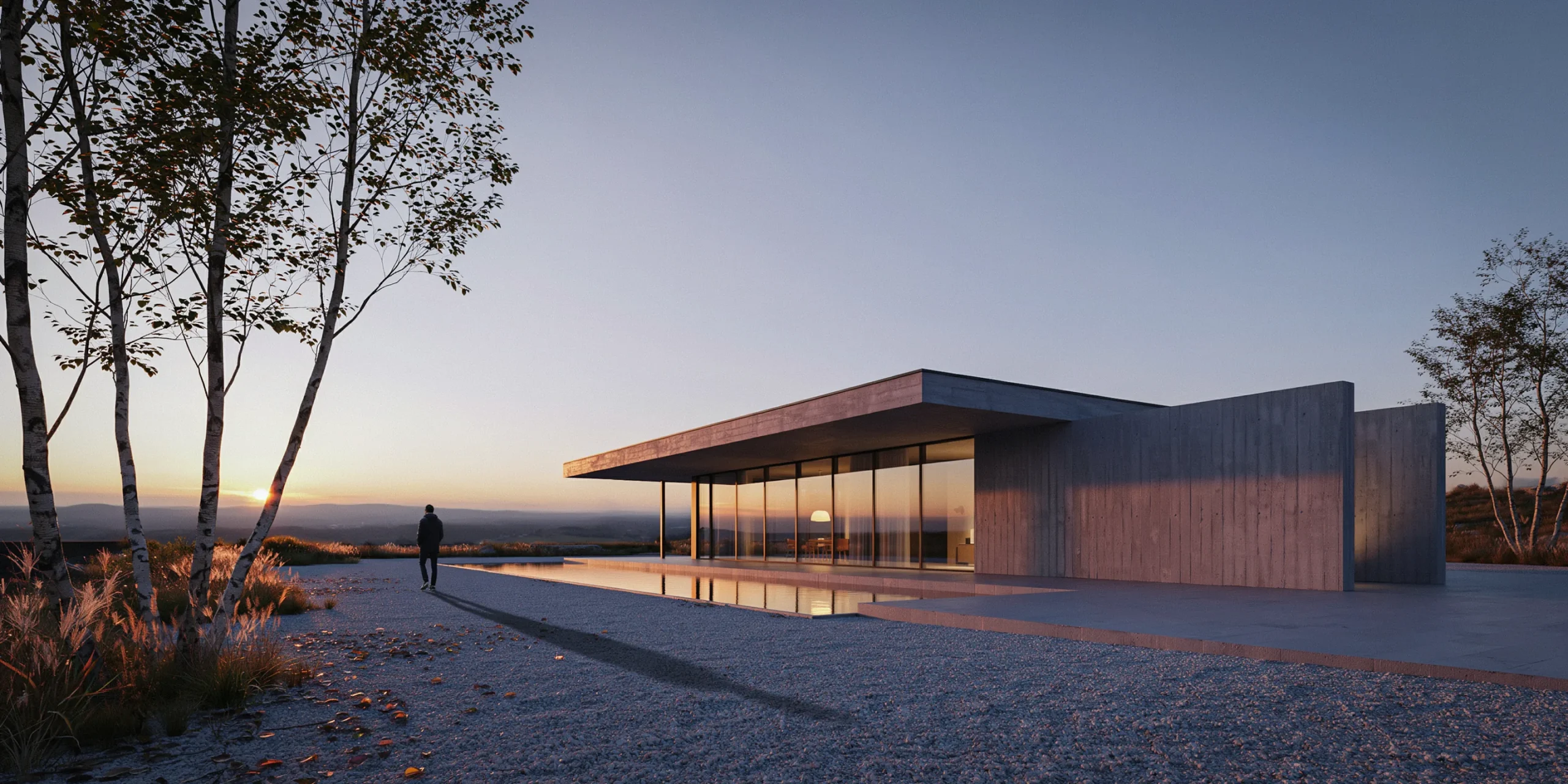
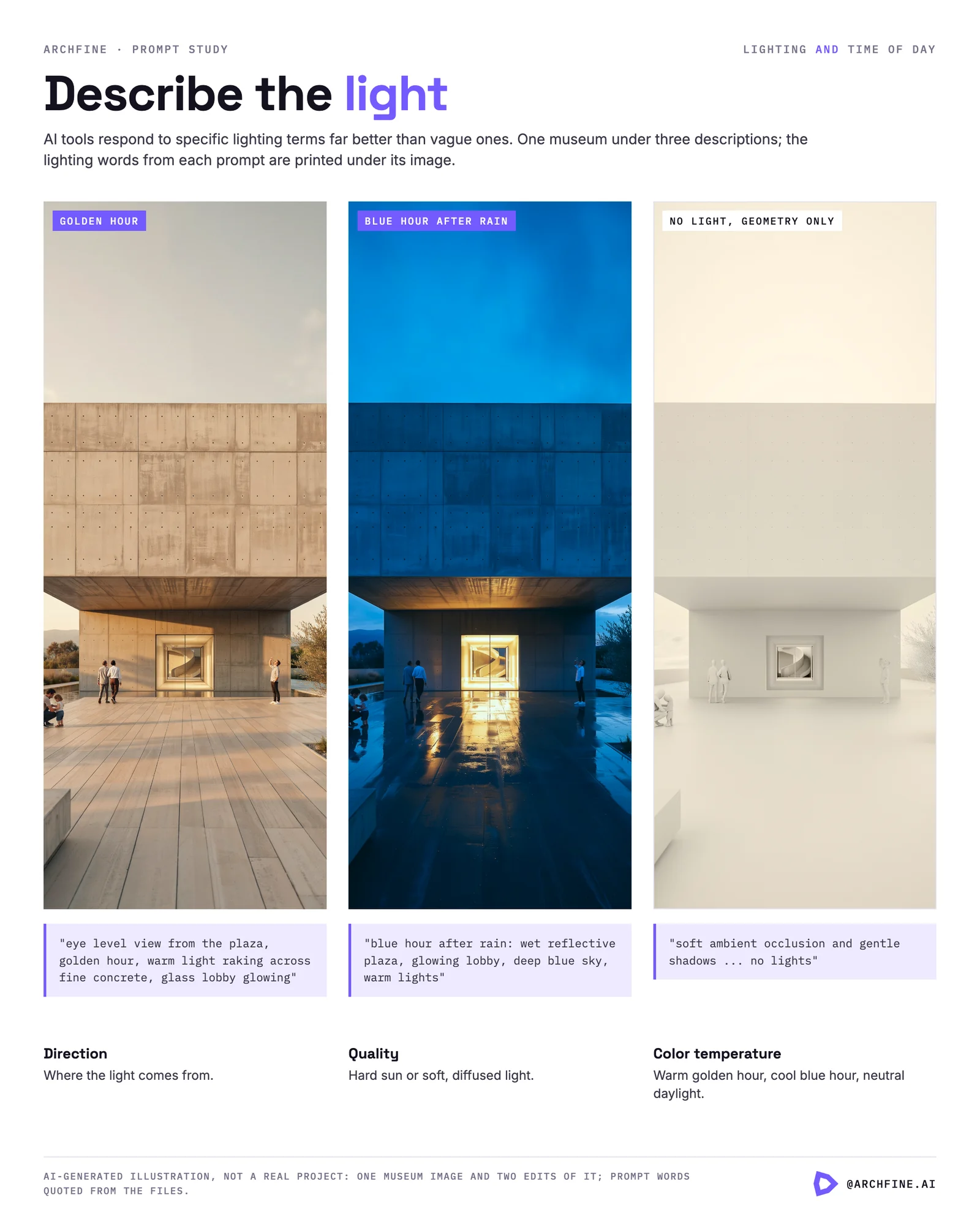
Controlling Lighting and Time of Day
🎓 Expert Insight
“Light is the most important element in architecture. It can change everything.” — Tadao Ando, Pritzker Prize-winning architect
This principle applies directly to AI rendering prompts. Specifying lighting clearly in your prompt can shift an entire render from flat and lifeless to spatially rich. If you only have time to add one detail to a basic prompt, make it a lighting instruction.
Defining Camera Angle and Composition

How to Use Style Keywords Effectively

💡 Pro Tip
When using style references, combine a broad category with a specific modifier. “Photorealistic architectural photography, magazine editorial quality, Archdaily cover image” works better than just “photorealistic.” The additional context narrows the AI’s interpretation and produces more polished, publication-ready images.
Adding Context: Landscape, People, and Atmosphere

🏗️ Real-World Example
One Central Park (Sydney, 2014): Jean Nouvel’s residential tower is famous for its living green facade and heliostat system that redirects sunlight. Early visualization renders of this project had to communicate both the architectural concept and the lush vegetation, which required extremely specific prompt-like briefs for the rendering artists: species of plants, density of coverage, seasonal variation, and the interplay of reflected light on the facade. AI prompts that describe similar layered facade-vegetation relationships produce richer results than those that simply say “green building.”
What to Avoid in AI Architectural Prompts
Knowing what to leave out is as important as knowing what to include. Several common prompt-writing habits consistently produce poor results in AI architectural rendering. Avoid contradictory instructions. Writing “minimalist interior with lots of decoration and ornate furniture” forces the AI to choose between two opposing directions. Pick one and commit. If you want to test both approaches, write two separate prompts. Avoid overly long prompts that try to describe every square meter of a building. Most AI rendering tools perform better with a focused description of the most important 3 to 5 visual elements than with an exhaustive specification of 20 details. If the prompt gets longer than 75 words, consider whether every word is earning its place. Avoid brand names for materials unless the AI specifically supports them. “Calacatta Gold marble” may work, but “Brand X luxury flooring system” will not. Stick to material descriptions that exist in architectural and visual vocabulary rather than commercial product names. Finally, avoid prompt templates copied from general-purpose image generators without modification. Architecture-specific AI tools like ArchFine are trained on architectural imagery and respond better to architectural terminology than to the artistic prompt language used in tools like Midjourney. Know your platform and adjust your language accordingly.Video: How to Use AI for Architecture (Best Prompts 2026)
This video by Melos Azemi walks through a complete AI-driven architecture workflow, showing how 2D floor plans become immersive 3D renders using prompt-based tools. It covers prompt-based interior design, material testing, and AI-generated layouts.Iterating on Your Prompts: The Feedback Loop
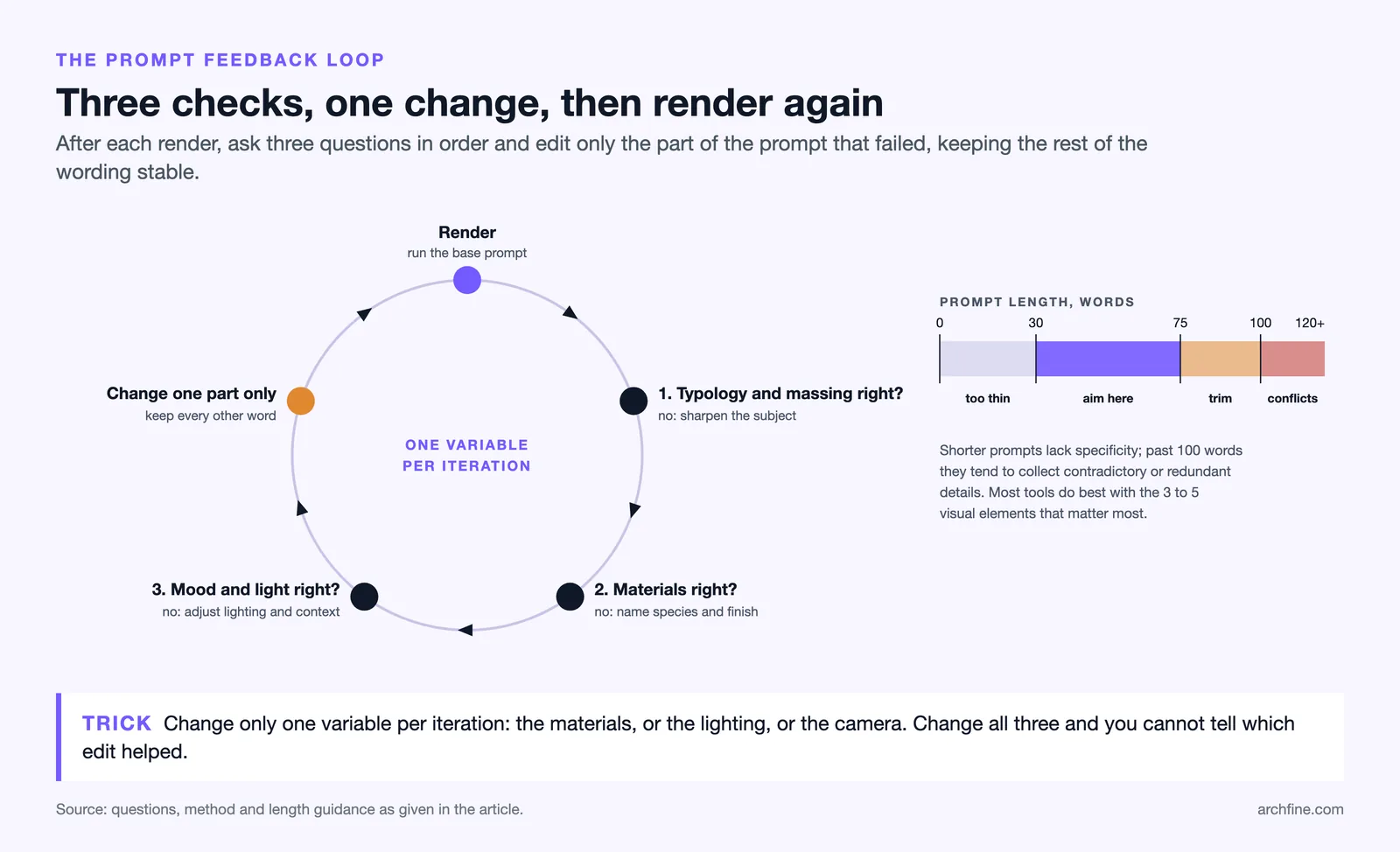
Writing a perfect prompt on the first try is rare. The most effective workflow is to start with a solid base prompt, evaluate the output, and then refine specific elements in follow-up iterations. This feedback loop is where AI rendering becomes genuinely powerful for architectural design exploration. After your first render, ask yourself three questions. First: did the AI capture the correct building typology and massing? If not, your subject description needs more specificity. Second: are the materials and finishes accurate? If the AI substituted a different material, add more precise terms or remove conflicting descriptors. Third: does the mood and atmosphere match your intent? If the lighting or environment feels wrong, adjust those portions of the prompt while keeping the rest stable. Changing only one variable at a time between iterations makes it easier to understand what each prompt element controls. If you change the materials, lighting, and camera angle all at once, you cannot identify which change improved or worsened the result. Professional visualization artists working with AI tools treat prompt iteration the same way they treat traditional render settings: methodical, controlled adjustments toward a target image.📌 Did You Know?
According to the 2024-2025 State of Architectural Visualization report by Chaos and Architizer, 44% of architecture firms now use AI to generate concept images and early design ideas. The most common workflow involves using AI-generated renders as a starting point, then refining the output through prompt iteration or manual post-processing, rather than expecting a final-quality image from a single attempt.
Prompt Examples for Common Architectural Scenarios
Below are five ready-to-use prompt templates that cover the most common scenarios architects face when using AI rendering tools. Adapt the specific details to your project while keeping the structural framework intact.Exterior Residential Render
“Contemporary two-story residential home with flat roof and large overhanging eaves, white plaster walls with vertical timber screen on the upper floor, floor-to-ceiling sliding glass doors opening to a landscaped garden, native grasses and a single mature olive tree, late afternoon golden hour sunlight from the left, photorealistic architectural photography, eye-level perspective from the garden”Interior Living Space
“Open-plan living room with double-height ceiling, polished concrete floor, white oak built-in shelving along the back wall, large sectional sofa in grey linen, pendant brass light fixture, floor-to-ceiling window on the left wall with sheer curtains filtering soft daylight, warm neutral color palette, interior design magazine photography style, wide-angle shot from the room entrance”Commercial Office Lobby
“Corporate office lobby with reception desk in dark walnut, terrazzo flooring with brass inlay strips, full-height glazed facade overlooking an urban street, recessed linear LED ceiling lighting, indoor tropical plants in concrete planters, two people walking through the space, midday natural light, photorealistic CGI quality, one-point perspective”Conceptual Exterior Sketch
“Organic-form museum building with curved concrete shell roof, semi-buried into a hillside with green roof blending into the landscape, reflecting pool at the entrance, architectural concept sketch style, pencil and watercolor on white paper, loose expressive lines, aerial three-quarter view”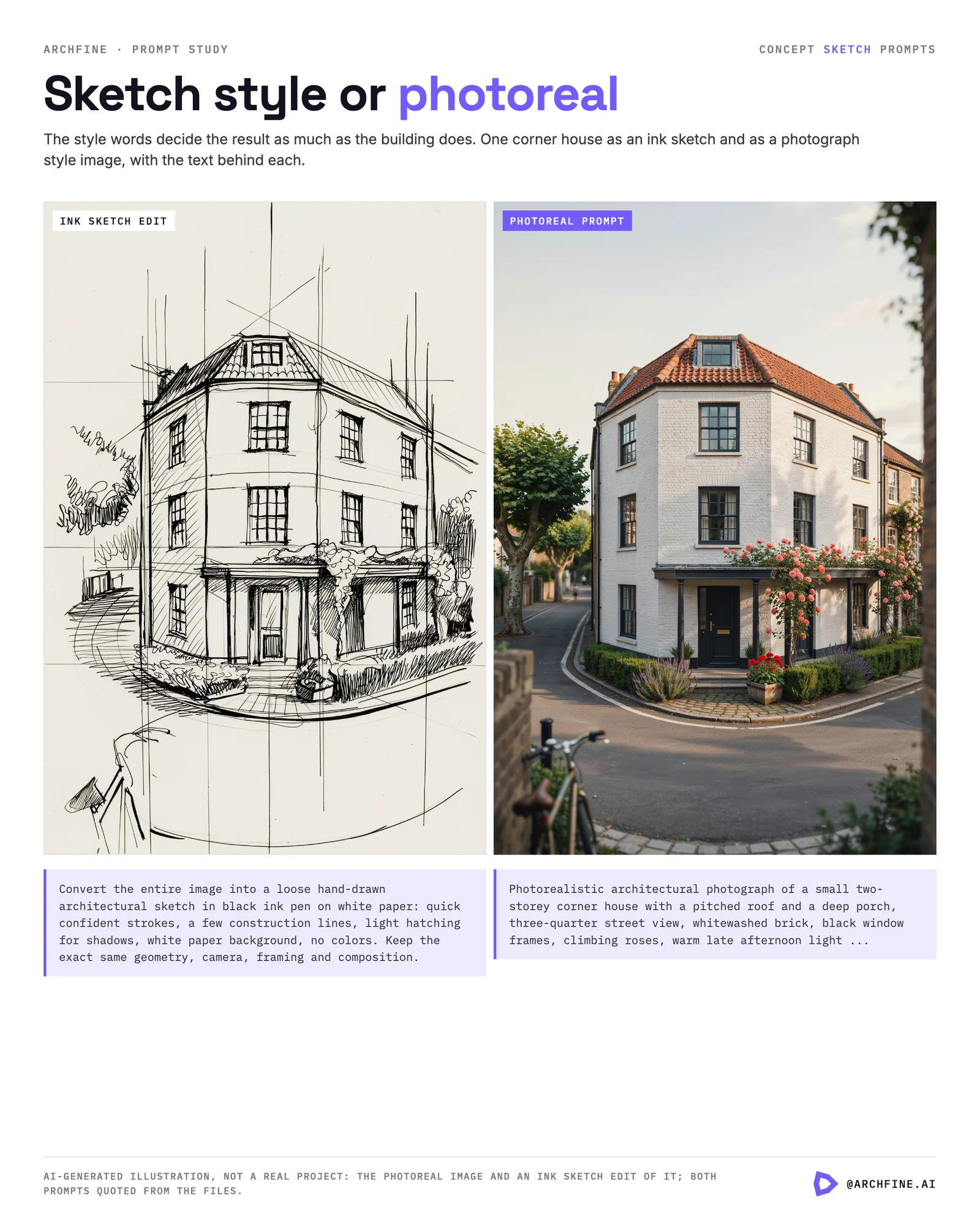
Landscape and Site Plan
“Bird’s eye view of a residential development with six two-story houses arranged around a central shared courtyard, paved pathways connecting each unit, mature deciduous trees providing shade, children’s play area in the center, surrounding suburban context with roads and neighboring houses, soft overcast daylight, clean architectural site visualization” Each of these prompts follows the five-part formula: subject, materials, context, lighting, and style. You can modify individual sections while keeping the structure consistent. For more guidance on choosing between rendering styles, the comparison of photorealistic and stylized renders on ArchFine’s blog is a useful reference.🔢 Quick Numbers
- The global 3D rendering market was valued at $4.85 billion in 2025 and is projected to reach $19.82 billion by 2033 (Grand View Research, 2025)
- 44% of architecture firms now use AI to generate concept images and early design ideas (State of Archviz Report, Chaos and Architizer, 2025)
- Still images remain the most valued visualization format, with 85% of architects reporting regular client revision requests related to mood and atmosphere (State of Architectural Visualization, Chaos and Architizer, 2024-2025)
Final Thoughts
✅ Key Takeaways
- Structure every AI prompt using the five-part formula: subject, materials, environment, lighting, and visual style.
- Front-load the most important architectural details at the beginning of your prompt, since AI models give more weight to earlier words.
- Use specific architectural vocabulary for materials (“board-formed concrete” instead of “concrete”) to dramatically improve output accuracy.
- Control lighting by describing direction, quality, and color temperature rather than using vague terms like “good lighting.”
- Iterate methodically by changing one prompt variable at a time, treating AI rendering like any other design refinement process.