How AI Rendering and Traditional 3D Visualization Actually Work

💡 Pro Tip
When comparing AI and traditional renders for a client pitch, always present both at the same resolution and file format. Clients often mistake resolution differences for quality differences. Export both at 4K, apply identical color grading in Photoshop, and the comparison becomes much more accurate.
Where AI-Generated Renders Match Professional 3D Work

Concept-Phase Exterior Views

Style Exploration and Material Palettes

Interior Mood Imagery

Where Professional 3D Artists Still Have the Edge

Geometric Precision and Custom Details
Consistency Across Multiple Views
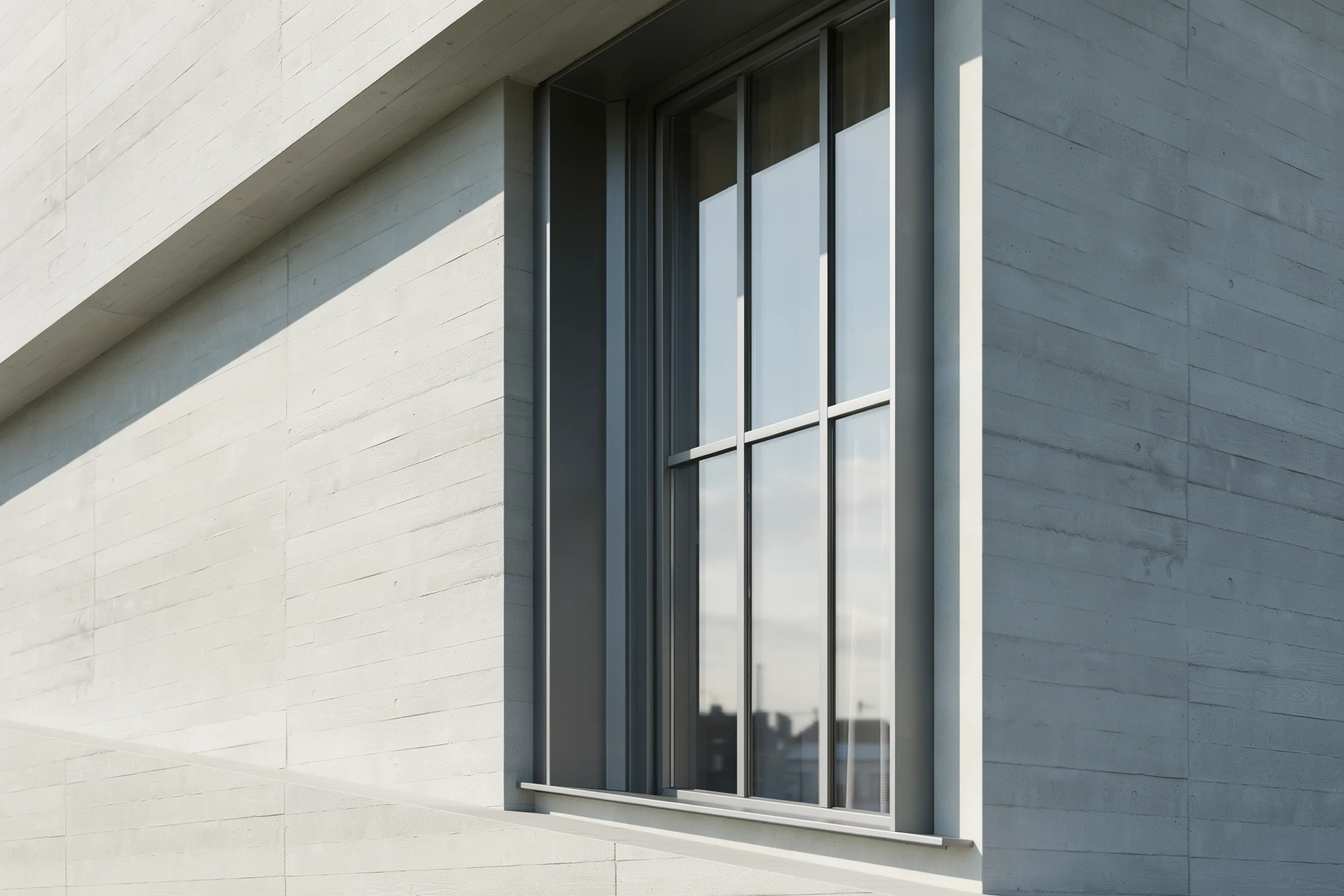
When a project requires 15 interior views and 8 exterior angles that all show the same furniture, the same materials, and the same lighting conditions, a 3D artist working from a single scene file maintains perfect consistency. AI generates each image independently, which means the sofa in the living room might change shape slightly between views, or the exterior cladding color might shift. For marketing packages and sales brochures where visual continuity is essential, this inconsistency is a deal-breaker.⚠️ Common Mistake to Avoid
Many architects assume AI renders are ready for final deliverables without review. AI tools can produce images with incorrect door proportions, floating furniture, or physically impossible reflections. Always have someone with architectural training review AI output before sending it to a client. A ten-second check prevents embarrassing errors that damage credibility.
Complex Lighting Scenarios

Animation and Motion
Architectural walkthroughs and flythrough animations require frame-to-frame consistency that AI currently cannot maintain. Every frame must show the exact same geometry, materials, and physics. Traditional rendering pipelines handle this natively because they work from a stable 3D scene. AI-generated video tools are improving, but they are not yet reliable for client-facing architectural animation.What Do Clients Actually Notice?
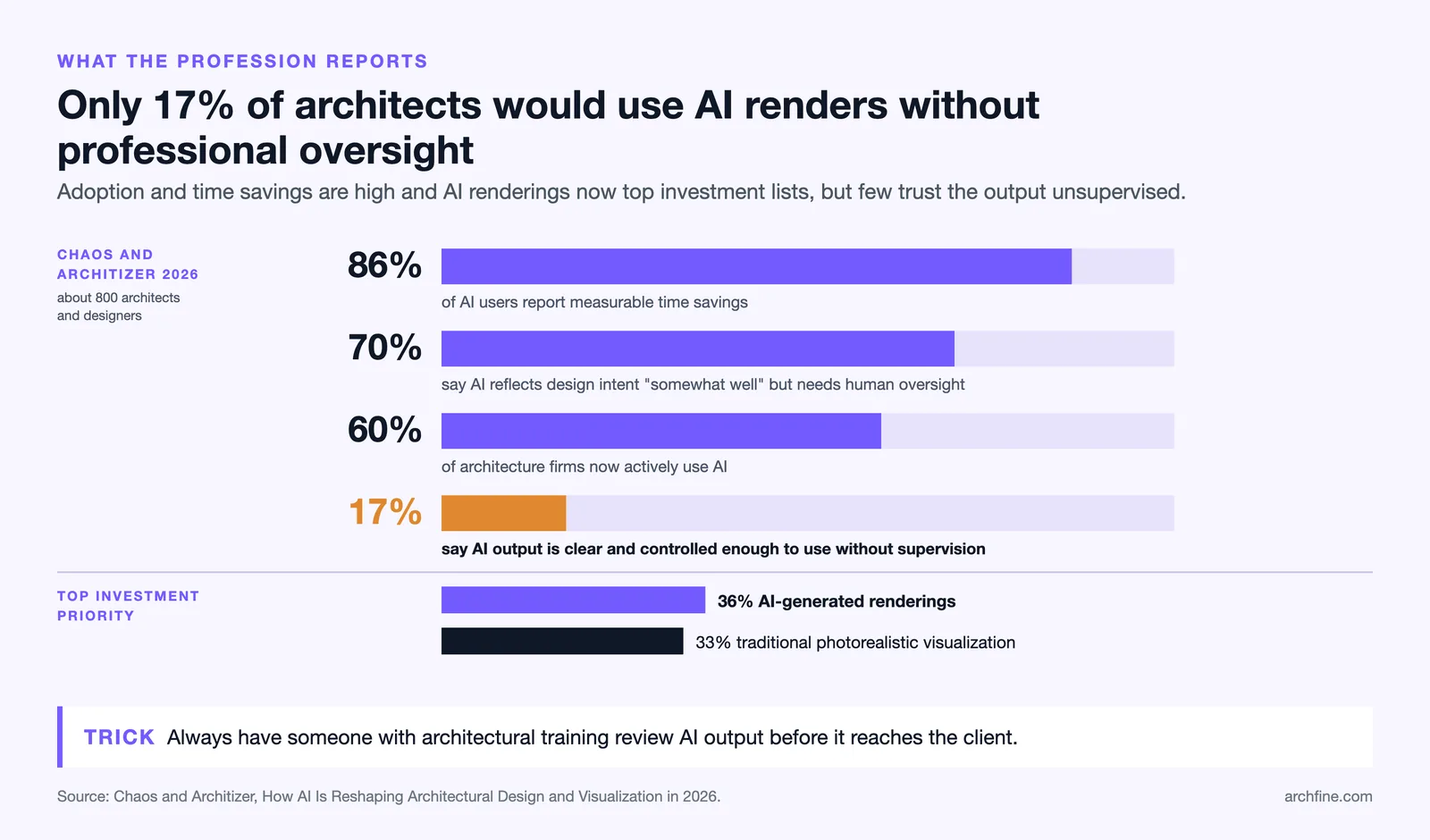
This is the central question, and the answer may surprise architects who obsess over render quality. Most clients are not evaluating pixel-level material accuracy. They are evaluating how a space feels. Research from the 2026 Chaos and Architizer industry report found that 70% of architects say AI visualizations reflect design intent “somewhat well” but still require human oversight. Only 17% felt AI output was clear and controlled enough to use without professional supervision. However, the report also found that 86% of AI users report measurable time savings, suggesting that for many use cases, the output is good enough. Clients typically notice these things in a render: Spatial proportions and room sizes. Whether the space feels cramped or generous. Whether natural light reaches the areas they care about. The overall material palette and color scheme. Whether the building looks attractive from the street. Clients typically do not notice: whether shadows are ray-traced or approximated, the precise texture resolution on a stone wall, subtle differences in glass reflectivity, or whether the vegetation was hand-placed or procedurally generated. These details matter to visualization professionals, but they rarely influence a client’s decision to approve or reject a design.🎓 Expert Insight
“Our customers know exactly what they’re trying to create. We’ve embedded contextual AI tools into our software, designed to support every phase from first sketch to final rendering.” — Roderick Bates, Senior Director of Product, Chaos
This perspective from one of the industry’s largest visualization software companies confirms the trend: AI is being positioned as a design support tool rather than a replacement, precisely because the gap between AI and human output varies depending on project stage.
AI Renders vs 3D Artists: A Side-by-Side Comparison
The following table summarizes the key differences across the factors that matter most to architects and their clients: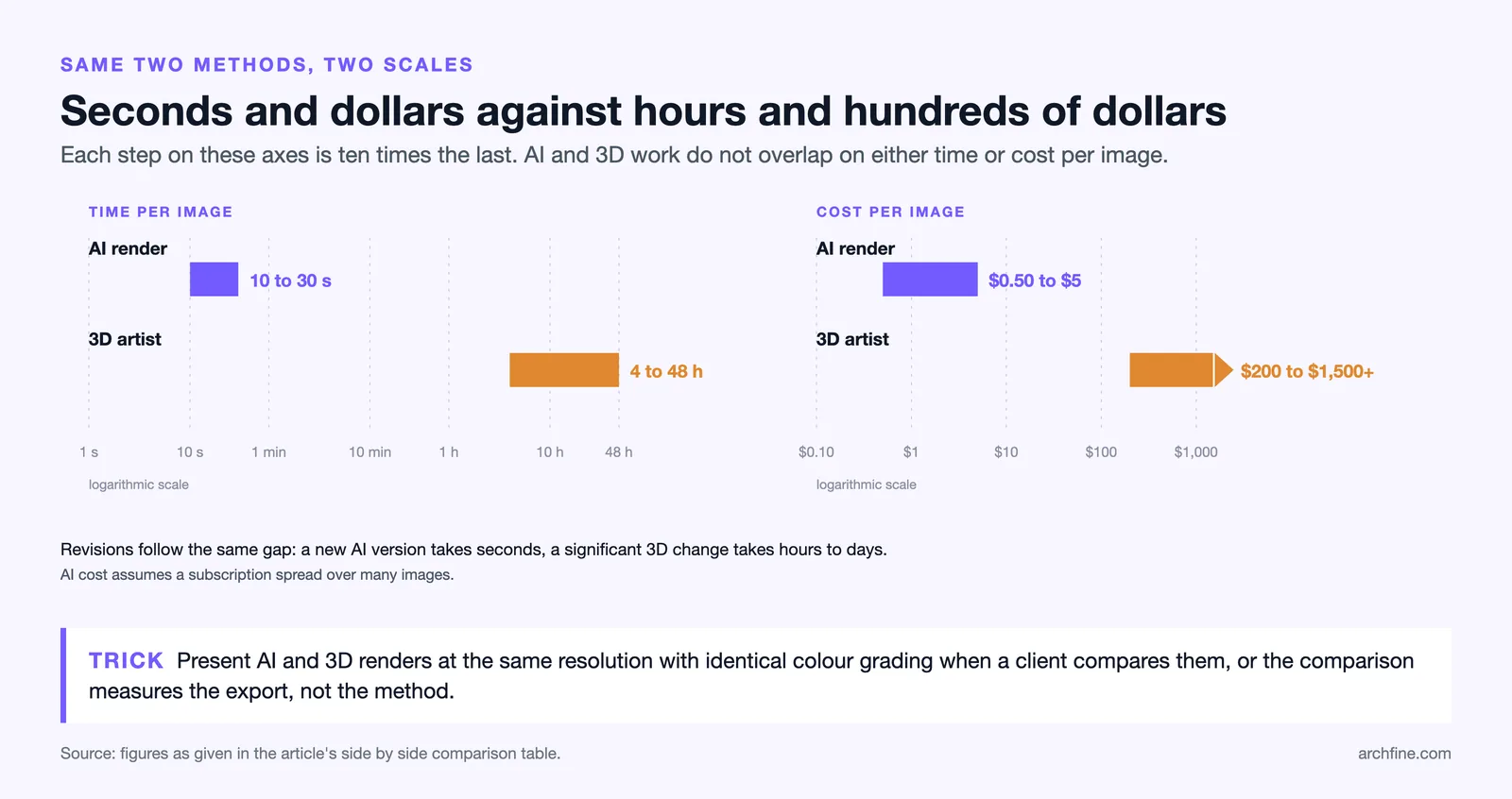
| Factor | AI-Generated Renders | Professional 3D Artists |
|---|---|---|
| Speed | 10-30 seconds per image | 4-48 hours per image |
| Cost per image | $0.50-$5 (subscription-based) | $200-$1,500+ per image |
| Geometric accuracy | Approximate; may alter details | Exact to specification |
| Multi-view consistency | Each image generated independently | Single scene, perfect continuity |
| Material precision | General appearance; may shift between images | PBR-accurate, manufacturer-matched |
| Lighting control | AI interprets; limited fine-tuning | Full control over every light source |
| Revision speed | Seconds to generate a new version | Hours to days for significant changes |
| Best for | Concept design, rapid iteration, style exploration | Final deliverables, marketing, regulatory submissions |
| Client perception | Indistinguishable at concept stage | Preferred for final approval and sales |
How AI Adoption Is Changing the Economics of Visualization
The financial implications of AI rendering are significant for architecture firms of every size. A solo practitioner who previously outsourced renders at $300-$500 per image can now generate concept visuals in-house for a fraction of that cost. A mid-size firm running three to five active projects can realistically recover 10 to 20 hours per week by replacing concept and iteration rendering with AI tools.🔢 Quick Numbers
- 60% of architecture firms are now actively using AI in their workflows (Chaos and Architizer, 2026)
- 86% of architects using AI tools report measurable time savings on every project (Chaos and Architizer, 2026)
- AI-generated renderings (36%) have overtaken traditional photorealistic visualizations (33%) as the top investment priority for firms (Chaos and Architizer, 2026)
When to Use AI Renders vs Professional 3D Work
The choice between AI and traditional rendering should be driven by the specific project phase and client expectations, not by a blanket preference for one method.Use AI-Generated Renders When:
You are in the concept or schematic design phase and need to present multiple directions quickly. The client wants to see material and style options before committing to a design. You are preparing for an internal design review where speed matters more than pixel-perfect accuracy. The budget does not support professional visualization at this stage. You need to iterate rapidly based on client feedback during a meeting.Use Professional 3D Artists When:
The project is approaching design development or construction documentation and every detail needs to match specifications. The renders will be used for marketing materials, sales brochures, or public-facing presentations. The client has approved the design and expects final-quality images for board presentations or investor pitches. The project requires animation, virtual tours, or 360-degree panoramic views. Regulatory authorities require accurate visual documentation.💡 Pro Tip
Build a “visualization escalation plan” into your project fee proposals. Define which rendering method you will use at each phase and tie it to specific deliverables. Concept phase gets AI renders, design development gets a mix, and final approval gets professional 3D work. This sets clear expectations with clients and prevents scope creep on visualization costs.

Video: AI Rendering vs Traditional Rendering Compared
This video walks through a practical comparison of AI rendering and traditional rendering workflows, covering speed, cost, output quality, and creative control for architects.The Hybrid Workflow: How Leading Firms Combine Both
The most successful architecture practices in 2026 are not choosing between AI and traditional rendering. They are using both strategically, matching the tool to the task at each project stage. A typical hybrid workflow looks like this: during early concept meetings, the architect generates AI-generated renders from rough sketches or SketchUp models to test design directions with the client in real time. This replaces what used to be a week-long wait for concept renders from a visualization studio. Once the client approves a direction, the team refines the 3D model and hands it to a professional visualization artist for the final marketing package. The AI output serves as a detailed brief for the 3D artist, showing the approved material palette, lighting mood, and camera angles. This approach cuts total visualization costs while improving client satisfaction, because the client sees more options earlier and feels more involved in the design process. Firms that adopt this dual-track method are reporting stronger engagement and faster approvals, as documented in our guide to choosing between rendering styles for client presentations.🏗️ Real-World Example
Heatherwick Studio, Vessel (New York, 2019): During the design competition for this iconic Hudson Yards structure, the studio produced dozens of concept visualizations to test public and client response before committing to final renders. Projects of this scale now routinely use AI tools for early-phase exploration, generating 10 to 20 concept views in the time it previously took to produce one. The final marketing visuals, however, were still produced by professional 3D visualization teams to ensure every structural detail matched the engineering specifications.
What Will the Next Two Years Look Like?
AI rendering quality is improving on a curve that shows no signs of flattening. The areas where professional 3D artists currently hold a clear advantage, particularly multi-view consistency and geometric precision, are active research problems for AI companies. Several platforms are already testing scene-level AI rendering, where a persistent 3D scene maintains consistency across multiple output images. The 2026 industry data from Chaos and Architizer shows that AI-generated rendering budgets have overtaken traditional photorealistic visualization budgets for the first time. This signals a structural shift, not a temporary trend. The most skilled 3D artists will continue to find work on premium projects, but the volume of routine visualization work that once sustained mid-tier rendering studios is migrating to AI tools. For architects, the practical takeaway is straightforward: invest time in learning AI rendering tools now, but maintain relationships with professional visualization artists for high-stakes deliverables. The firms that treat these as complementary rather than competing resources will produce better work and win more projects.✅ Key Takeaways
- AI-generated renders are now functionally indistinguishable from professional 3D work at the concept design stage, especially for exterior views and style exploration.
- Professional 3D artists still lead in geometric precision, multi-view consistency, custom lighting control, and animation, all critical for final deliverables.
- Most clients evaluate renders based on spatial feel and material palette rather than technical rendering quality, which favors AI output for early presentations.
- 60% of firms are now actively using AI in their visualization workflows, and AI rendering budgets have overtaken traditional rendering budgets for the first time.
- The most effective firms use a hybrid workflow: AI for concept and iteration, professional 3D for marketing and final approval.