ArchFine vs Adobe Firefly architecture is a comparison between a purpose-built AI rendering platform for architects and a general creative AI tool integrated into Adobe’s Creative Cloud ecosystem. ArchFine focuses on photorealistic architectural visualization from uploaded images, while Firefly is a broad-spectrum image generation tool that handles architectural elements alongside portraits, marketing visuals, and graphic design.
Two Very Different Tools Targeting the Same Workflow Gap
Architects searching for AI-assisted rendering in 2026 face a market split into two camps: dedicated architecture platforms and general creative AI tools that happen to handle buildings. Adobe Firefly lands firmly in the second category. ArchFine was built with the first in mind.
Adobe Firefly launched in 2023 and has gone through four major image model iterations, arriving at Image Model 5 as of late 2025. The platform now generates images at up to 4 megapixels natively, supports layered editing, prompt-based object manipulation, and integrates directly with Photoshop, Illustrator, and Premiere Pro. It also expanded into a multi-model ecosystem, giving users access to third-party models from Google, OpenAI, and Black Forest Labs alongside its own Firefly models.
ArchFine takes a narrower approach. Users upload a photo or sketch, add a text prompt describing the desired render, and receive a photorealistic architectural visualization in approximately 30 seconds. There are no creative generalist features — no video generation, no typography tools, no brand design workflows. Every decision in the product was made with architects, interior designers, and students in mind.
Both tools address a real pain point: traditional rendering workflows in software like V-Ray or Lumion require significant time, hardware, and technical expertise. AI-powered alternatives cut that pipeline dramatically. But the way each tool cuts it reflects fundamentally different product philosophies.
💡 Pro Tip
When using any AI rendering tool for client presentations, always upload a clean, well-lit reference photo or a sketch with clear line weights. Ambiguous inputs produce ambiguous outputs — the quality of your prompt matters far less than the quality of your source image. Blurry or poorly framed uploads consistently produce distorted geometry in the rendered result.

Adobe Firefly Architecture Visualization: Capabilities and Limitations
Adobe Firefly’s Image Model 4 and the newer Image Model 5 both show noticeable improvements in handling architectural elements. Adobe has specifically noted that these models deliver stronger results for rendering architectural structures compared to previous generations. The introduction of 4MP native resolution in Image Model 5 gives designers sharper outputs for print or large-format presentation use.
The integration with Photoshop is Firefly’s strongest argument for architects already working in Adobe’s ecosystem. Generative Fill allows users to replace materials, add entourage, extend the frame of an image, or remove elements using natural language prompts directly inside Photoshop. For post-processing an existing render, this workflow is genuinely efficient.
The limitations emerge when architects need output that goes beyond conceptual ideation. Firefly is a general-purpose tool — its training data covers every category of visual content, not just buildings. Architectural rendering requires precision in how light interacts with materials, how structural geometry holds together, and how spatial depth reads in a flat image. Firefly produces visually plausible results, but professionals often find that it requires significant manual refinement to achieve the accuracy level that client-facing deliverables demand.
Pricing is another friction point. Firefly is bundled into Adobe Creative Cloud plans, meaning architects who already pay for Creative Cloud get access without additional cost. However, generation uses “Generative Credits,” which are capped per plan tier. The free plan now gives a limited number of daily generations, and standalone Firefly plans start at $9.99 per month as of October 2026. Power users who generate at volume during a project sprint will find those credits exhausted quickly.
⚠️ Common Mistake to Avoid
Many architects assume that because Firefly’s Image Model 4 handles “architectural elements with exceptional precision” (per Adobe’s own documentation), it functions as an architectural rendering tool. It does not. Rendering a building facade for a marketing image is different from generating a photorealistic render that accurately represents structural intent, material specifications, and lighting conditions for a design review. Firefly excels at the former; purpose-built tools are designed for the latter.

ArchFine vs Firefly Output Quality: What the Results Actually Show
Output quality in architectural AI tools cannot be judged by resolution alone. The meaningful criteria are material fidelity, geometric accuracy, lighting realism, and spatial coherence.
Firefly, using Image Model 4 Ultra or Image Model 5, produces high-resolution images with strong surface detail. For moodboarding, concept exploration, or generating reference images, the quality is competitive. Where it breaks down is in architectural specifics: window mullion proportions may shift, structural overhangs can look physically implausible, and material reflectivity sometimes ignores the context cues present in the input image.
ArchFine’s architecture-specific training means the model has seen far more architectural inputs than a general creative tool. The result is output that respects the spatial logic of the uploaded reference. Material transitions, facade depth, and shadow behavior are more consistent with how real-world architectural photography looks. For a tool where the primary use case is client presentation and design iteration, this specificity matters.
The trade-off is creative range. Firefly’s general training gives it broader stylistic flexibility — an architect wanting to generate an image that blends architectural photography with painterly illustration, for instance, will find Firefly more capable of that hybrid output. ArchFine’s focus keeps it in the photorealistic lane.
📌 Did You Know?
Adobe’s Firefly platform has generated over 20 billion assets since its 2023 launch and reached more than 50 million monthly active users as of the November 2025 update. Despite that scale, architectural professionals represent a small fraction of its user base — the platform was built for the broader creative market, which includes marketers, brand designers, video editors, and social media creators. That general audience shapes what the model optimizes for.

Workflow Integration: Where Each Tool Fits in an Architectural Practice
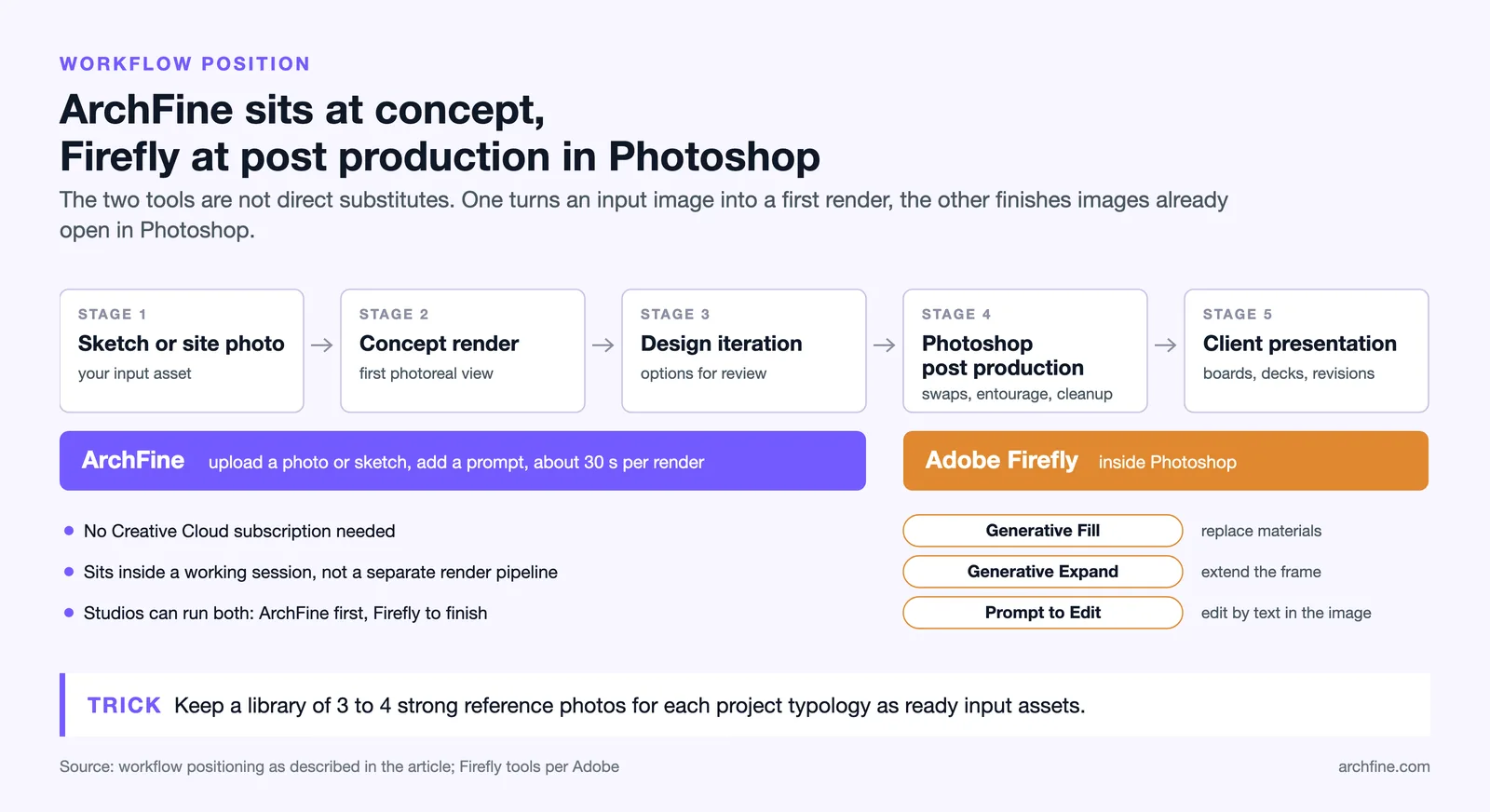
For firms already deep in the Adobe Creative Cloud ecosystem, Firefly’s workflow integration is a genuine strength. The ability to trigger Generative Fill inside Photoshop, extend an image with Generative Expand, or replace a material with a single prompt without leaving the application saves real time. For post-processing existing renders — cleaning up backgrounds, adding context, or making quick material swaps for client revisions — this is a well-designed workflow.
ArchFine fits earlier in the design process. The use case is concept-to-visual: you have a sketch, a photo, or a rough 3D export, and you need a photorealistic render for a client meeting, a pitch deck, or a design review. The 30-second generation time means it can sit inside a working session rather than requiring a separate rendering pipeline. There is no Creative Cloud subscription required, no credit limit to monitor, and no generalist features competing for interface space.
The two tools are not direct substitutes. A studio could realistically use both: ArchFine for initial concept renders and design iteration, Firefly for post-production and presentation asset creation inside Photoshop. The question of “which one” becomes more pointed when budget or simplicity is a constraint.
💡 Pro Tip
If you are presenting to a client who is not familiar with architectural drawings, a photorealistic render generated in 30 seconds communicates spatial intent far more effectively than a detailed floor plan or section. Keep a library of 3–4 strong reference photos for each project typology you work on — these become your input assets and dramatically speed up the AI rendering workflow regardless of which tool you use.
Adobe Firefly Commercial Use in Architecture: Licensing and IP Considerations
Adobe has consistently positioned Firefly as commercially safe. Its training data consists of licensed Adobe Stock images, openly licensed content, and public domain material. Adobe explicitly states it does not train on Creative Cloud subscribers’ personal content. For architects working on commercial projects, this is relevant: outputs generated with Firefly are cleared for commercial use without additional licensing concerns.
ArchFine follows a similar approach, with outputs owned by the user. For professional practice, both tools are viable from a licensing perspective. The commercial use question matters most when outputs are used in published marketing materials, submitted to planning authorities, or licensed to third parties — contexts where documentation of AI tool usage is becoming increasingly expected.

Firefly Limitations for Architecture: An Honest Assessment
What Adobe Firefly Does Well for Architects
Firefly is strong at atmosphere and mood. Exterior renders showing a building at golden hour, an interior flooded with diffused daylight, or a facade in rain are all situations where Firefly’s broad training in photography and mood-based image generation produces impressive results. It handles entourage — people, trees, vehicles, skies — with more natural variety than tools trained only on buildings.
The Photoshop integration remains its most practical asset for professional workflows. Architects who already use Photoshop for presentation layout can access AI generation without switching applications. The new Prompt to Edit feature in Image Model 5 allows natural language editing directly inside the image, which reduces the gap between ideation and final output.
Where Firefly Falls Short for Architectural Use
Structural logic is where general creative AI tools consistently underperform for architecture. Firefly can produce a building that looks photographic but fails to represent a real structural condition correctly — a cantilever that reads as visually dramatic but physically implausible, for example. For design communication, this matters. A render shown to a structural engineer or planning board needs to represent what is actually being proposed.
Firefly’s output also lacks the depth of control over architectural-specific parameters that dedicated tools provide. Specifying a particular facade material — board-formed concrete with a specific joint pattern, for instance — requires very precise prompting, and even then, results are inconsistent across generations. Tools built for architecture can accept more specific material and construction inputs and produce more reliable results.
Architecture-Specific AI vs General Creative AI: The Core Difference
The distinction between ArchFine vs Adobe Firefly architecture comes down to what each model was trained to do. A general creative AI optimizes across all visual domains. An architecture-specific AI trains on architectural photography, renders, and visualization data, learning the specific visual logic of built environments.
This is not a marketing distinction — it produces measurably different outputs. Shadows fall more accurately relative to the sun angle implied in the input. Glazing reflects the sky in a way that reads as physically correct. Structural depth — the way a wall reads thicker or thinner based on its relationship to adjacent elements — is maintained across the image rather than smoothed into a flat plane.
For architects at the concept and design development stages, this accuracy is not a luxury. Presenting a render that misrepresents the massing or materiality of a design creates problems in client communication and design coordination. Architecture-specific AI reduces the gap between what you intend and what the render shows.
🎓 Expert Insight
“The challenge with general AI image tools in architecture is that they optimize for visual plausibility rather than design accuracy. A beautiful render that misrepresents the spatial logic of a project can actually be more damaging than no render at all.” — Senior Architectural Visualizer, 12+ years experience in competition and commercial projects
This distinction — between visual plausibility and design accuracy — is the most useful frame for evaluating any AI rendering tool for professional architectural use. The question is not which tool generates the most impressive image, but which tool generates the most accurate representation of your design intent.

Pricing Comparison: ArchFine vs Adobe Firefly for Architects
Adobe Firefly is accessible through multiple entry points. A free Adobe account includes a limited number of daily generations, which is enough for light exploration but not production use. Creative Cloud plans that include Firefly access start at higher monthly tiers, with credit allowances scaling by plan. Enterprise accounts on Creative Cloud Pro receive expanded access, including Firefly Boards and the full multi-model ecosystem.
ArchFine offers subscription plans designed around the rendering volume typical of architectural practice. Users generating renders for a single ongoing project have different needs than a studio running multiple concurrent projects, and ArchFine’s pricing reflects that. There is also a free trial that allows architects to test output quality against their own reference images before committing.
For individual architects or small studios not already subscribed to Adobe Creative Cloud, the pricing comparison clearly favors ArchFine. For firms already paying for Creative Cloud, Firefly represents a no-additional-cost add-on, which changes the value equation — even if the output quality for architectural use is secondary to a dedicated tool.
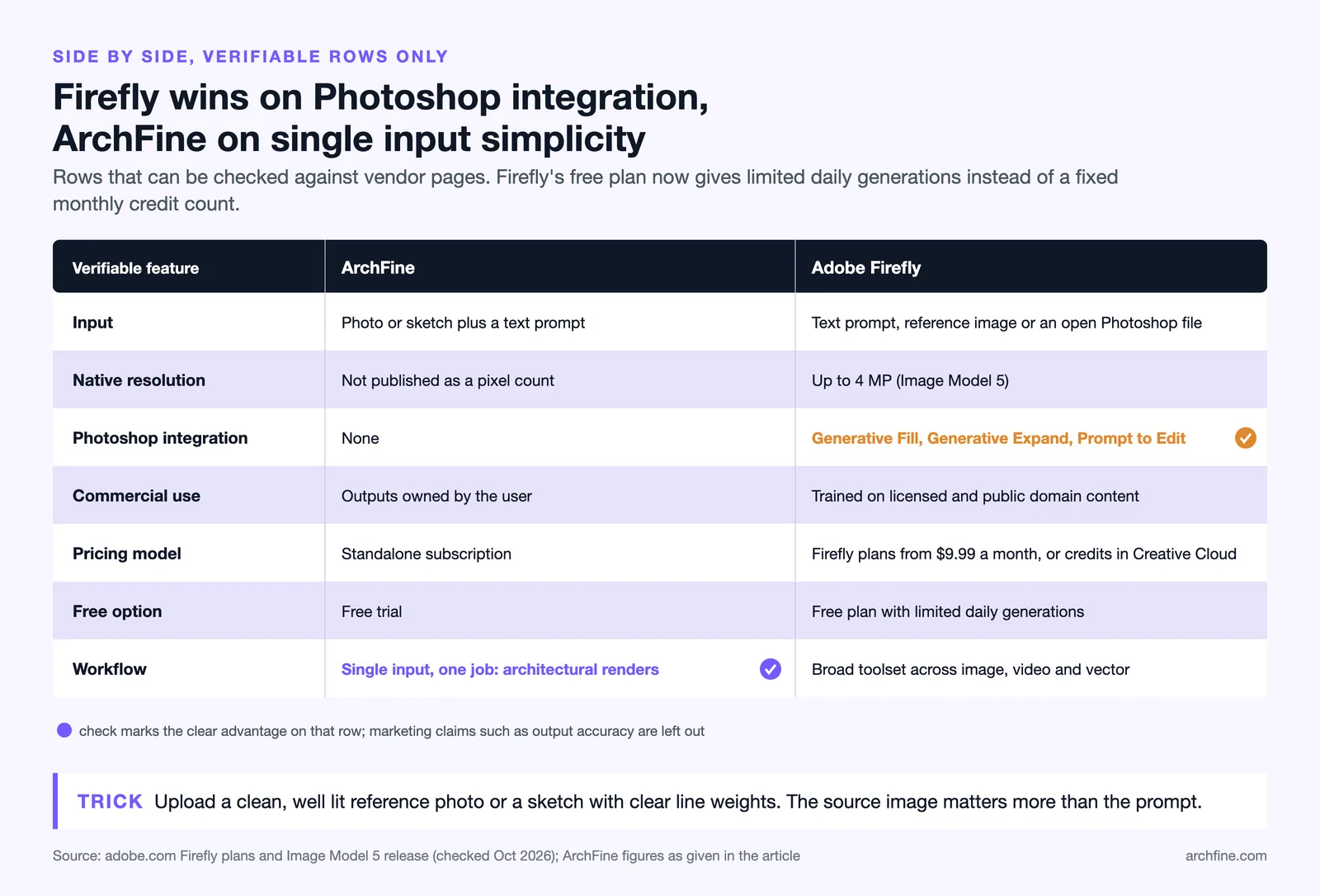
Side-by-Side Comparison
| Feature | ArchFine | Adobe Firefly |
|---|---|---|
| Primary use case | Architectural rendering from photo/sketch inputs | Broad creative image, video, and vector generation |
| Architecture specificity | Purpose-built for architecture | General creative AI with architectural capability |
| Generation time | ~30 seconds | Varies by model and plan |
| Image resolution | Optimized for architectural presentation | Up to 4MP native (Image Model 5) |
| Photoshop integration | No | Yes, native via Generative Fill / Prompt to Edit |
| Workflow entry point | Concept and design iteration stage | Post-processing and presentation production |
| Commercial use | Yes, outputs owned by user | Yes, commercially safe training data |
| Pricing model | Standalone subscription, free trial available | Firefly plans from $9.99 a month (as of October 2026), or credits in Creative Cloud |
| Structural accuracy in output | High — architecture-specific training | Moderate — general model, variable results |
| Learning curve | Low — single input workflow | Moderate — broad toolset requires familiarity |
Which Tool Should Architects Choose?
The answer depends on what stage of practice you are in and what you already use.
If you are an architect or student who needs fast, accurate photorealistic renders for design iteration and client communication — and you are not already inside Adobe’s ecosystem — ArchFine is the more direct choice. The tool does one thing and does it well, with a workflow that fits how architectural design actually moves.
If you are already working in Photoshop and Creative Cloud daily, and your rendering needs are occasional rather than central to your practice, Firefly’s built-in access makes it worth using for specific tasks like material replacement, background replacement, or entourage generation. It should not replace a dedicated rendering tool for serious design work.
For studios running at volume — multiple projects, frequent client presentations, competitive pitches requiring quick turnaround renders — the dedicated architecture AI model in ArchFine consistently outperforms Firefly’s general image model for the specific outputs architects need.
✅ Key Takeaways
- ArchFine is built specifically for architectural rendering; Adobe Firefly is a general creative AI that handles architecture among many other use cases.
- Firefly’s Photoshop integration makes it genuinely useful for post-production and presentation finishing — not as a primary rendering tool.
- Architecture-specific AI training produces more structurally accurate outputs; general creative AI optimizes for visual plausibility across all image categories.
- Firefly is effectively free for Creative Cloud subscribers; ArchFine is a standalone tool with pricing designed around architectural rendering volume.
- For most dedicated architectural rendering workflows, a purpose-built tool outperforms a generalist platform regardless of that platform’s general image quality.
Adobe Firefly will continue improving its architectural rendering capabilities with each model iteration. But the gap between a general tool that handles architecture and one built exclusively for it reflects a fundamental difference in product focus — and for professionals whose work depends on accurate design representation, that gap matters.
Try ArchFine with your own project images at app.archfine.com/demo to see how architecture-specific AI rendering compares to general creative tools on your actual work.