ArchFine vs ArchiVinci is a comparison between two AI-powered architectural rendering platforms that convert sketches, photos, and 3D model exports into photorealistic visuals. ArchFine focuses on a fast, chat-based workflow optimized for concept-stage rendering, while ArchiVinci offers a broader module library covering interiors, exteriors, masterplans, virtual staging, and video generation. The right choice depends on your workflow, budget, and the types of projects you handle.
What Are ArchFine and ArchiVinci?
Both platforms sit in the same category: browser-based AI rendering tools built for architects, interior designers, and visualization professionals. Neither requires a local GPU, heavy software installation, or years of rendering experience. You upload an image, add a text prompt, and the AI handles the rest.
ArchFine is a chat-based AI rendering SaaS designed around a conversational interface. Users upload a project image, describe what they want, and receive a photorealistic architectural render in approximately 30 seconds. The platform targets concept-stage speed and simplicity — the workflow is intentionally minimal so teams can iterate quickly during design development without context-switching between tools.
ArchiVinci takes a module-based approach. The platform groups its tools into distinct categories — Interior, Exterior, Masterplan, Furnish Room, Dream Render, Style Transfer, Exact Render, 360° Panorama, and more — each accessible from a unified dashboard. It also offers coin-based add-ons for ArchiGPT (a prompt-driven architectural assistant) and video generation.
💡 Pro Tip
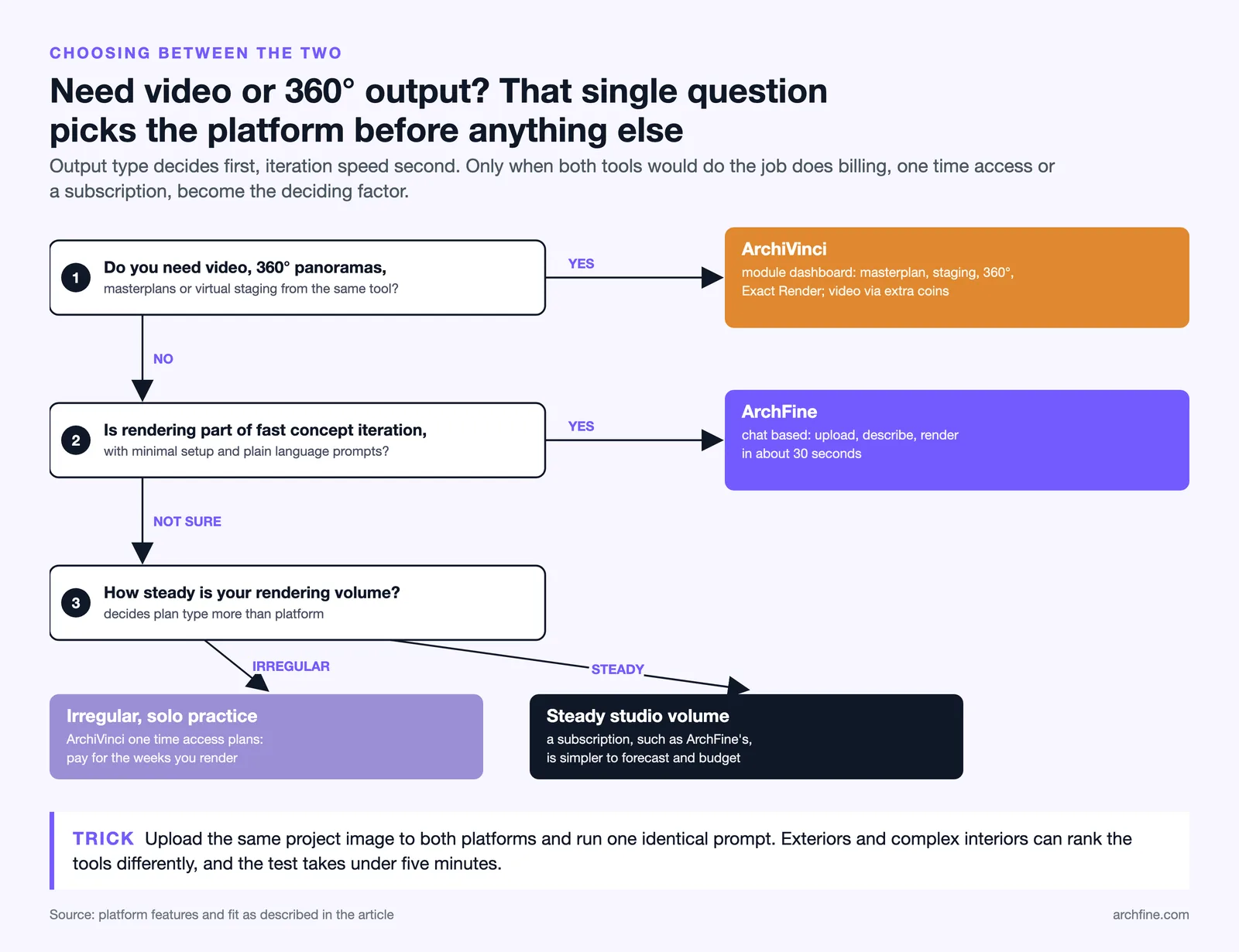
Before committing to either platform, upload the same project image to both and run a test render with an identical prompt. Real-world output quality varies by project type — what performs best on exteriors may not hold up on complex interiors, and a side-by-side test takes less than five minutes.

ArchFine vs ArchiVinci: Feature Comparison
The table below summarizes the core differences between the two platforms across the features that matter most to architects and designers.
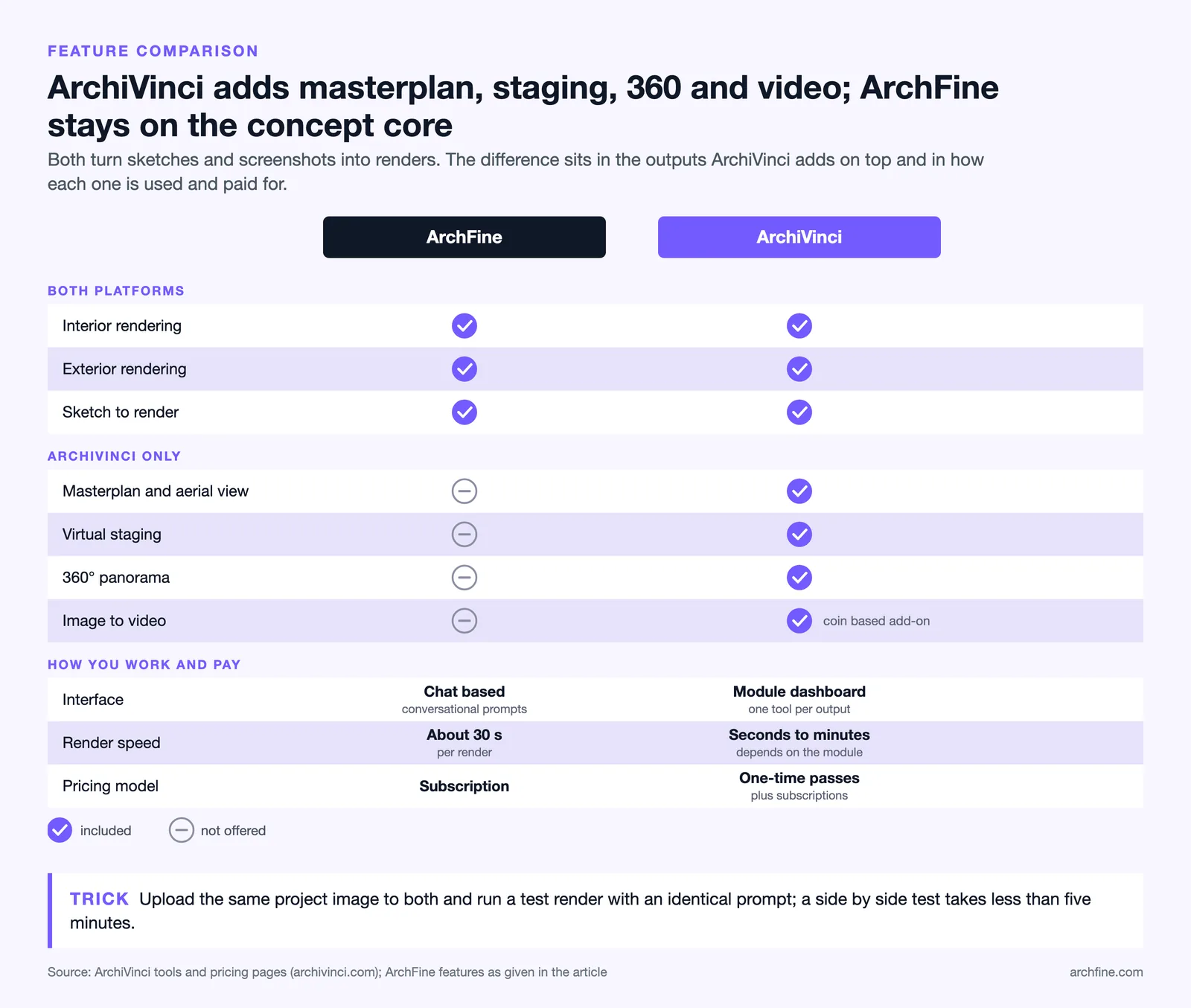
Side-by-Side Feature Overview
| Feature | ArchFine | ArchiVinci |
|---|---|---|
| Interface type | Chat-based / conversational | Module-based dashboard |
| Render speed | ~30 seconds | Seconds to minutes (module-dependent) |
| Interior rendering | Yes | Yes |
| Exterior rendering | Yes | Yes |
| Masterplan / aerial view | No | Yes |
| Virtual staging | No | Yes |
| 360° panorama | No | Yes |
| Image-to-video | No | Yes (coin-based) |
| Sketch-to-render | Yes | Yes |
| Pricing model | Subscription | One-time access plans plus subscriptions |
Render Quality and Accuracy
Render quality is where the ArchFine vs ArchiVinci comparison gets practical. Both platforms use diffusion-based AI models to generate photorealistic outputs from image inputs, but they approach quality control differently.
ArchiVinci uses Stable Diffusion guided by ControlNet, which preserves the geometry, scale, and perspective of the input image when generating output. According to ArchiVinci’s platform documentation, the system is trained specifically on architectural data rather than general image datasets, which helps maintain spatial accuracy and material plausibility in renders. The Exact Render module is designed for projects where design fidelity is non-negotiable — it holds closer to the original proportions than the more generative Dream Render mode.
ArchFine targets concept-stage photorealism through its chat-driven workflow. The conversational interface means users can refine outputs iteratively with follow-up prompts, which is useful when a render needs quick adjustments without restarting the process from scratch. The platform processes inputs and returns results in approximately 30 seconds, making it practical for back-and-forth iteration during design meetings or client presentations.
📌 Did You Know?
ArchiVinci has generated over 3 million architectural renders across its platform. That volume of training feedback and real-world use gives architecture-specific AI models a significant edge over general-purpose image generators when it comes to understanding spatial depth, material surfaces, and structural plausibility.

ArchiVinci vs ArchFine: Pricing Compared
Pricing structure is one of the clearest differences between these two platforms.
ArchiVinci offers one-time payment plans with no recurring charges, alongside weekly, monthly and yearly subscriptions. As of October 2026, one-time plans include a 3-day access option for $69, a 1-month plan for $129, a 3-month plan for $389, a 6-month plan for $599, and a full-year plan for $799, while subscriptions run $39 per week, $79 per month, or $549 per year (about $46/month). All paid plans include unlimited renders across core modules, commercial use rights, image upscaling, and four parallel render slots. Advanced features like ArchiGPT and video generation require additional coins purchased separately.
ArchFine operates on a subscription model. This makes cost forecasting straightforward for studios with consistent monthly rendering needs. Subscription pricing also means you get continuous access to new features and improvements as the platform develops, without managing one-time plan renewals or tracking expiry dates.
For a solo architect with irregular rendering needs, ArchiVinci’s pay-once model can be more cost-effective — you buy access when you need it and don’t pay during slower periods. For teams or studios with steady volume, ArchFine’s subscription approach may be simpler to manage and budget for.
⚠️ Common Mistake to Avoid
Many architects compare AI rendering platforms based on the lowest advertised price without accounting for what’s included. ArchiVinci’s coin system means advanced features like ArchiGPT or video exports cost extra on top of any plan. Always calculate your real cost by factoring in the features your workflow actually requires — not just the base plan price.

Which Platform Is Better for Architects?
The answer depends on what stage of the design process you’re focusing on and how you structure your team’s workflow.
ArchFine suits teams that need rapid turnaround on concept renders during early design phases. The conversational interface removes the learning curve of navigating a module library — you describe what you want in plain language, and the platform generates a result. This works well in settings where rendering is a frequent, embedded part of the design conversation rather than a distinct production step.
ArchiVinci is a better fit for practices that handle a wide range of output types across a single project — exteriors, interiors, masterplans, virtual staging, and client-ready video walkthroughs. The module-based structure gives users more deliberate control over which rendering pipeline they’re using, and the 360° panorama and Exact Render modules add output types that go beyond standard concept visualization.
💡 Pro Tip
If your projects regularly move from concept renders to client presentations with video or 360° content, ArchiVinci’s module ecosystem handles that entire production chain in one platform. If your priority is fast, iterative concept feedback with minimal setup, ArchFine’s chat-first workflow keeps things lean.

Is ArchiVinci a Good Alternative to Traditional Rendering?
Yes — both ArchFine and ArchiVinci replace significant portions of the traditional rendering workflow. Traditional architectural visualization requires full 3D modeling, manual lighting and material setup, long render queues, and often dedicated render farm hardware. AI-based platforms eliminate that overhead by working directly from image inputs.
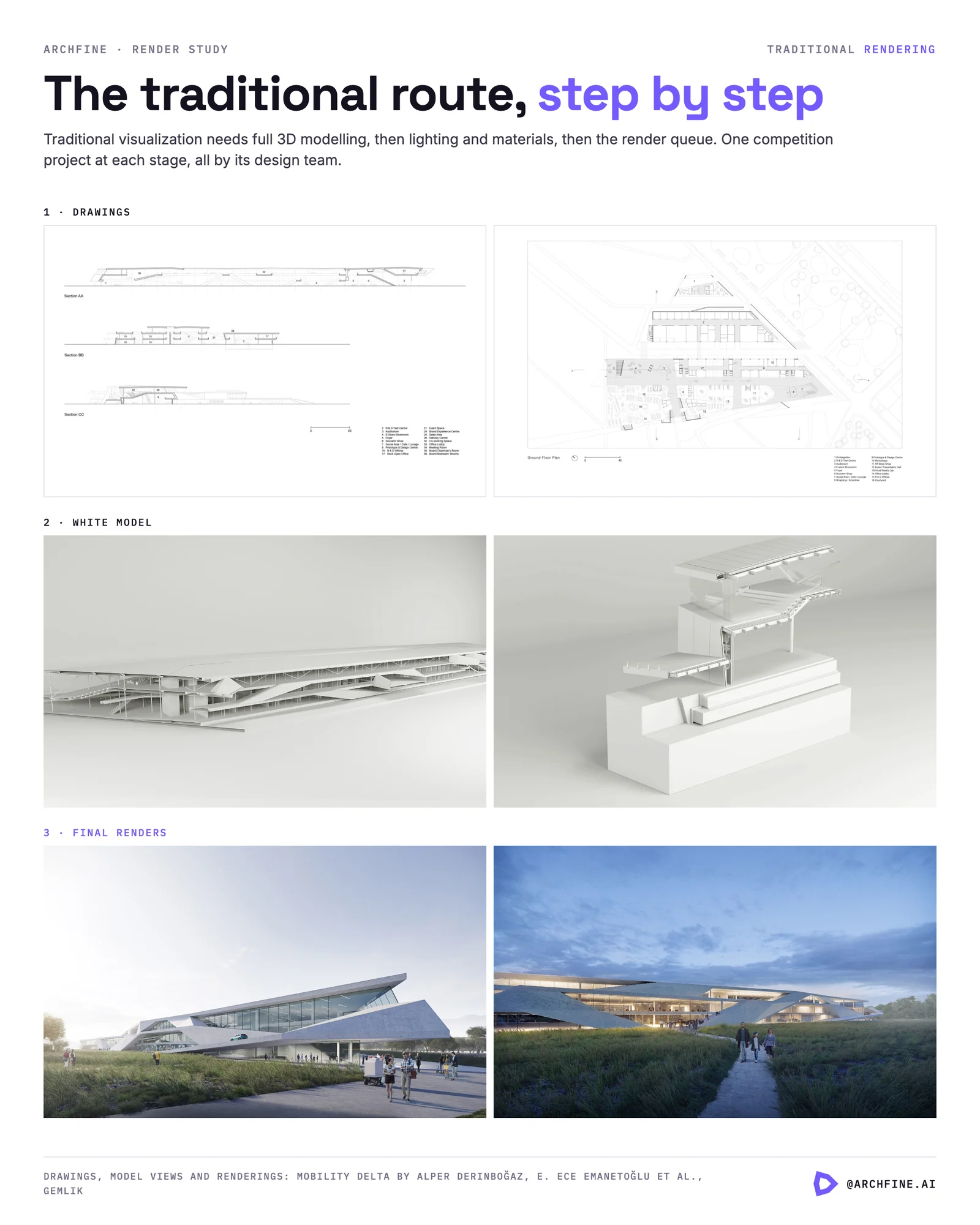
According to ArchiVinci’s own documentation, the platform uses ControlNet to interpret geometry and perspective from uploaded images, then applies realistic materials and lighting automatically. This means architects can produce client-ready visuals from a SketchUp screenshot or hand-drawn sketch without building a full 3D scene in a traditional renderer like V-Ray or Corona.
The tradeoff is control — traditional rendering gives experienced users complete authority over every shader, light, and camera setting. AI platforms trade that granularity for speed. For most concept-stage and early-presentation work, that tradeoff is worthwhile. For final construction documentation visuals or highly technical material studies, traditional rendering pipelines still have advantages.
AI Rendering Platform for Architects: What to Look for Beyond the Two
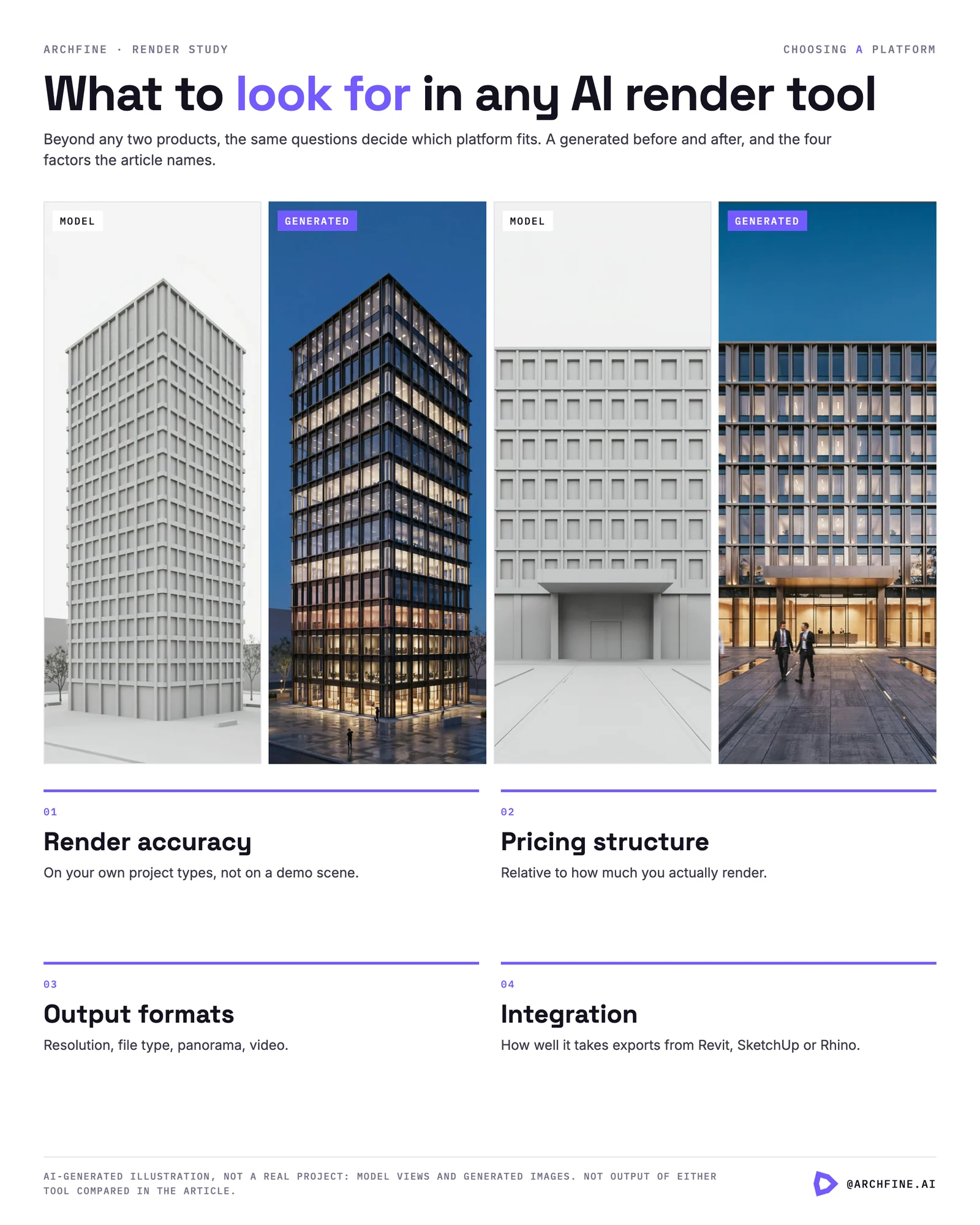
ArchFine and ArchiVinci are not the only options in the AI rendering SaaS space. When evaluating any architectural AI render comparison, the factors that matter most are render accuracy on your specific project types, pricing structure relative to your usage patterns, output format support (resolution, file type, panorama, video), and how well the platform integrates with your existing software exports from tools like Revit, SketchUp, or Rhino.
Both platforms accept standard image exports from CAD and modeling software, which keeps them compatible with most existing architecture workflows without requiring workflow restructuring or special file preparation.
🎓 Expert Insight
“The best AI rendering tool is the one that fits where your team is in the project — not the one with the longest feature list.” — Senior Architect, London-based practice (10+ years in computational design)
This reflects a widely shared view among practitioners testing AI rendering tools: complexity of features only adds value if the workflow supports using them. A leaner tool used consistently outperforms a feature-rich platform that teams find difficult to adopt.
✅ Key Takeaways
- ArchFine uses a chat-based workflow for fast concept renders, targeting speed and simplicity in early design phases.
- ArchiVinci offers a broader module library including masterplans, virtual staging, 360° panoramas, and video — suited for full-project visual production.
- ArchiVinci prices access as one-time payments (from $69 to $799) as well as subscriptions; ArchFine uses a subscription model.
- Both platforms work from standard image exports — no dedicated 3D file formats required.
- For concept-stage iteration, ArchFine’s conversational interface is faster. For multi-format client deliverables, ArchiVinci covers more output types.
- Advanced ArchiVinci features (ArchiGPT, video) require additional coin purchases beyond the base plan.
Pricing figures referenced in this article reflect publicly available information as of early 2025. Verify current pricing directly on each platform’s official pricing page before making a purchase decision.