Architectural rendering software falls into two camps: real-time tools like Enscape, Twinmotion, D5 Render, and Lumion that produce instant viewport feedback, and offline engines like V-Ray and Blender Cycles that trade speed for photorealistic depth. The right choice depends on your CAD platform, hardware, deadlines, and how much realism each project actually demands.
Choosing architectural rendering software is one of the highest-leverage decisions an archviz studio makes, because it shapes your daily workflow far more than any single render setting. This comparison breaks down the main render engines architects rely on, when real-time beats offline, and which archviz software suits sketch reviews versus hero shots. Rather than crowning one winner, the goal is to match the tool to the job so your renders land with clients faster.
What is architectural rendering software?
Architectural rendering software converts a 3D model from a CAD or BIM program into a lit, textured image or animation. It calculates how light bounces, how materials reflect, and how shadows fall, then outputs stills, walkthroughs, or VR experiences. Most tools connect directly to Revit, SketchUp, Rhino, ArchiCAD, or 3ds Max so geometry flows in without manual rebuilding.
The category splits along one main axis: how the engine computes light. Real-time renderers use the GPU and hardware ray tracing to draw frames many times per second, so you see results as you move the camera. Offline engines (biased renderers or unbiased path tracers) spend seconds to hours per frame computing more accurate light transport. Both produce professional results; they simply make different speed-versus-fidelity tradeoffs.
If you are coming from an AI-first workflow, the line is blurring further. Our breakdown of photorealistic vs stylized renders covers how output style, not just engine choice, drives which images actually win client approval.
Real time vs offline rendering: what is the difference?
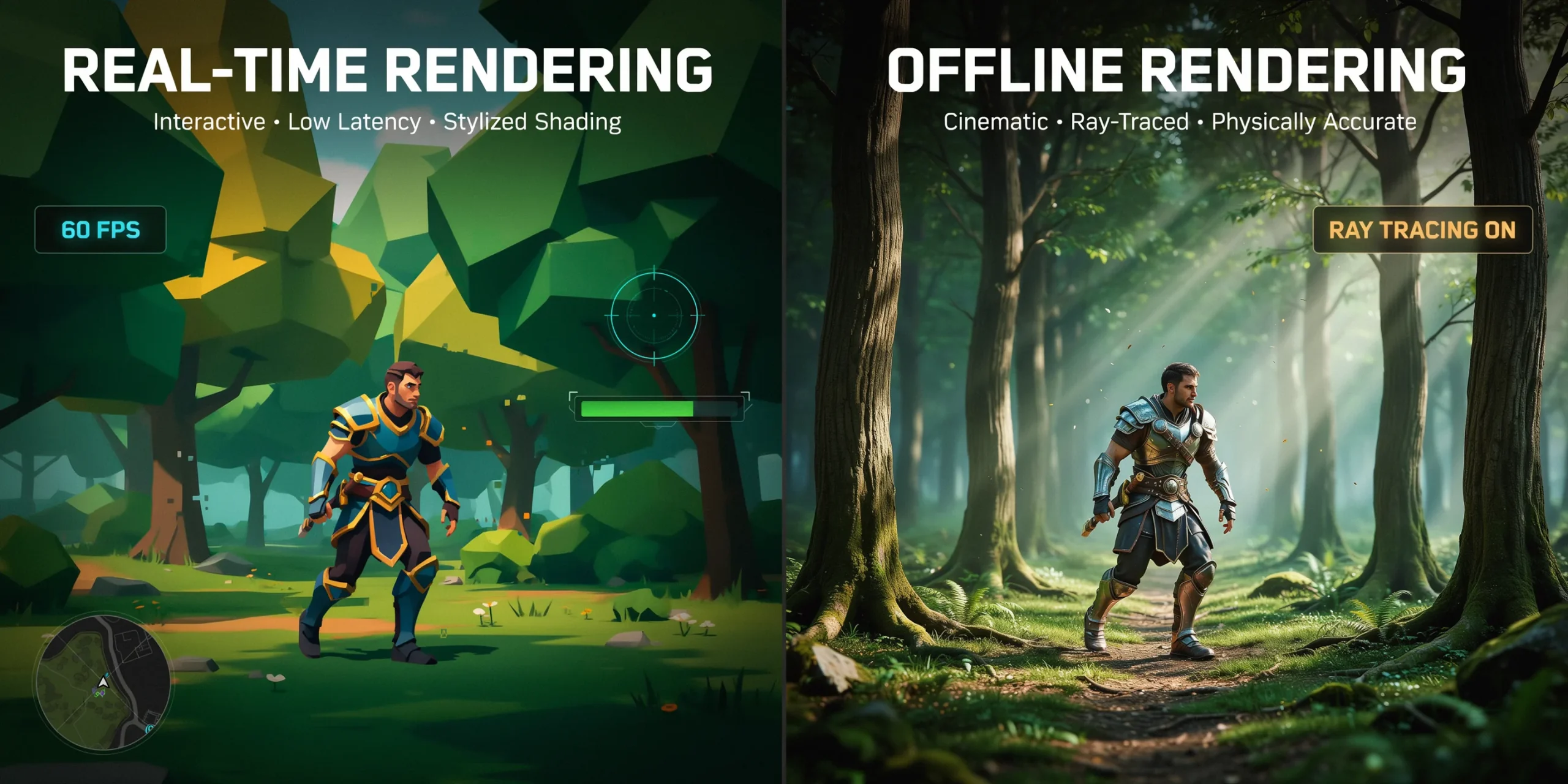
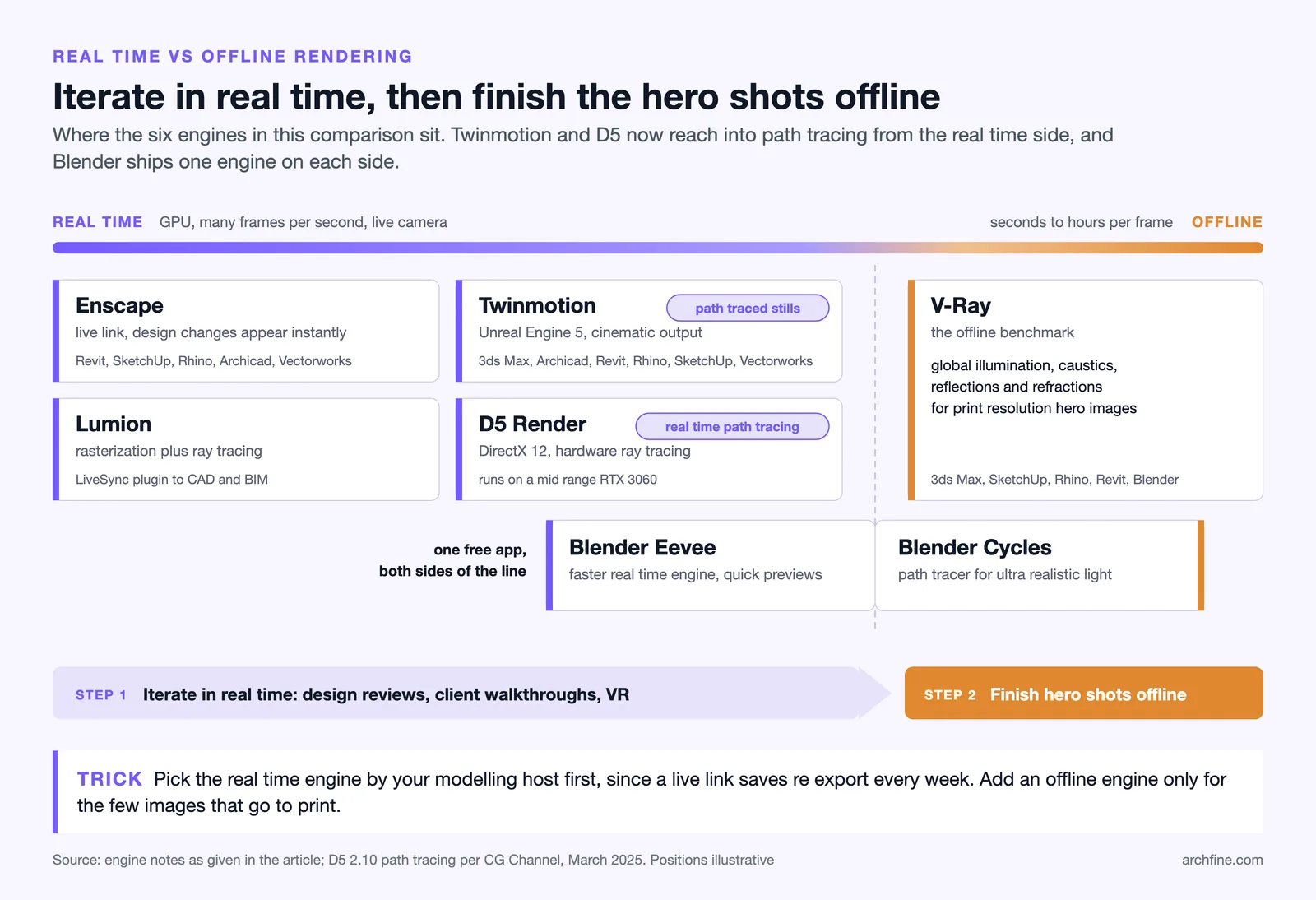
Real-time rendering draws each frame on the GPU fast enough to interact with the scene live, while offline rendering computes a single high-fidelity frame over a longer fixed period. Real-time wins on iteration speed and client walkthroughs; offline wins on absolute photorealism, complex caustics, and print-resolution hero images where every reflection must be physically exact.
For most architectural practices, the decision is not ideological. Real-time tools have closed much of the quality gap, especially now that several support path tracing. D5 Render added experimental real-time path tracing in version 2.10 for physically accurate global illumination, reflections, and shadows while staying interactive, according to CG Channel. That puts genuine path-traced output inside a live viewport, something that was offline-only a few years ago.
Offline engines still hold the top end. When you need flawless interior light, layered glass, or a magazine cover render, a dedicated path tracer like V-Ray gives you control that real-time tools approximate. The practical rule: iterate in real time, then finalize hero shots in an offline engine if the project budget and timeline justify it.
⚖️ Pros & Cons at a Glance
✔️ Real-time pros: instant feedback, live client walkthroughs, fast iteration, lower learning curve, VR ready
✖️ Real-time cons: GPU dependent, occasional light approximation, heavy scenes can strain VRAM, and less fine control and physical accuracy than slower offline engines
Comparing the main render engines architects use
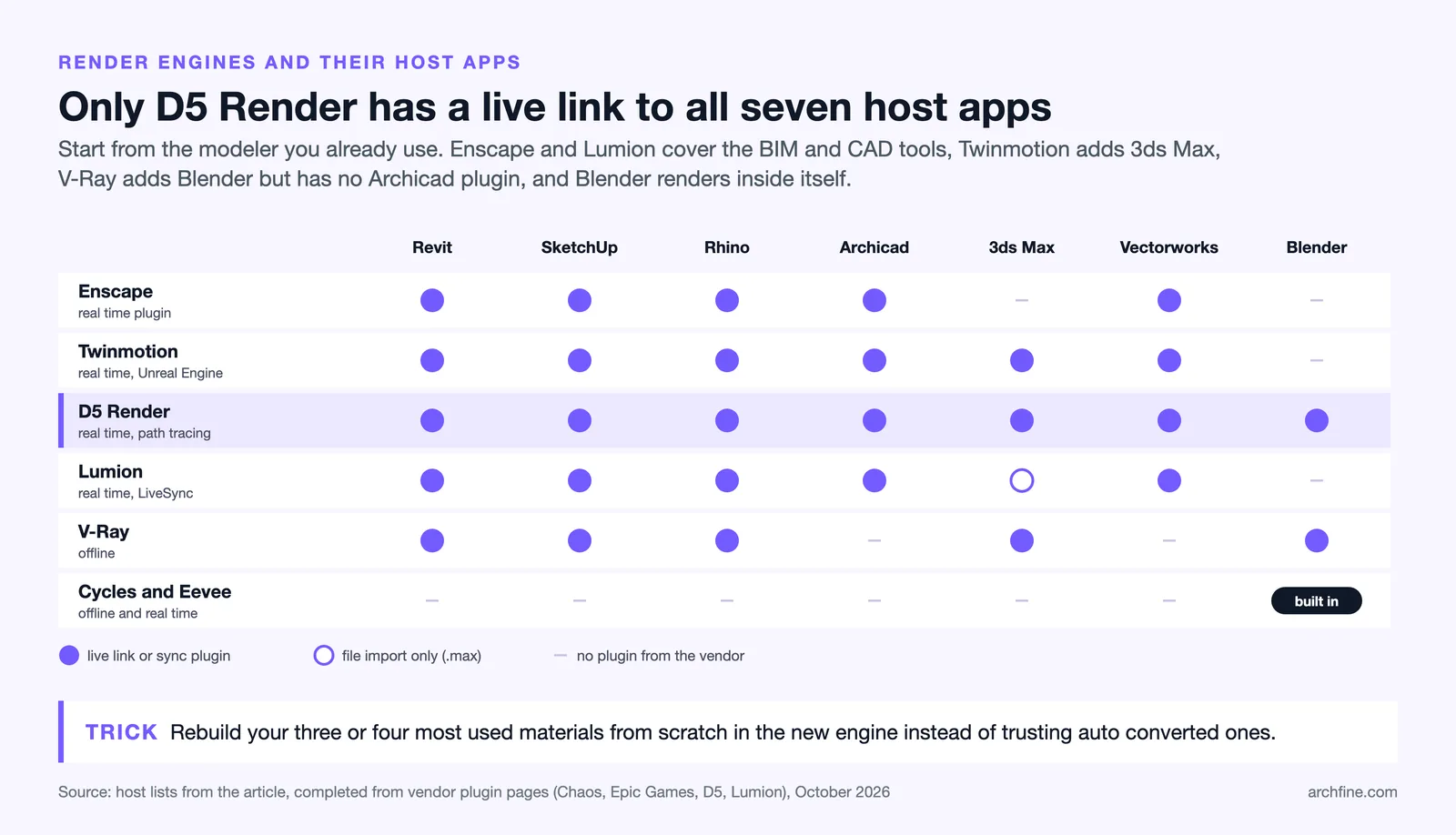
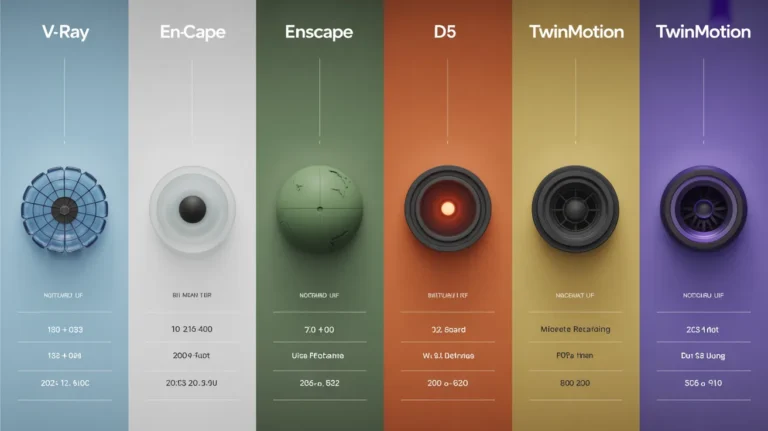
Below is a practical render engine comparison of the six tools that dominate professional archviz software stacks. Each entry notes the host CAD platforms, the rendering approach, and the type of architect it suits best.
Enscape
Enscape, part of the Chaos portfolio, is a real-time renderer that plugs directly into Revit, SketchUp, Rhino, ArchiCAD, and Vectorworks. Its biggest strength is the live link: there is no import or export, so design changes appear instantly in the render window. According to Chaos, Enscape keeps CAD/BIM and visualization seamlessly integrated, and it supports VR headsets so clients can explore a project at full scale. It suits architects who want visualization to live inside their modeling tool rather than as a separate stage.
Twinmotion
Twinmotion is built on Unreal Engine 5 and owned by Epic Games, pairing high-end real-time graphics with a simplified interface. It offers one-click sync with 3ds Max, ArchiCAD, Revit, Rhino, SketchUp Pro, and Vectorworks, plus a large built-in asset library. Per Twinmotion, a single project can output path-traced stills, walkthrough videos, VR experiences, and interactive configurators. It now supports Nanite for very high-polygon scenes. Twinmotion suits teams who want cinematic output and animation without learning full Unreal Engine.
D5 Render
D5 Render is a GPU renderer built around DirectX 12 and hardware-accelerated ray tracing, with a strong focus on AI-assisted workflows and atmosphere. It uses smart asset streaming to reduce VRAM load, so it runs smoothly on a mid-range card like an RTX 3060. With real-time path tracing added recently, D5 delivers physically accurate lighting inside an interactive viewport, making it a popular choice for architects who want near-offline quality without leaving real time.
Lumion
Lumion combines rasterization with ray tracing and ships with more than 8,500 assets covering materials, vegetation, and furnishings. Its free LiveSync plugin keeps your CAD or BIM model connected to the render. Lumion Pro 2025 added AI image upscaling to 8K and expanded ray-traced effects such as water and volumetric lighting, according to Lumion. It suits architects who want rich, populated scenes and landscape context with minimal setup.
V-Ray
V-Ray, also from Chaos, is the long-standing benchmark for offline photorealism. It delivers true-to-life global illumination, caustics, reflections, and refractions, and it now runs natively inside Blender as well as 3ds Max, SketchUp, Rhino, and Revit. The Chaos Cosmos library supplies ready-to-render models, materials, and HDRIs. V-Ray suits studios producing print-resolution hero images and complex interiors where physical accuracy is non-negotiable.
Blender (Cycles and Eevee)
Blender is free and open source, bundling two engines: Cycles, a path tracer for ultra-realistic lighting, and Eevee, a faster real-time engine for quick previews. Its zero licensing cost and rapid development have driven strong archviz adoption among solo artists and smaller studios. Blender suits architects who want full control over the pipeline, a generous plugin ecosystem, and no per-seat fees, in exchange for a steeper learning curve than plug-and-play real-time tools.
🔢 Quick Numbers
- D5 Render recommends an RTX 3060 and lists a GTX 1060 6 GB as its minimum GPU (D5 Render system requirements)
- Lumion ships with more than 8,500 built-in assets for materials, objects, and furnishings (Lumion, 2026)
- Twinmotion provides built-in access to over one million assets from a single project (Twinmotion, Epic Games)
Best rendering software for each type of project
There is no single best rendering software; the smart move is to map each tool to a use case. Below are the most common archviz scenarios and the rendering tools architects tend to reach for in each.
- Live design reviews in Revit: Enscape, for its zero-friction real-time link and BIM integration.
- Cinematic walkthroughs and animation: Twinmotion, for Unreal Engine quality with an approachable interface.
- Near-offline quality on mid-range hardware: D5 Render, for real-time path tracing and low VRAM demands.
- Landscape and context-heavy scenes: Lumion, for its vast asset and vegetation library.
- Print-resolution hero shots: V-Ray, for uncompromising photorealism and light control.
- Budget-conscious or fully custom pipelines: Blender, for free path tracing and total flexibility.
If your CAD source is SketchUp, the host plugin matters as much as the engine. Our guide to SketchUp AI rendering walks through getting photorealistic results from lightweight models, and the same model-prep logic applies whether you finish in Enscape, V-Ray, or an AI tool.
💡 Pro Tip
When you adopt a new render engine, rebuild your three or four most-used materials from scratch in that engine rather than relying on auto-converted ones. Imported materials from another renderer almost always carry over wrong reflection and roughness values, and fixing them per project wastes far more time than building a small clean library once.
How to choose the right archviz software
Choosing among architectural rendering software comes down to four practical questions. Work through them in order and the field narrows quickly.
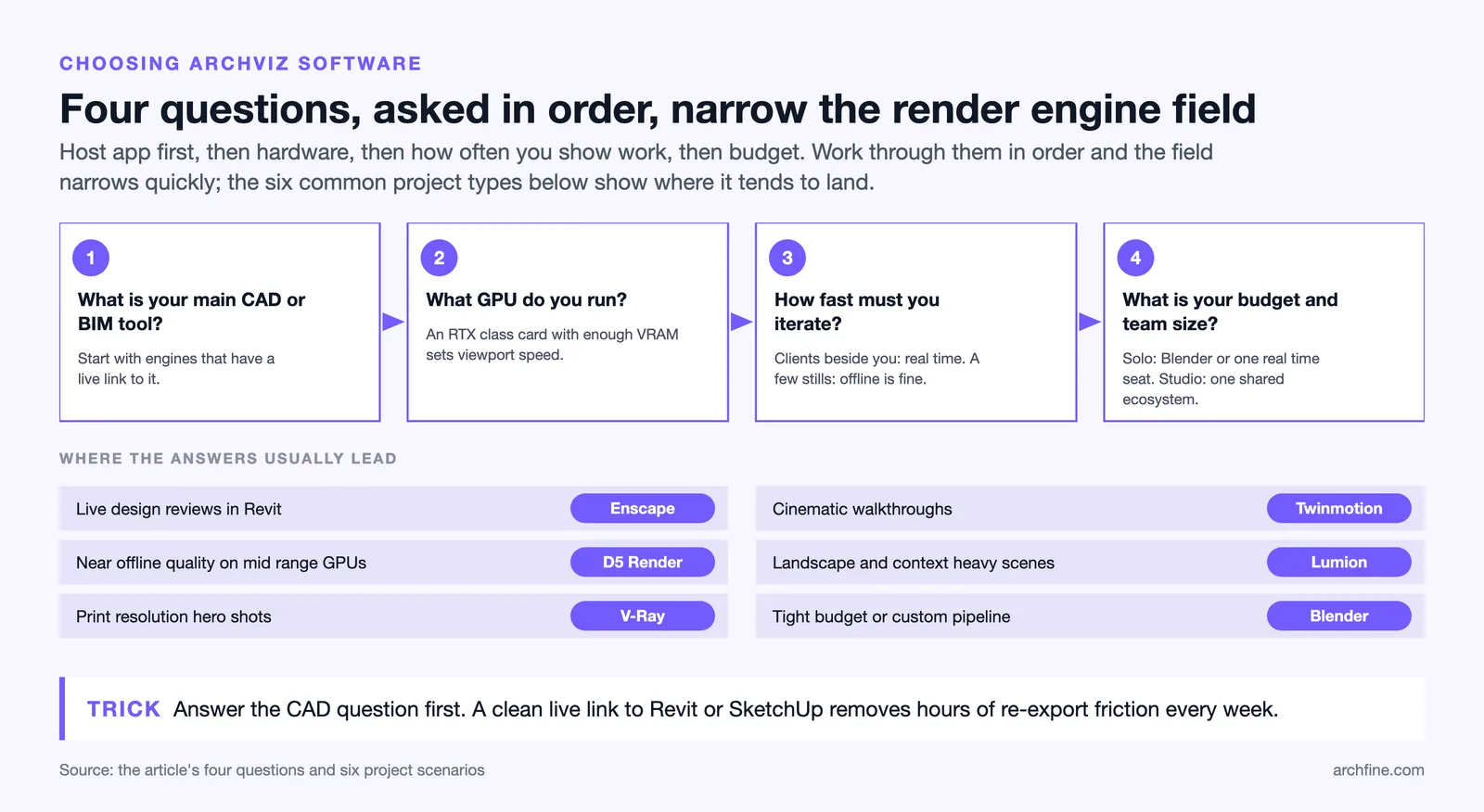
- What is your primary CAD or BIM tool? Start with engines that offer a native live link to it. A clean Revit or SketchUp sync removes hours of re-export friction every week.
- What GPU do you run? Real-time and path-traced tools lean heavily on the graphics card. An RTX-class GPU with adequate VRAM is the single biggest factor in viewport smoothness.
- How fast must you iterate? If clients sit beside you during reviews, prioritize real-time. If you deliver a handful of polished stills per project, an offline engine may earn its longer render times.
- What is your budget and team size? Solo practitioners often start with Blender or a single real-time license, while larger studios standardize on a Chaos or Epic ecosystem for shared assets and support.
🏗️ Real-World Example
Twinmotion Configurations (2026.1 update): Twinmotion introduced live design-option switching, letting a client compare Facade A against Facade B inside a single running presentation. This kind of interactive real-time review increasingly replaces emailing static image sets, because decisions happen in the meeting rather than over days of back-and-forth.
Many studios now run a hybrid stack: a real-time engine for daily work plus AI rendering for rapid concept variations. If that path interests you, our practical guide on how to use AI to render architecture shows where AI fits alongside traditional engines, and the AutoCAD AI rendering walkthrough covers turning flat CAD drawings into finished visuals.
For more head-to-head breakdowns of these tools, browse the full rendering software comparison category on Archfine.
Frequently Asked Questions
Which architectural rendering software is easiest to learn?
Real-time tools with native CAD plugins are the easiest to learn because they remove import and export steps and show results live. Enscape and D5 Render are widely regarded as approachable, since you render straight from your model with minimal setup. Twinmotion is also beginner-friendly given its simplified interface over Unreal Engine.
Do I need an expensive GPU for architectural rendering?
Not necessarily. While high-end GPUs help with heavy scenes, mid-range cards now handle real-time rendering well. D5 Render runs smoothly on an RTX 3060 thanks to smart asset streaming, and several engines scale settings to suit available hardware. VRAM capacity often matters more than raw speed for large architectural scenes.
Is real-time rendering as photorealistic as offline rendering?
For most projects, modern real-time engines come very close, especially those that now support path tracing such as D5 Render and Twinmotion. Offline engines like V-Ray still lead at the extreme high end for complex caustics, layered glass, and print-resolution hero shots where every light path must be physically exact.
Can I use more than one render engine in the same workflow?
Yes, and many studios do. A common hybrid approach is to iterate and present in a real-time engine, then finalize select hero images in an offline path tracer or an AI tool. Because most engines share CAD sources like Revit and SketchUp, moving between them is practical once your model is clean.
The Bigger Picture
Bottom Line: The best architectural rendering software is the one that matches your CAD platform, hardware, and deadline rather than the one with the highest benchmark scores. Real-time engines like Enscape, Twinmotion, D5, and Lumion win daily iteration, while V-Ray and Blender hold the high end for photorealistic hero shots. Most professional studios get the best results by combining both.