ArchFine vs Midjourney is one of the most practical comparisons an architect or visualization professional can make right now. ArchFine is a purpose-built AI rendering platform designed specifically for architectural work, while Midjourney is a general-purpose image generator with a large creative following, run on a subscription with no free tier. Both produce compelling AI visuals, but they approach architectural rendering from fundamentally different angles, and the difference matters depending on how you work.
What Is ArchFine and How Does It Work?
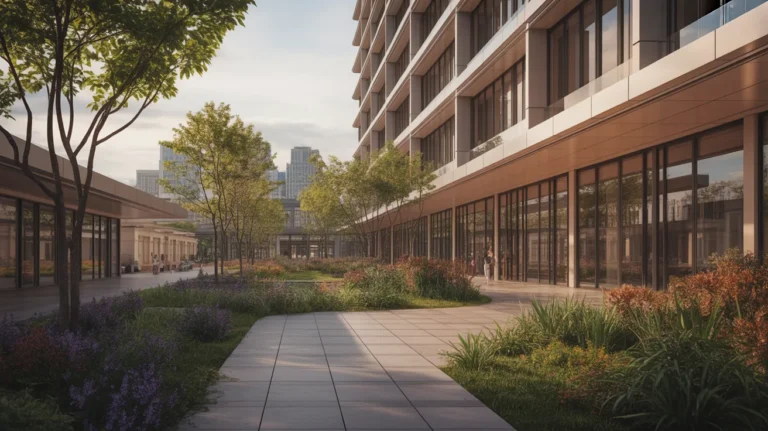
ArchFine is an AI-powered architectural rendering SaaS platform built for one specific task: turning architectural inputs into photorealistic renders. The workflow centers on uploading a reference image, adding a prompt, and receiving a high-quality render in approximately 30 seconds. There is no Discord interface, no prompt engineering guesswork, and no output variation suited for general creative use.
The platform is designed to fit directly into an architect’s existing pipeline. You bring your sketch, floor plan image, or rough massing model, describe the desired outcome, and the AI produces a context-aware photorealistic result. Because the model is trained on architectural imagery, it understands spatial logic, material behavior, and lighting conditions in ways a general-purpose generator does not.
💡 Pro Tip
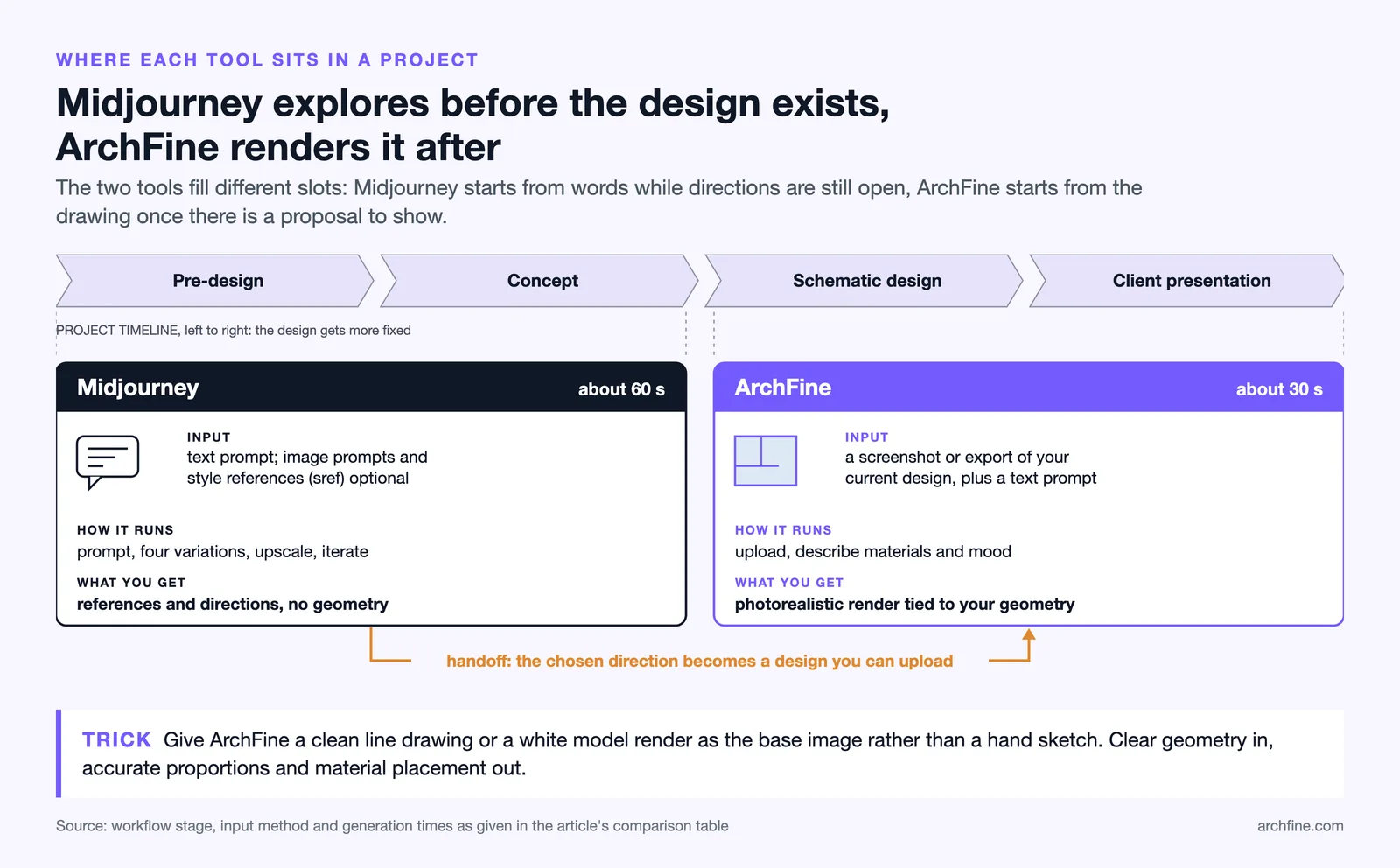
When uploading a reference image to ArchFine, use a clean line drawing or a white-model render as your base rather than a hand sketch. The model reads spatial structure from the image and generates far more accurate proportions and material placement when the input geometry is clear.
What Is Midjourney for Architects?
Midjourney is a text-to-image AI generator built by a San Francisco-based research lab. It operates primarily through a Discord interface where users type prompt commands to generate images. Midjourney architecture rendering became popular quickly because the tool produces visually striking results and handles aesthetic variety well, making it useful for early-stage concept exploration and mood boarding.
For architects, Midjourney has a clear role in the ideation phase. You can generate dozens of exterior or interior visual directions within an hour, explore material palettes, test massing variations in atmospheric renderings, or produce marketing visuals for competition entries. Midjourney V7, released in April 2025, introduced improved spatial coherence and better handling of complex multi-element compositions, which helped with architectural output quality.
The limitations are just as relevant. Midjourney cannot take your specific building design as input and produce an accurate rendering of it. Every image starts from a text prompt. If your project has particular geometry, a specific site context, or precise material requirements, Midjourney will produce something inspired by your description rather than a render of your actual design. For concept development, that is often fine. For client presentations tied to a real project, it falls short.
⚠️ Common Mistake to Avoid
Many architects use Midjourney-generated images in client presentations as if they represent the proposed design. Because Midjourney generates imagery from text alone, the resulting visual has no connection to your actual building geometry, site conditions, or material specifications. Presenting these as design proposals rather than mood references can create client expectations that the final project cannot meet.
ArchFine vs Midjourney: Side-by-Side Comparison
The table below breaks down the key differences between the two tools across criteria that matter most to architectural visualization professionals.
| Feature | ArchFine | Midjourney |
|---|---|---|
| Input method | Image upload + text prompt | Text prompt (plus optional image prompts and style reference via --sref) |
| Primary use case | Photorealistic architectural rendering from existing design | Creative ideation, concept art, mood boards |
| Architecture-specific training | Yes | No (general image generator) |
| Average generation time | ~30 seconds | ~60 seconds |
| Interface | Web app (chat-based) | Discord, web interface |
| Geometric accuracy | High (based on uploaded design) | Low to moderate (prompt-dependent) |
| Render realism | Photorealistic, architecture-calibrated | Varies widely; can be photorealistic or stylized |
| Learning curve | Low (upload and describe) | Moderate to high (prompt engineering required) |
| Free tier | Available | No (free trial ended in March 2023) |
| Best workflow stage | Schematic design through client presentation | Pre-design, concept, ideation |
Rendering Quality: Where Each Tool Stands
The rendering quality question depends entirely on what you mean by quality. Midjourney V7 produces visually impressive images. The update improved spatial coherence, material texture rendering, and overall image fidelity compared to earlier versions. An architect generating mood board imagery for a client kickoff or competition visual will find Midjourney capable of producing compelling results with a well-crafted Midjourney architecture prompt.
ArchFine’s rendering quality is calibrated differently. Because the model starts from your uploaded design, the output reflects your actual building. Material selections, massing proportions, and spatial relationships carry over from the input image rather than being invented from a text description. For client presentations tied to a real design in progress, this distinction changes the professional value of the output entirely.
📌 Did You Know?
Midjourney V7, which began rolling out on 3 April 2025, was described by CEO David Holz as “a totally different architecture”. The release notes claim sharper textures and noticeably better coherence in bodies, hands and objects, while text rendering remains the weakest part of the model. For architecture-specific tasks, this matters less than for graphic design work, but it does affect labeling and signage in visualizations.
AI Rendering Workflow: How Each Tool Fits Into Practice
The difference in workflow integration between ArchFine and Midjourney is substantial. Midjourney architecture rendering happens outside your design software entirely. You write a prompt, review four image variations, upscale the best result, and iterate from there. Getting high-quality architectural output from Midjourney requires learning specific prompt structures, referencing visualization styles, specifying camera angles and lighting conditions, and often making dozens of generations before landing on something useful for a project.
ArchFine sits closer to where your design actually lives. You export or screenshot your current design state, upload it, describe the material and atmosphere you want, and receive a render tied to your geometry. The AI rendering workflow for architects using ArchFine requires less prompt engineering because the image itself provides structural guidance that the model builds on.
This also means the tools are not necessarily competing for the same slot in your workflow. Midjourney makes the most sense at the start of a project when you are exploring directions and generating reference material. ArchFine becomes relevant once you have a design to show and need photorealistic output that reflects your actual proposal.
🎓 Expert Insight
“I think of these tools as being like a sketchbook with paper and a pencil. I’m really interested in these tools because of their potential, but it’s not because of what they can offer for architecture right now. It’s because generative AI tools are changing my entire perspective about what architecture is.” — Hassan Ragab, Architect and Conceptual Artist
Ragab’s perspective speaks to the exploratory value of tools like Midjourney in early-phase design thinking. Architecture-specific AI rendering platforms like ArchFine then take that exploration into the territory of client-ready photorealistic output grounded in real design geometry.
Midjourney Architecture Limitations Worth Knowing
Understanding where Midjourney falls short for architectural work helps set realistic expectations. First, you can upload an image of your building as an image prompt, but Midjourney treats it as inspiration and does not keep its geometry as the spatial foundation for a render. Midjourney’s style reference feature (--sref) helps maintain stylistic consistency across generations but does not translate structural geometry into the output. Your building design and the rendered image remain disconnected.
Second, precise control over architectural output requires significant Midjourney architecture prompt knowledge. Getting consistent results across multiple views of the same project is difficult. Each generation is independent, so maintaining material consistency, scale, and spatial logic across a project presentation takes considerable manual effort.
Third, Midjourney pricing moved to a paid-only model in March 2023, with plans ranging from $10 to $120 per month depending on usage volume and features (20% less with annual billing, as of October 2026). There is no free tier to test the tool before committing. For occasional users, the monthly commitment may not make sense.
💡 Pro Tip
If you use Midjourney for architecture concept boards, reference established visualization studios in your prompts to anchor the aesthetic. Terms like “in the style of Mir rendering” or “architectural photography by Iwan Baan” pull the output toward professional-grade visualization aesthetics rather than generic AI imagery. Combine this with specific material descriptions and lighting conditions for more controlled results.

Which Is the Best AI Tool for Architectural Renders?
The direct answer is that ArchFine is the better choice when your goal is photorealistic architectural rendering AI output tied to an actual design. If you need your building, your materials, and your spatial proportions to show up accurately in the render, ArchFine’s image-based input model makes that possible in a way Midjourney cannot replicate from a text prompt alone.
Midjourney remains a strong tool for concept-phase visual exploration, mood board production, and generating a wide range of aesthetic directions quickly. Its value is in creative range and speed during the phases of a project where you are still discovering what the design should be rather than documenting what it is.
For many architecture practices, both tools have a place. Midjourney for early ideation, ArchFine for design development through presentation. Using them in sequence, rather than treating them as direct substitutes, is how most professionals with experience in both platforms tend to approach their AI rendering workflow for architects.
✅ Key Takeaways
- ArchFine generates photorealistic renders from your uploaded design; Midjourney generates images from text prompts with no connection to your actual building geometry.
- Midjourney excels at concept exploration, mood boards, and aesthetic direction-finding during early project phases.
- ArchFine produces architecture-specific output in around 30 seconds with a low learning curve; Midjourney requires prompt engineering for quality architectural results.
- Midjourney removed its free trial in March 2023; ArchFine offers a free tier for new users.
- The strongest workflow combines both tools sequentially: Midjourney for ideation, ArchFine for design-accurate photorealistic rendering.