
ArchFine vs DALL-E for architecture is one of the most common comparisons architects and designers run into when evaluating AI visualization tools. ArchFine is built specifically for architectural rendering, while DALL-E is a general-purpose image generator from OpenAI. Both can produce architectural imagery, but they approach the task from completely different angles, with different results depending on what you actually need.
What Is DALL-E and How Does It Handle Architecture?
DALL-E 3 is OpenAI’s text-to-image model. As of October 2026 it has been retired: OpenAI removed DALL-E from its API on May 12, 2026, and image generation in ChatGPT now runs on its newer GPT Image models. It generates images from written prompts, and because it was trained on an enormous dataset of images across every category, it can produce architectural visuals when given the right instructions.
The model handles general architectural descriptions well. Ask it for “a modern glass house on a hillside at sunset” and you will get a convincing result. The images tend to have good lighting, reasonable material representation, and a polished aesthetic. For mood boards, conceptual exploration, or presenting a general design direction to a client, DALL-E can be genuinely useful.
Where it starts to break down is specificity. DALL-E has no memory of your project. It does not accept a floor plan or elevation drawing as input and produce a coherent render from it. Each prompt is treated as an independent generation request, which means getting consistent results across a project takes significant effort. You cannot upload a reference image and tell it “render this building” the way you would with a dedicated tool.
⚠️ Common Mistake to Avoid
Many architects assume that a detailed text prompt in DALL-E will reliably translate into an accurate architectural render. In practice, DALL-E frequently misinterprets structural elements, invents window placements, and applies incorrect materials. Text prompts alone cannot convey the spatial and structural logic of a real architectural design. Use it for concept visuals, not for representing a specific building.

How DALL-E 3 Architecture Prompts Work in Practice
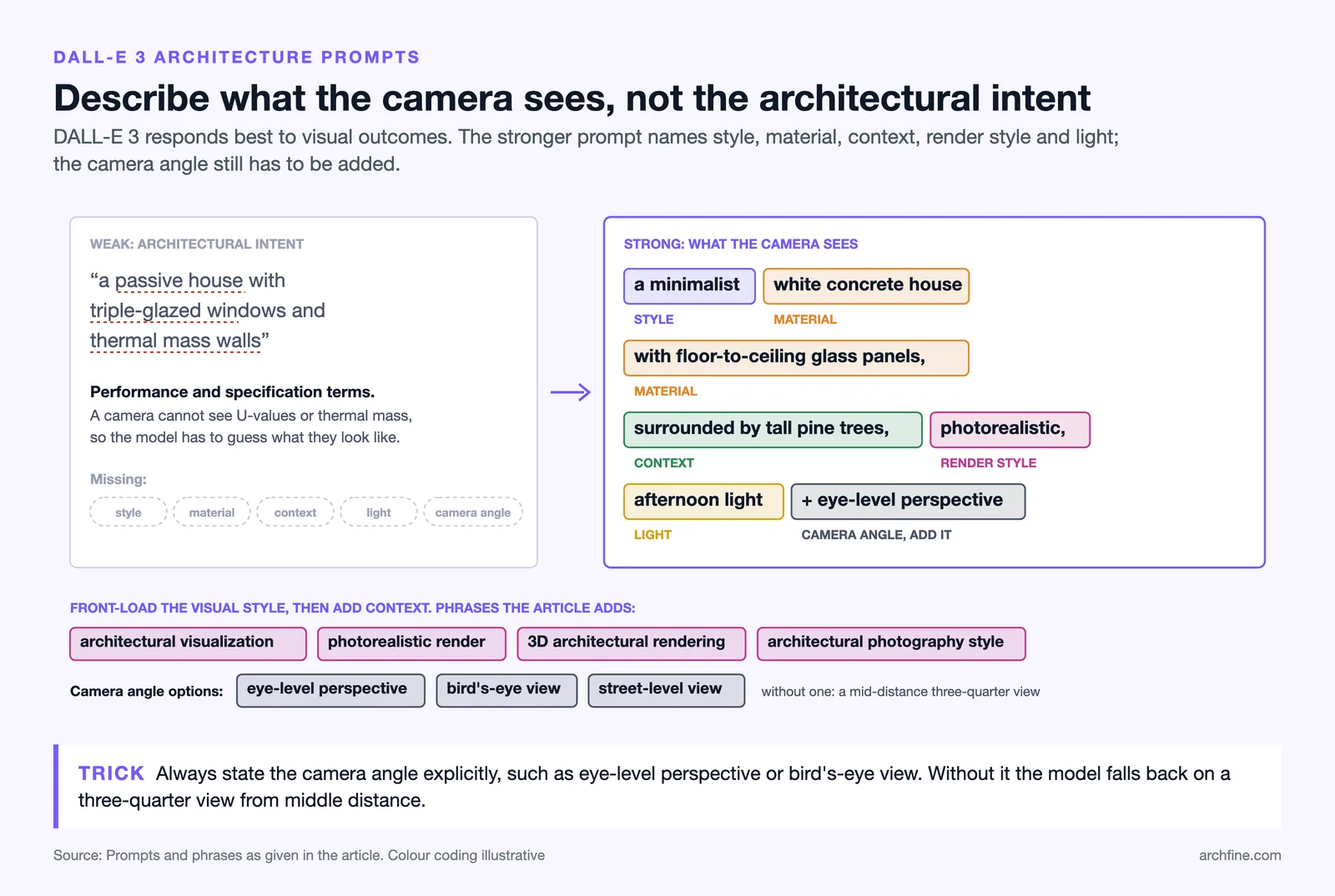
Getting usable results from DALL-E 3 with architecture prompts requires a specific approach. The model responds best to prompts that describe visual outcomes rather than architectural intent. Instead of “a passive house with triple-glazed windows and thermal mass walls,” something like “a minimalist white concrete house with floor-to-ceiling glass panels, surrounded by tall pine trees, photorealistic, afternoon light” will produce better results.
Experienced users of DALL-E for architectural rendering have developed prompt structures that front-load the visual style, then add context. Specifying “architectural visualization,” “photorealistic render,” or “3D architectural rendering” in the prompt consistently improves output quality compared to leaving the style undefined.
The platform also supports image editing through its inpainting feature, where you can mask and regenerate specific areas of an image. This can be useful for adjusting a facade detail or changing the landscape around a building without regenerating the entire image. However, the level of control is still limited compared to what a purpose-built rendering tool offers.
💡 Pro Tip
When writing DALL-E architecture prompts, always specify the camera angle explicitly: “eye-level perspective,” “bird’s-eye view,” or “street-level view.” Without this, the model tends to default to a mid-distance three-quarter view that may not match your presentation needs. Adding “architectural photography style” also helps it prioritize structural clarity over painterly effects.
What Is ArchFine and How Does It Approach Rendering?
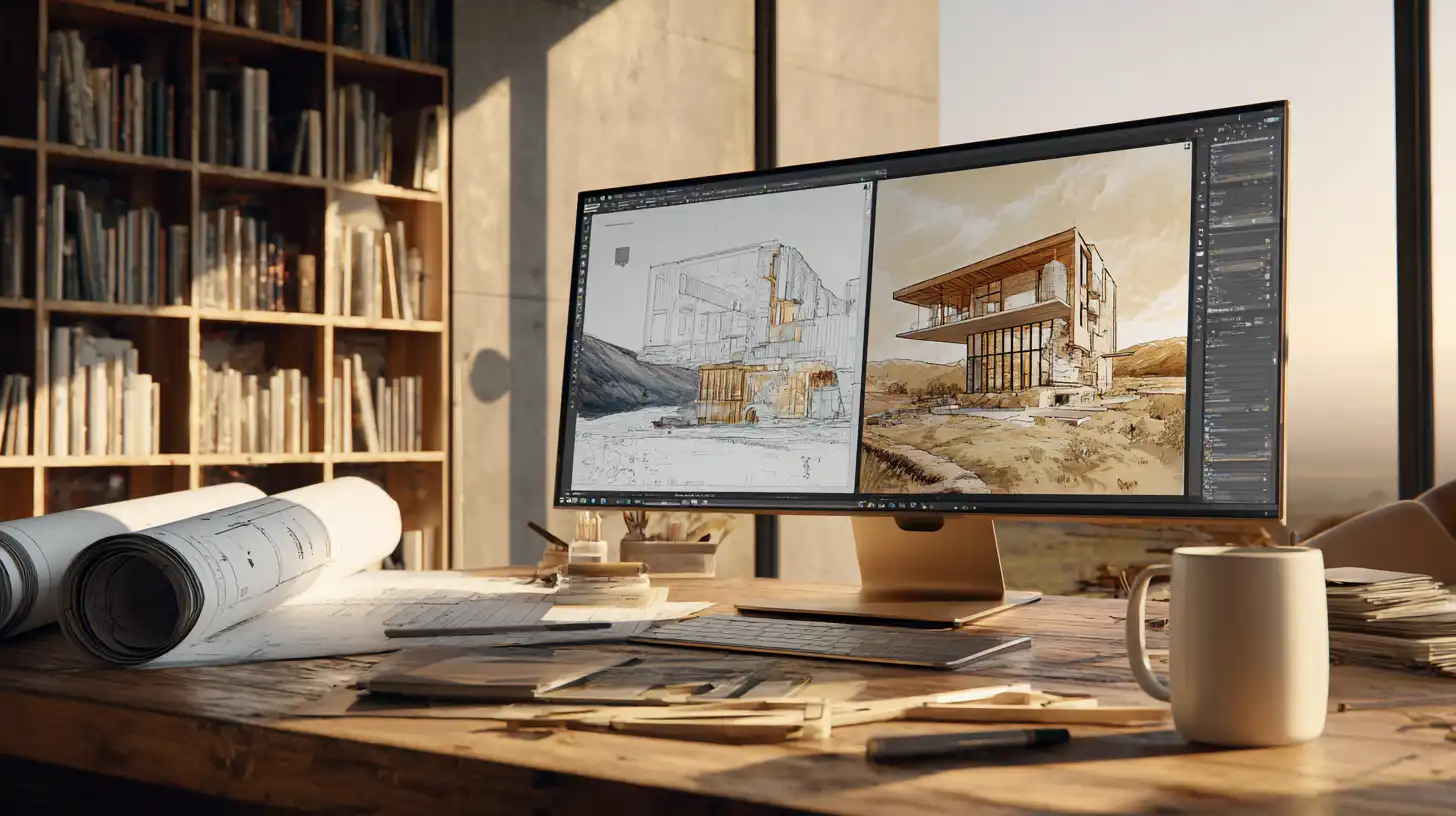
ArchFine is an AI-powered architectural rendering platform designed around a workflow that architects actually use. Rather than starting from a text prompt, ArchFine allows users to upload an existing image, sketch, or reference and apply a prompt on top of it. The AI then generates a photorealistic render that preserves the spatial layout of the original while applying the requested materials, lighting, and style.
This reference-image-first approach is the core difference between ArchFine and DALL-E. A rough floor plan sketch becomes a finished exterior render. An early massing model becomes a client-ready visualization. The structural logic of the uploaded image is respected throughout the generation process, which means the output corresponds to the actual design rather than a plausible-but-generic interpretation of a text description.
The generation time on ArchFine is approximately 30 seconds per render. There is no need to install software or set up a local rendering environment. The workflow is entirely browser-based, which makes it accessible on any device without hardware requirements.
ArchFine vs DALL-E Render Accuracy: A Direct Comparison
The most practical way to understand the difference between these two tools is to look at how each handles the same task: producing a render that represents a specific building design.
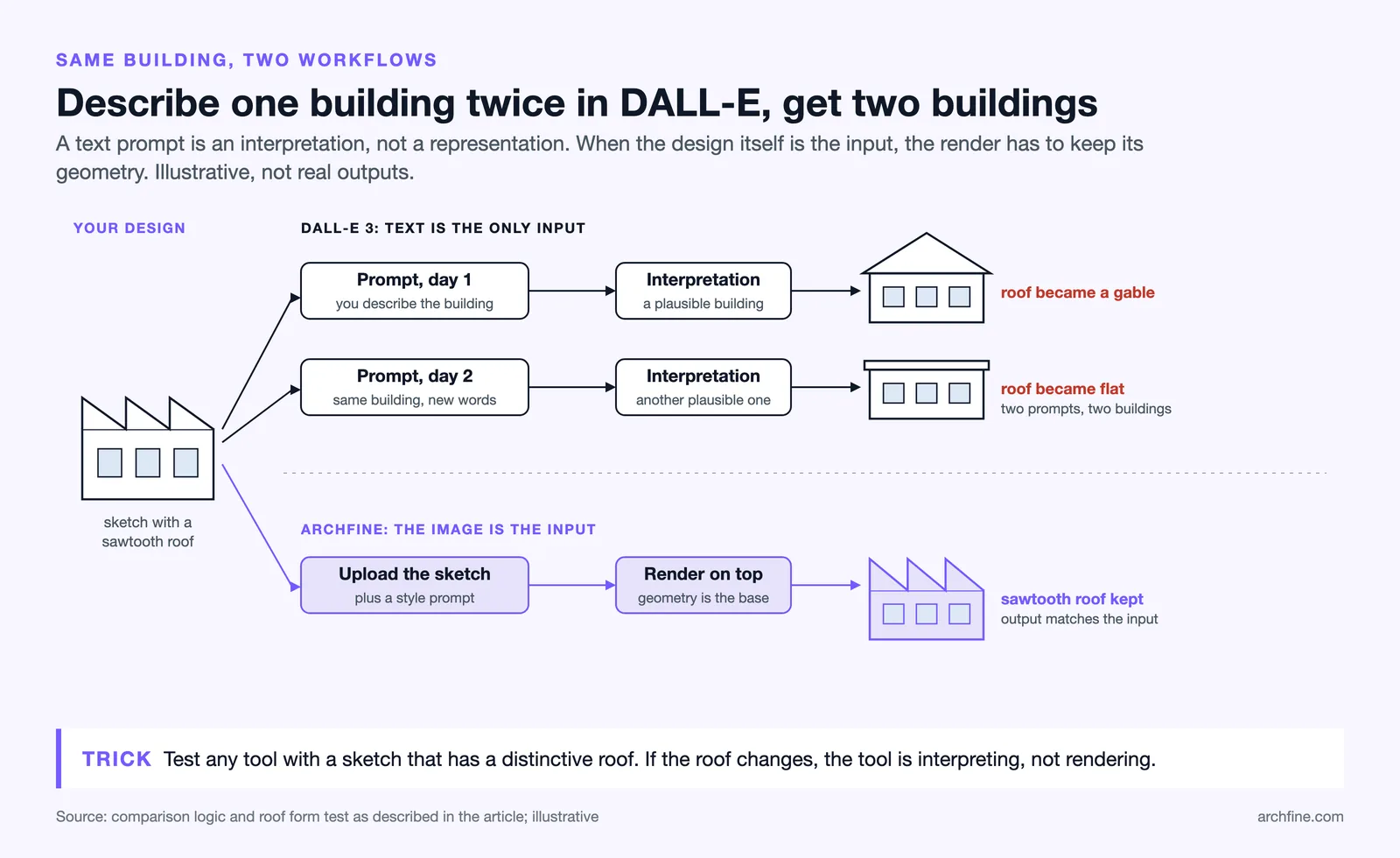
With DALL-E, you describe the building in text. The model generates something that fits the description, but it is an interpretation, not a representation. Two prompts that describe the same building will produce two different buildings. There is no mechanism to anchor the output to a real design.
With ArchFine, you upload an image of the design. The AI uses the uploaded file as a structural reference and applies the render style on top of it. The building in the output matches the building in the input because the input is the foundation of the generation process.
For DALL-E architecture visualization purposes, this is not necessarily a limitation if the goal is mood boarding or exploring aesthetic directions. For any project that requires showing a real design to a real client, the gap in render accuracy between a general AI image generator and an architecture-specific tool becomes significant.
| Feature | ArchFine | DALL-E 3 |
|---|---|---|
| Reference image input | Yes (core feature) | Limited (via ChatGPT) |
| Architecture-specific training | Yes | No |
| Preserves spatial layout | Yes | No |
| Render generation time | ~30 seconds | ~15–30 seconds |
| Photorealistic architectural output | Optimized for architecture | General photorealism |
| Prompt-only workflow | Optional | Primary method |
| Purpose-built for architects | Yes | No |
| No software installation | Yes | Yes |
| Best use case | Project renders, client presentations | Concept exploration, mood boards |
DALL-E Limitations for Architects
Understanding where DALL-E falls short for architectural work is useful because the limitations are structural, not just quality-related. They come from the way the tool is built, not from a lack of refinement.
The first limitation is the absence of reference image control. DALL-E does not take a floor plan or hand sketch as a direct input and interpret it as a building to render. You can describe a design in text, but text cannot encode the precise spatial relationships that define architecture. A window position, a roof slope, or a setback distance cannot be communicated through language with enough fidelity to produce an accurate output.
The second limitation is consistency. Because every generation in DALL-E starts from a prompt rather than a fixed reference, producing multiple images of the same building from different angles is difficult. The model generates a new interpretation of the text each time, which means a street-level view and a garden-level view will often look like two different buildings.
The third limitation is professional context. DALL-E was designed as a general creative tool. It is not aware of architectural conventions, structural logic, or construction materials in any technical sense. It produces images that look architecturally plausible but may include proportions, details, or structural configurations that would not work in reality.
📌 Did You Know?
DALL-E 3, released in late 2023, marked a major improvement in text comprehension for image generation. However, even with improved prompt adherence, architectural professionals consistently report that without a reference image, maintaining structural consistency across multiple renders of the same building remains one of the most difficult tasks for any text-only AI image generator.
Architecture-Specific AI vs General AI: Why the Difference Matters
The distinction between architecture-specific AI and general AI image generation is not just marketing. It reflects a real difference in how each type of tool handles the data it processes.
General AI image generators are trained on broad datasets that include architecture as one category among thousands. The model learns what buildings look like, but not how they are designed, how materials perform, or how spatial relationships govern form. The result is an AI that can produce convincing-looking buildings without understanding what makes them architecturally coherent.
Architecture-specific tools are built with architectural workflows at the center of the design. Reference image processing, style transfer that respects structural constraints, and output tuned to the quality standards expected in professional visualization are not add-ons. They are the core function.
For practitioners evaluating AI rendering tools, this distinction has a direct impact on time spent post-processing outputs. A render from an architecture-specific tool typically requires less manual correction because the structural logic of the design is preserved in the generation. A render from a general tool may be visually appealing but require significant adjustment before it accurately represents the actual project.
💡 Pro Tip
A practical test when evaluating any AI rendering tool for architectural work: upload a rough sketch with a distinctive roof form and ask for a photorealistic render. If the output changes the roof form or replaces it with something more conventional, the tool is interpreting your design rather than rendering it. Architecture-specific tools should preserve the uploaded geometry; general tools frequently do not.

OpenAI Image Generation for Architects: Realistic Use Cases
DALL-E does have legitimate uses in architectural practice. The key is matching the tool to the right stage of the project.
Early-stage concept development is where DALL-E performs best for architects. Before a design has been defined in detail, generating a range of visual directions quickly can help clarify aesthetic preferences with clients or narrow down a design approach for the team. Ten concept images in ten minutes is a genuine productivity advantage in early design stages.
Presentation background imagery is another area where DALL-E adds value without requiring accuracy. Context illustrations, atmosphere images, or site impression visuals that support but do not represent the design can be generated quickly and used to enrich a pitch deck or concept presentation.
What DALL-E is not suited for is design representation. Any visualization that is meant to show what a real building looks like, either to a planning authority, a client approving construction details, or a contractor checking coordination, requires a tool that is anchored to the actual design. That is where ArchFine’s reference-based rendering workflow addresses a gap that general image generators cannot fill.
ArchFine Architectural AI Advantages in a Professional Workflow
For architects evaluating where ArchFine fits in an existing workflow, the strongest advantages center on speed and fidelity. Traditional rendering pipelines, whether in Lumion, V-Ray, or Twinmotion, can take hours to set up and render even a basic scene. ArchFine compresses that process significantly for concept-stage and early design-development renders.
The 30-second generation time means it is practical to produce multiple render variations during a single client meeting. Changing the material palette, the time of day, or the landscape context can be done on the fly rather than requiring a follow-up session after the meeting.
Because the platform is browser-based and requires no local installation, it is accessible on a laptop during a site visit, a presentation at a client’s office, or a design review on a tablet. The hardware requirements for traditional rendering software have always been a friction point for small architecture practices. ArchFine removes that constraint entirely.
🎓 Expert Insight
Taking repetitive visual work off an architect’s desk is directly relevant to how AI rendering tools should be evaluated. The question is not whether AI can replace traditional rendering, but whether it handles the task accurately enough to remove the repetitive production work from an architect’s day.

Which Tool Is the Better Choice for Architectural Visualization?
The answer depends entirely on the stage of work and the output required.
DALL-E is the more flexible tool for unanchored visual exploration. If you are generating conceptual images without a fixed design, testing aesthetic directions, or creating illustrative content for a pitch, it performs well and the same kind of image generation, now running on OpenAI’s GPT Image models, is accessible through a tool most architects already use via ChatGPT.
ArchFine is the more capable tool for design-anchored visualization. If you have an actual building to render, a client to present to, or a project that requires visual consistency across multiple views, a purpose-built architecture AI tool produces better results than a general image generator. The reference image workflow, architecture-specific output quality, and fast generation time make it a more practical choice for production rendering tasks.
The two tools are not in direct competition for the same use case. DALL-E is a creative exploration tool that includes architecture among its many capabilities. ArchFine is an architecture rendering tool that applies AI to a specific professional task. For most architectural workflows, both have a role, and knowing which one to reach for at each stage is more useful than treating them as interchangeable.
✅ Key Takeaways
- DALL-E generates architecture from text prompts; ArchFine renders from reference images uploaded by the user
- DALL-E does not preserve the spatial layout or structural logic of a specific design
- ArchFine produces output in approximately 30 seconds with no software installation required
- DALL-E 3 architecture prompts work best for concept images and mood boards, not project representation
- Architecture-specific AI tools consistently outperform general generators when render accuracy matters
- For client presentations and design-stage renders, a reference-based workflow is significantly more reliable than prompt-only generation
Getting Started with AI Architecture Rendering
If you are new to AI rendering tools, the most practical first step is to test both tools against a project you already have. Upload a sketch or early massing image to ArchFine and generate a render. Then describe the same building in a DALL-E prompt and compare the outputs. The difference in how each tool handles your actual design will make the right choice for your workflow immediately clear.
For teams that are already using ChatGPT and want to add a rendering capability without switching tools, ChatGPT’s built-in image generation (now on GPT Image models, which replaced DALL-E) is a low-friction starting point. For architects who need to produce renders that accurately represent real projects, ArchFine is the more direct solution to that specific problem.
AI architectural rendering is developing rapidly. Both OpenAI and dedicated architecture platforms are releasing updates that improve output quality and expand capability. Staying current with both categories of tools and knowing when each is the right fit is part of how architectural practices get the most value from AI visualization technology.