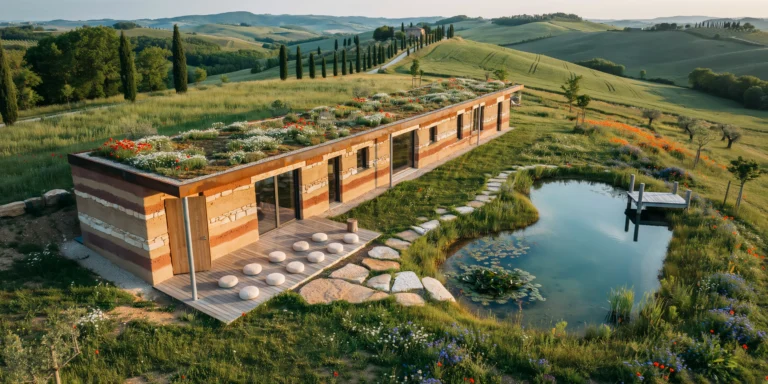
A rammed earth wellness retreat building set in rolling Tuscan hills, designed as a long linear bar (approximately 40m x 8m) oriented east-west following the contour of a gentle hillside. Single story with a green roof that merges into the landscape when viewed from uphill. Walls: Load-bearing rammed earth construction (500mm thick) with clearly visible horizontal stratification lines from the ramming process. Each lift layer is approximately 150mm deep. The earth mix uses local soils creating a natural palette of warm ochre, burnt sienna, raw umber, and pale terracotta tones in alternating layers, with occasional thin bands of crushed local limestone appearing as pale cream strata. The walls are sealed with a breathable silicone treatment that enhances the color depth. Roof: A living green roof (extensive sedum and native wildflower mix including poppies, chamomile, and wild thyme) on a waterproof membrane over CLT structural deck. The roof is nearly flat (2% fall for drainage) with a slim Corten steel fascia edge (200mm deep) that has developed a mature rust patina. Entrances and openings: A large pivoting entrance door (3000mm x 1500mm, single panel in solid European oak, 100mm thick) on a floor-mounted pivot hinge, currently partially open. Deep-set windows (wall thickness visible as 500mm deep reveals) with frameless fixed glass panels set flush with the exterior wall surface. Window openings vary in size from small square apertures (400mm x 400mm) to full-height slots (500mm x 2800mm). Outdoor meditation deck: A covered outdoor terrace (12m x 4m) extends from the south facade, sheltered by a cantilevered CLT roof overhang (3m projection) supported by two slim weathering steel columns (120mm x 120mm SHS). The deck surface is oiled European larch decking with silver-gray patina. Simple meditation cushions (zafu style, undyed natural linen covers) are arranged in two rows of six, facing the valley view. Landscape: Unmowed wildflower meadow with tall grasses (Stipa tenuissima) interspersed with wild poppies (red), cornflowers (blue), and ox-eye daisies (white). Rolling hills covered in olive groves, vineyards, and hay fields. A line of Italian cypress trees follows a distant farm road. An organic-shaped natural swimming pond (approximately 8m x 5m) sits in the meadow approximately 15m from the building, with a regeneration zone of aquatic plants at one end and clear swimming water at the other. A wooden diving platform (larch, simple post-and-beam, 1m above water level) extends over the deep end. Stone pathway: Large irregular stepping stones (local sandstone, approximately 600mm x 400mm, 80mm thick, set into meadow grass) create a winding path from the terrace to the swimming pond. Lighting and time: Golden hour side lighting from the west (approximately 6:30 PM in late June) raking across the rammed earth walls at a low angle, dramatically emphasizing the horizontal stratification texture. Long shadows of the cypress trees stretch across the meadow. Camera angle: Drone perspective from the southeast, approximately 8m elevation and 25m distance, angled down at approximately 20 degrees. The composition shows the full length of the retreat with its green roof, the meditation deck, the swimming pond in the foreground, and the rolling Tuscan landscape beyond. Focal length equivalent 35mm. Full depth of field. Aspect ratio 16:9.