VisualizeAI is a browser tool that redesigns a photograph of a room in seconds, offering more than thirty style presets and selling credits as a one time purchase rather than a subscription. That pricing model is unusual in this category and it is the main reason people choose it.
It handles any room type, including gardens, and produces short walkthrough videos alongside still images.
The product is aimed at homeowners, agents and designers presenting ideas rather than at architects producing project imagery, and the limitations follow from that. VisualizeAI is priced and built for occasional use rather than for production.
What VisualizeAI Does
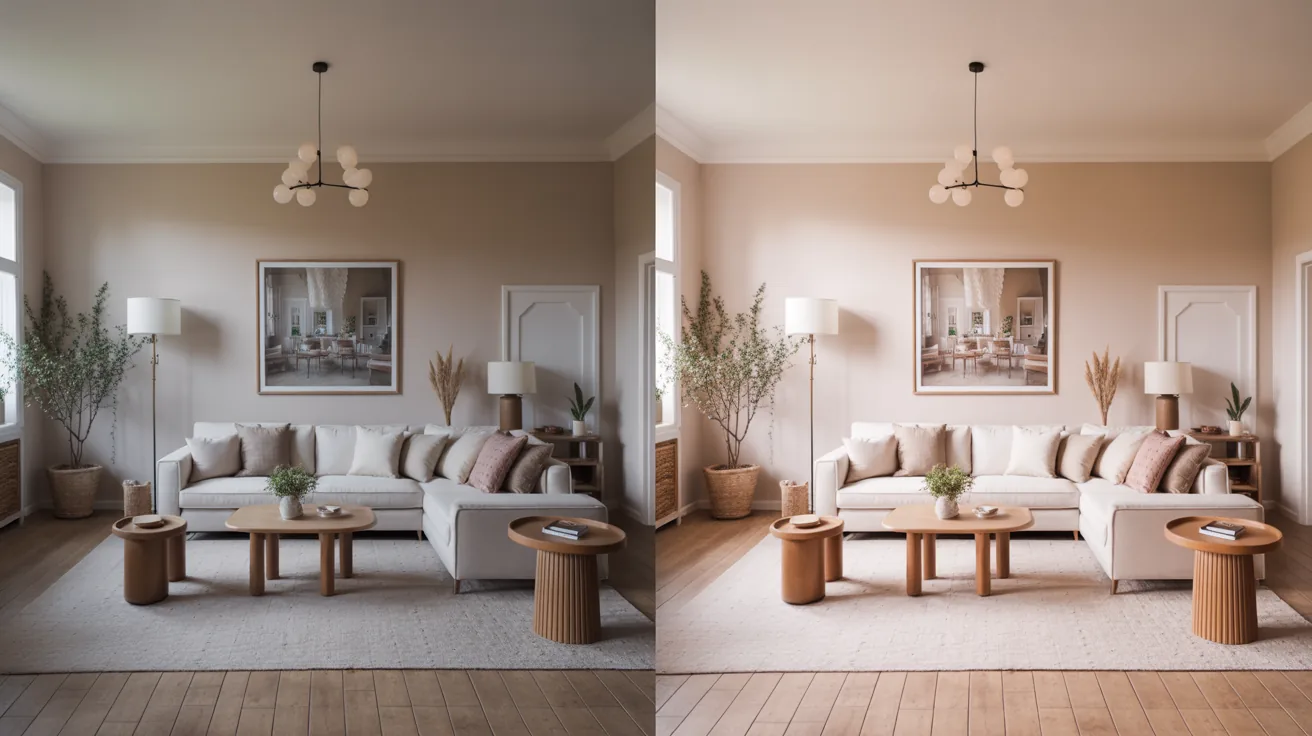
Upload a photograph, pick a room type and a style, and receive a redesigned version of the same space. The room shape, window positions and camera stay, and surfaces, furnishing and finish change.
Style coverage is the widest part of the offering, running from modern and minimalist through japandi, scandinavian, boho, art deco, mediterranean and industrial. Details are published on VisualizeAI’s pricing page.
A comparison slider lets you drag between the original and the redesign, which sounds trivial and is genuinely the most useful feature for showing a client what changed.
Video mode produces short walkthroughs from a still, which are marketing assets rather than actual walkthroughs since nothing beyond the frame exists.
Pricing

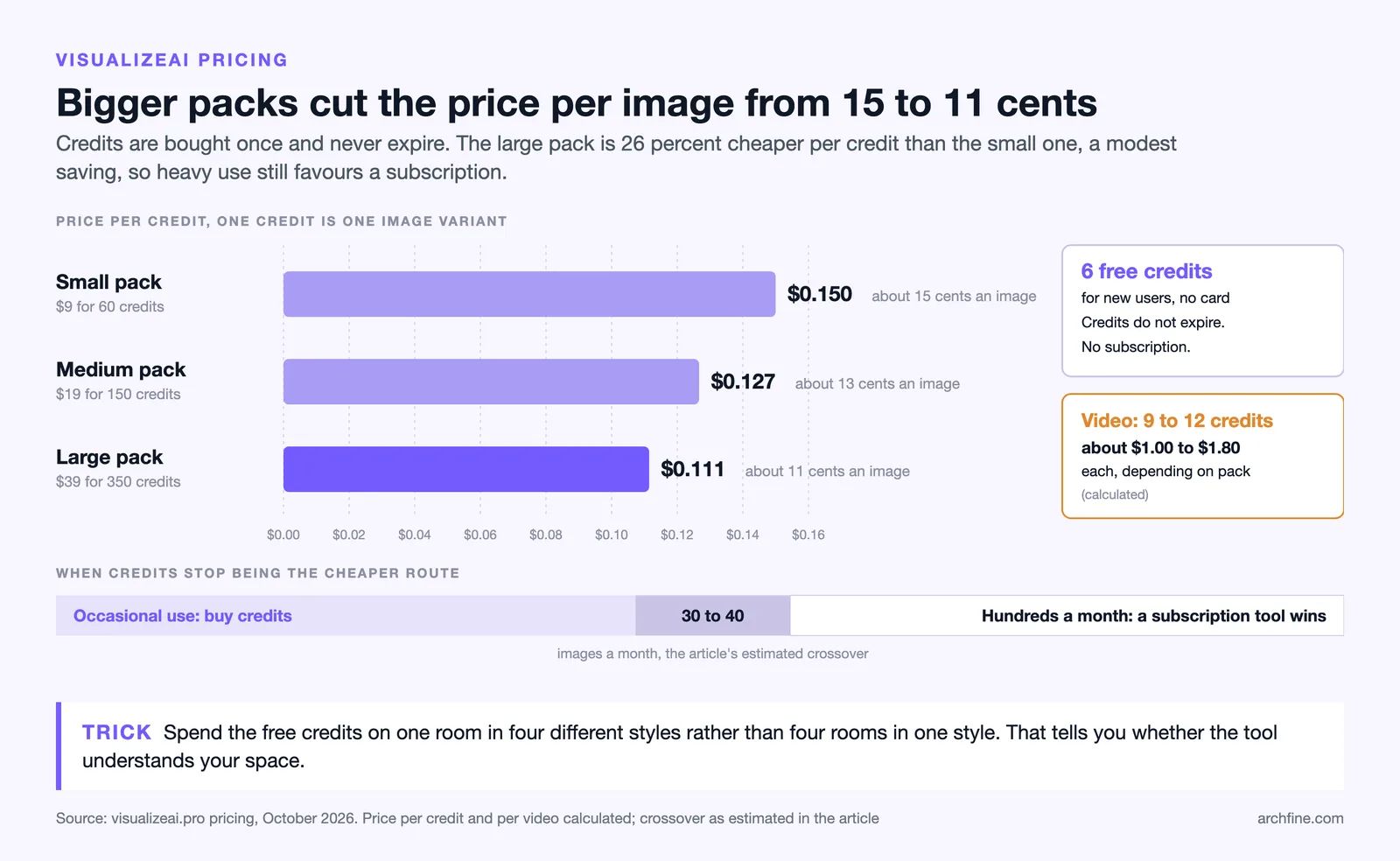
Credits are sold outright with no subscription, which is the differentiator. Plans run at roughly $9 for 60 credits, $19 for 150 and $39 for 350, with six free credits to test.
One credit is roughly one image variant, and a video costs considerably more, at about 9 to 12 credits.
For anyone doing this occasionally that model is much better value than a monthly subscription they forget to cancel. For someone generating hundreds of images a month the arithmetic reverses, and a subscription tool such as those covered in our ArchSynth review works out cheaper.
Pricing model comparison
| Tool | Model | Suits |
|---|---|---|
| VisualizeAI | One time credit purchase | Occasional use, single projects |
| ArchSynth | Low monthly subscription | Regular use, wide toolset |
| MNML AI | Tiered subscription with credits | Volume, site scale work |
| Plugin tools | Annual licence | Model based practices |
💡 Pro Tip
Spend the free credits on one room in four different styles rather than on four rooms in one style. The variation between styles tells you whether the tool understands your space, and four rooms in the same style only tells you the tool is consistent.
Output Quality

Interiors come back convincingly, which is true of every tool in this category because interior photographs dominate the training data.
Style presets are the strength. Each produces a coherent look rather than a loose interpretation, which matters when you are showing a client three directions rather than one.
Where it drifts is the same place as everywhere else. Existing furniture leaves traces when removed, mirrors produce reflections that do not correspond to the room, and window positions occasionally move.
Gardens are weaker than interiors, which is consistent across the category and covered in our guide to AI garden design.
Commercial Rights and Listing Use
Advertising standards from bodies such as the National Association of Realtors’ Code of Ethics apply regardless of the tool. The platform licenses output for commercial use including real estate listings, which is worth confirming for any tool used professionally rather than assuming.
That does not remove the disclosure obligation. An image showing a furnished version of an empty room is a staged image regardless of how it was produced, and it needs labelling, as our guide to virtual staging covers.
It also does not remove the accuracy obligation. Check every output against the original for changes you did not request, since removing a radiator or enlarging a window turns a marketing image into a misleading one.
⚖️ Pros & Cons at a Glance
✔️ Pros: No subscription, low entry cost, wide style range, useful comparison slider, commercial rights included, free credits to test
✖️ Cons: Photograph only so no unbuilt work, no masking control, credits expensive at volume, furniture residue on redesigns
Getting Usable Output
Photograph quality decides more than the style preset does. A bright, level, corner shot with two walls visible produces a convincing redesign, and a dim phone snapshot produces something that looks generated.
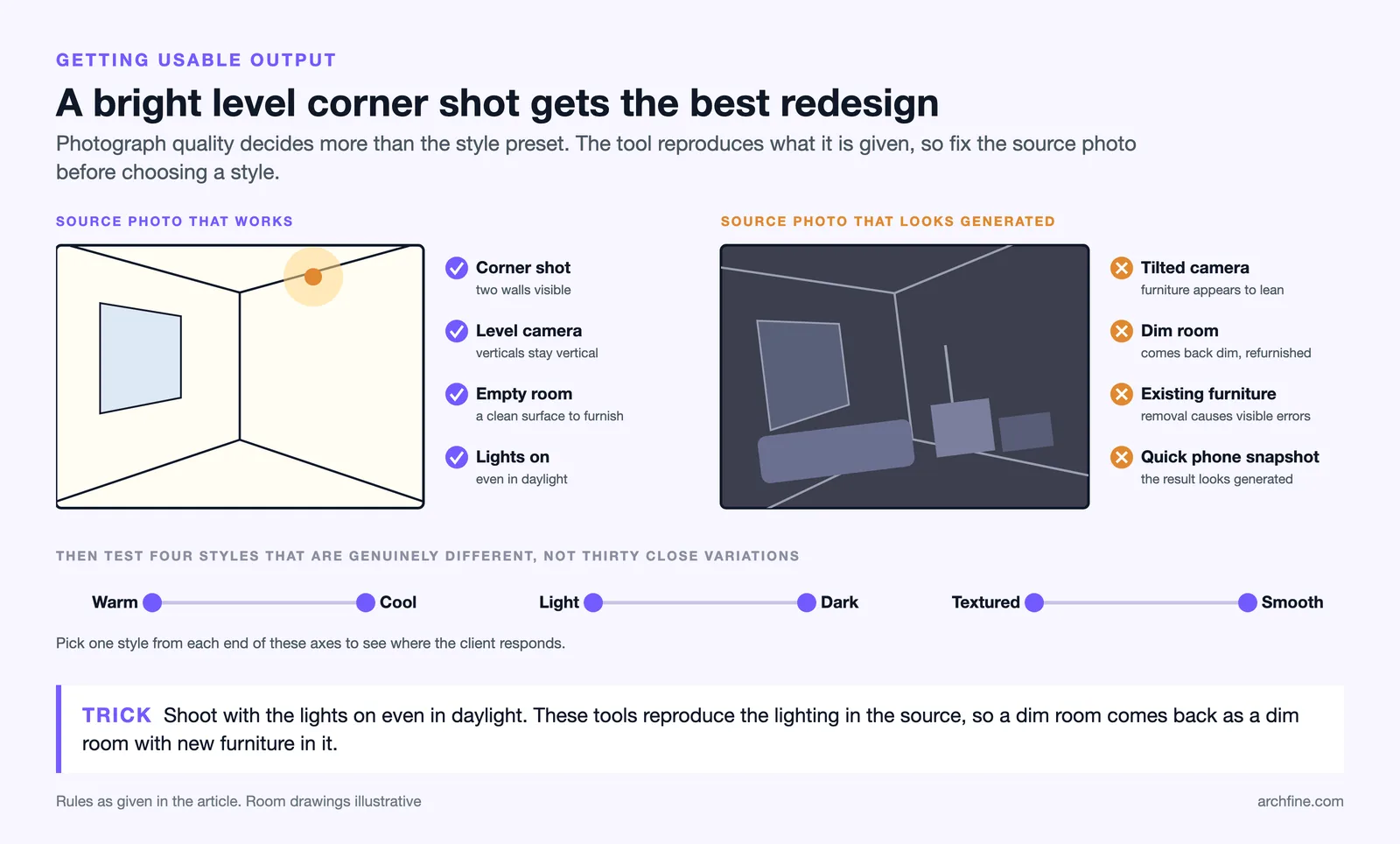
Empty the room where possible. Removing existing furniture is where the visible errors come from, and a bare room gives the tool a clean surface.
Keep the camera level so verticals stay vertical, since a tilted photograph produces furniture that appears to lean.
Shoot with the lights on even in daylight. These tools reproduce the lighting in the source, so a dim room comes back as a dim room with new furniture in it.
Working through the styles
Thirty styles sounds like more choice than it is, since several are close variations. Test four that are genuinely different rather than working through the list.
Warm against cool, light against dark, textured against smooth. Those axes describe most of the actual difference, and picking one from each end tells you where the client responds.
Where the Credit Model Bites
Credits do not expire, which is what makes the model work for occasional use. Larger packs lower the price per credit only modestly, from about $0.15 to $0.11 as of October 2026, so heavy use still costs more than a subscription.
The crossover point sits somewhere around thirty to forty images a month. Below that, buying credits is cheaper. Above it, a subscription tool from our roundup of AI design tools wins.
Video is where credits disappear fastest, at roughly 9 to 12 credits each. A handful of videos consumes a small credit pack, and it is worth deciding whether the video adds anything before generating one.
Who It Suits
Homeowners planning one renovation are the clearest fit. Nine dollars answers the question and nothing recurs afterwards.
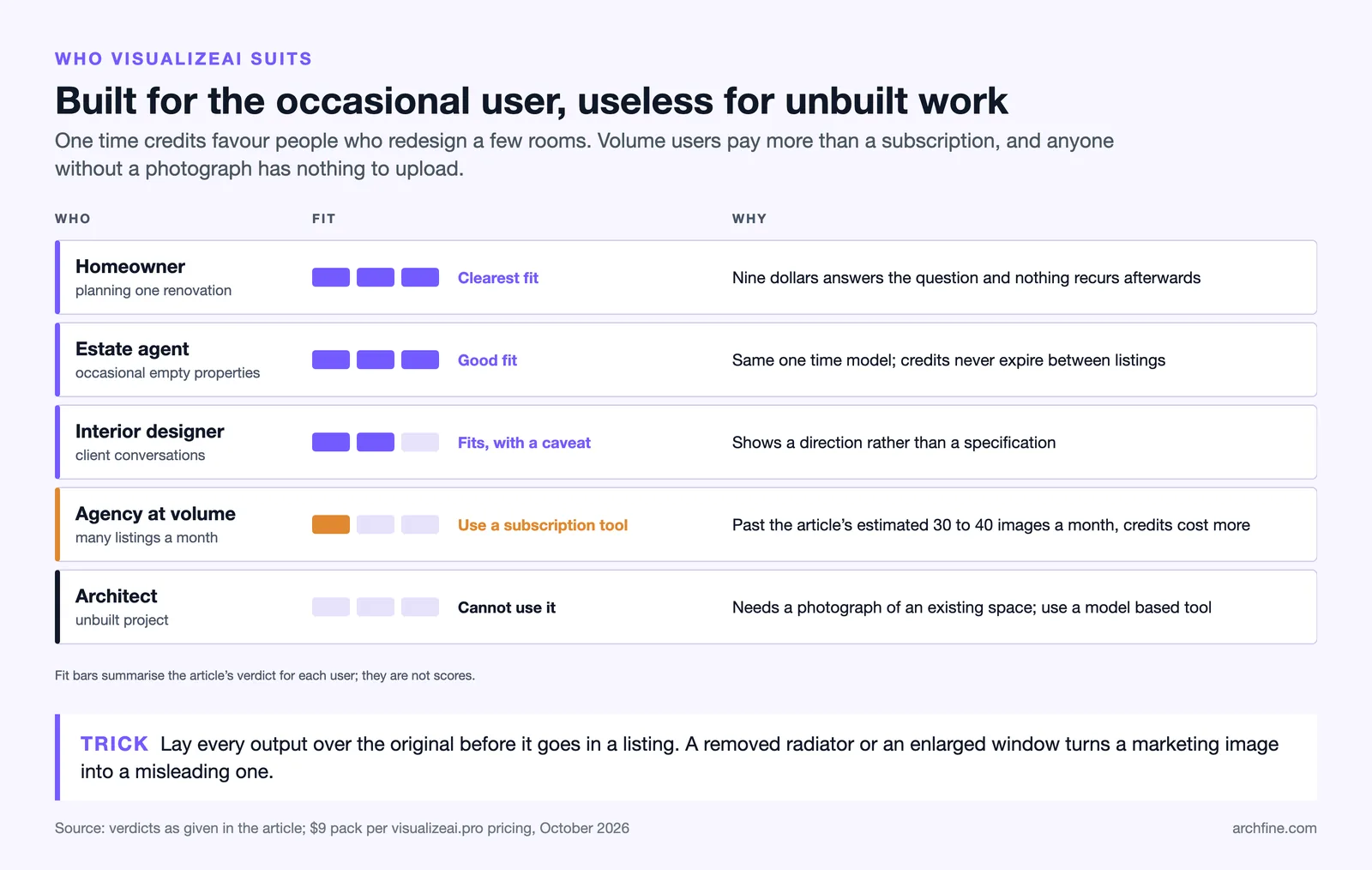
Estate agents handling occasional empty properties get value from the same model, and agencies at volume are better served by a subscription tool.
Sourcing platforms such as Houzz are the bridge from a generated look to real products. Interior designers can use it as a client conversation tool, with the same caveat that applies across the category: it shows a direction rather than a specification.
Architects working on unbuilt projects cannot use it at all, since it needs a photograph of an existing space. That work belongs with the model based tools covered in our MyArchitectAI review.
Bottom Line: VisualizeAI is the right choice when you need a handful of room redesigns and do not want a subscription. The one time credit model is genuinely better for occasional use, and the tool does nothing for unbuilt projects.
Where It Sits in the Category
The market splits by pricing model as much as by capability. Subscription platforms suit continuous use, credit purchases suit occasional use, and plugins suit model based practices.
VisualizeAI occupies the occasional use slot cleanly, and it is worth knowing that most of its competitors would cost more for a single project and less for a busy year.
Working out which pattern describes your work is a better basis for choosing than comparing output quality, since at this end of the market the outputs are close.