Free Revit families are downloadable RFA components covering doors, windows, furniture, sanitaryware and manufacturer products that you load into a project rather than modelling yourself. Manufacturers publish them to get their products specified, and community libraries cover everything generic.
Used carefully they save days across a project. Used carelessly they bloat the file, break on parameter changes and introduce naming that fights your standards. Judging free Revit families before loading them is the whole skill.
The skill is knowing which to reject, and that judgement takes two minutes per family.
Where Free Revit Families Come From
Manufacturer libraries are the best source. A window from the company that makes it carries correct dimensions, real product references and usually sensible parameters. Specifying from these also means the model matches what gets ordered.
Aggregator platforms such as BIMobject, BIMsmith and BIM&CO collect manufacturer content across many brands, which is convenient and occasionally carries outdated versions of products.
Community libraries — RevitCity is the long-running example — cover generic components that no manufacturer publishes, with quality ranging from professional to unusable.
Autodesk default content ships with Revit and is adequate for early stage work, though it is generic by design and rarely stays in a developed model.
The Libraries, Named
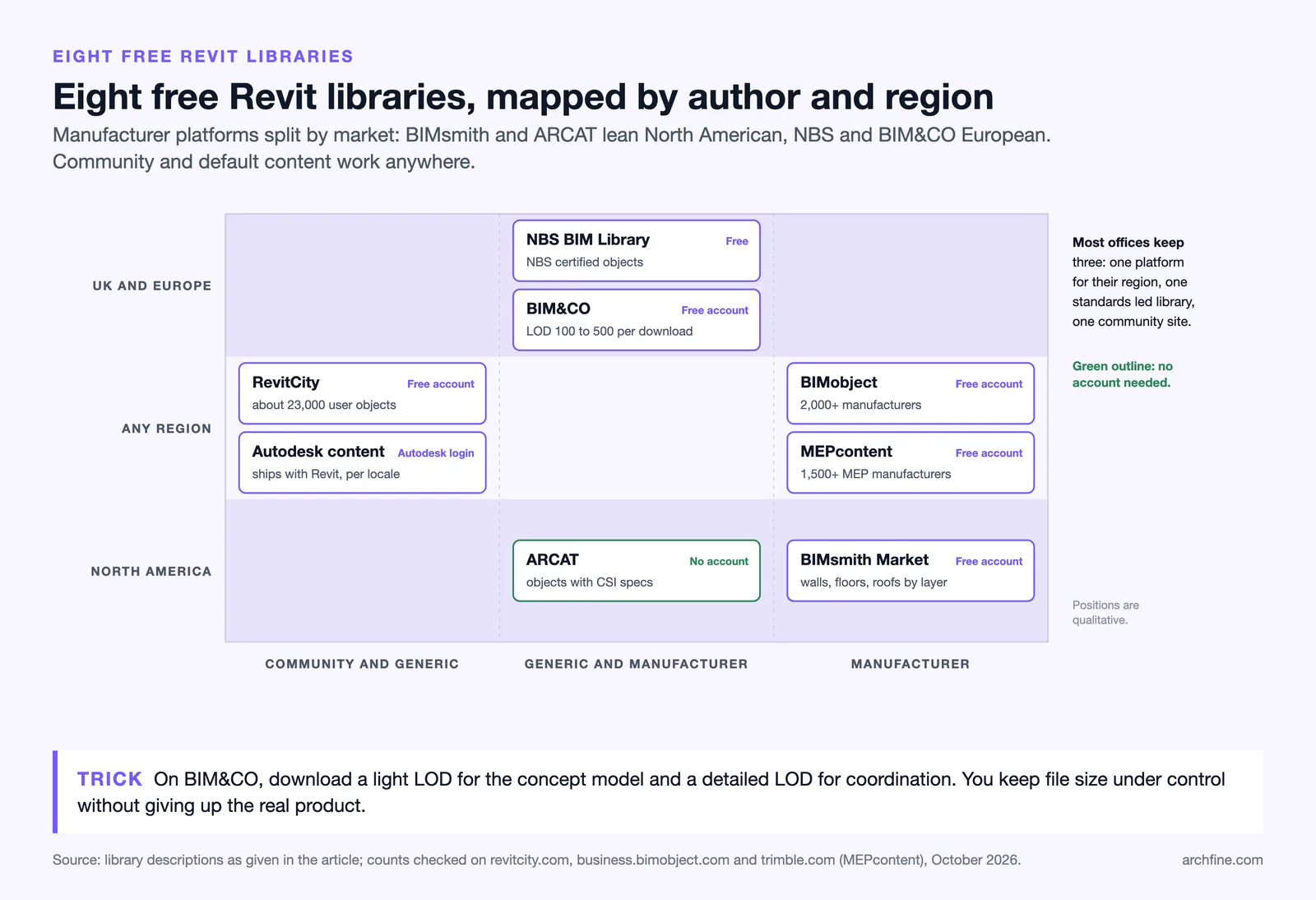
Eight worth knowing, and what each is actually good at. Nobody uses all of them. Most offices settle on a manufacturer platform, a standards-led library and one community site, and treat the rest as overflow for the object they cannot find anywhere else.
NBS BIM Library
The NBS BIM Library is the standards-led option, run by NBS in the UK and free to download. It holds two distinct kinds of content: NBS generic objects, which describe a component without naming a product, and manufacturer objects from named brands.
The distinction matters more than it sounds. Generic objects let you model a cavity wall or a fire door at concept stage without implying a product has been chosen, then swap in the manufacturer object once it has. Everything in the library is certified against the NBS BIM Object Standard, so naming, parameters and classification are consistent from one object to the next rather than reflecting whoever authored it. Output covers Revit, Archicad, Vectorworks and Bentley.
Best for: UK and European practice, and anywhere you need generic families that behave predictably at early stages.
Watch for: The catalogue is smaller than the manufacturer aggregators. It is curated rather than exhaustive.
BIMobject
BIMobject is the largest manufacturer catalogue in the field. Founded in 2011 and based in Malmö, it carries content from over 2,000 manufacturers, and most of the brands an architect actually specifies are on it somewhere.
Downloads are free but need an account, and objects are usually offered in several formats at once, so the same product is available as RFA, IFC and SketchUp. There is also a free Design App plugin for Revit that searches the catalogue and loads families without leaving Revit, which removes the download-unzip-load cycle entirely.
Best for: Product-specific families at design development and technical design, when the model needs to match what gets ordered.
Watch for: Breadth means age. Check the publication date on the object page — discontinued products stay listed, and an object uploaded five years ago may not match the current range.
BIMsmith Market
BIMsmith Market, run by Anguleris Technologies, is manufacturer content with a narrower and more North American focus than BIMobject. Free with registration.
Its real value is the companion tool. BIMsmith Forge builds walls, floors, roofs and ceilings layer by layer from real products — you pick the membrane, the insulation, the board, the finish, and it returns the assembly as a Revit system family with the layers named and thicknesses correct. That is a different and often more useful thing than downloading a single loadable family, because assemblies are where most model rework happens.
Best for: Building up wall, floor and roof assemblies from named products rather than modelling generic layers.
Watch for: Coverage outside North America is thin, and the catalogue is a fraction of BIMobject’s.
ARCAT
ARCAT is the outlier: free, and with no registration at all. No account, no trial, no download limit. For a library of this size that is unusual enough to be the main reason to use it.
It began as a specification database and the BIM content sits alongside it, so an object and its CSI three-part specification are available from the same product page. Content is submitted and maintained by the manufacturers themselves. Formats cover RFA and RVT, plus SKP, DWG and IFC, and there is a free Biminit plugin for searching from inside Revit.
Best for: North American commercial products — roofing, curtain walling, insulation, hardware — and any workflow where the specification and the model need to stay tied together.
Watch for: Heavily US-oriented. European products are patchy or absent.
BIM&CO
BIM&CO, a French platform run by BIM&CO SAS, carries generic and manufacturer objects for Revit, IFC, SketchUp and Archicad, free of charge.
The feature that separates it from the others is that level of detail is a download option rather than a fixed property of the file. The same object can be pulled at LOD 100 through LOD 500, so you can take a light version for a concept model and a detailed one for coordination instead of accepting whatever geometry the manufacturer chose to publish. Given that excess detail is the single most common reason a downloaded family has to be rejected, this is a genuine advantage.
Best for: Keeping file size under control, and any project where you want the same component at two different levels of detail.
Watch for: Smaller manufacturer coverage, and strongest on European brands.
MEPcontent
MEPcontent is the MEP counterpart to the architectural libraries, and it exists because those libraries thin out badly once you leave architecture. It is run by Trimble, which acquired it with Stabiplan, and it holds content from more than 1,500 manufacturers.
Content is parametric Revit families for mechanical, electrical and plumbing products, plus DWG symbols, free to download with a free account. It is also browsable from inside Stabicad, if the engineering side of the project uses it.
Best for: Anything mechanical, electrical or plumbing, where BIMobject and ARCAT run out.
Watch for: Not an architectural library. Do not go here for doors and furniture.
RevitCity
RevitCity is the community end of the spectrum and the oldest site on this list. Around 23,000 objects, all uploaded by users rather than manufacturers, free to download after free registration.
It covers what no manufacturer publishes: the generic bollard, the reception desk, the odd piece of equipment nobody sells a BIM object for. The largest categories are furnishings, equipment, plumbing, electrical and doors, and files go back through every Revit version since Building 5. Quality ranges from professional to unusable within the same category, so nothing from here should reach a live model without the checks in the next section.
Best for: Generic components that have no manufacturer equivalent, and filling gaps quickly.
Watch for: No quality control whatsoever. Imported CAD geometry and wrong categories are common.
Autodesk’s own content libraries
The families that ship with Revit are easy to dismiss and shouldn’t be. They are downloadable per version and per locale from your Autodesk account, and the localised library — UK, US, metric, imperial — matters, because the wrong one gives you families built to the wrong conventions.
The content is generic by design and rarely survives into a developed model, but it is correctly built, correctly categorised and correctly parameterised, which is exactly what most downloaded families are not. That makes it the right starting point when you decide to build your own: open the nearest default family, see how Autodesk solved it, and work from there rather than from a blank template.
Best for: Early stage modelling, and as a reference for how a family should be built.
Watch for: Generic. It will not carry you past technical design.
At a glance
| Library | Content | Account | Best for |
|---|---|---|---|
| NBS BIM Library | Generic + manufacturer, NBS-certified | Free | UK/EU standards work |
| BIMobject | 2,000+ manufacturers | Free account | Product-specific families |
| BIMsmith Market | Manufacturer, North America | Free account | Wall/floor/roof assemblies |
| ARCAT | Manufacturer + CSI specs | None required | US commercial products |
| BIM&CO | Generic + manufacturer, LOD selectable | Free account | Controlling file size |
| MEPcontent | 1,500+ MEP manufacturers | Free account | Mechanical, electrical, plumbing |
| RevitCity | ~23,000 community objects | Free account | Generic components |
| Autodesk libraries | Default Revit content | Autodesk account | Early stage and reference |
Judging a Family Before Loading It

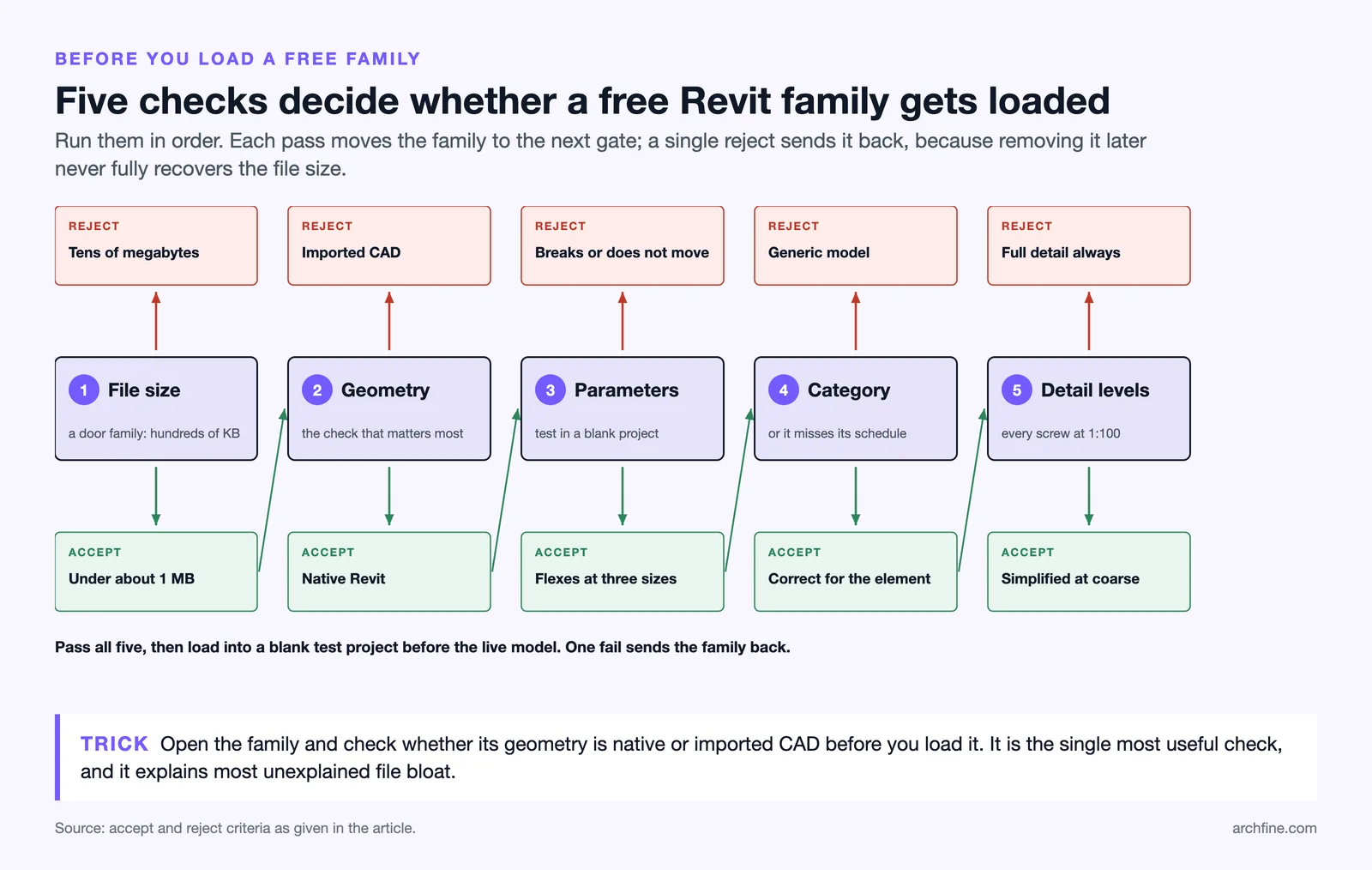
File size is the fastest filter. A door family should be measured in hundreds of kilobytes. Anything in the tens of megabytes contains imported CAD geometry or excessive detail, and it will slow every view it appears in.
Parameters are the second check. A well built family flexes properly, so changing width or height produces a correct component rather than a broken one. Load it into a blank project and try three sizes before trusting it.
Category matters more than it seems. A family built in the wrong category schedules wrongly, tags wrongly and behaves unexpectedly in views. A window built as generic model will not appear in a window schedule.
Detail level is the fourth. A family with the same geometry at coarse, medium and fine detail levels renders every screw at 1:100, which is where model performance disappears.
📐 Technical Note
Families imported from CAD geometry rather than modelled natively are the main cause of unexplained file bloat. They cannot flex, they carry unnecessary triangulated geometry, and they frequently arrive in the wrong category. Opening a family and checking whether the geometry is native before loading it is the single most useful check in this process.
Accept or reject

| Check | Accept | Reject |
|---|---|---|
| File size | Under about 1 MB | Tens of megabytes |
| Geometry | Native Revit | Imported CAD |
| Parameters | Flexes at three sizes | Breaks or does not move |
| Category | Correct for the element | Generic model |
| Detail levels | Simplified at coarse | Full detail always |
Keeping the Model Manageable
Purge unused families regularly. Revit retains every family ever loaded, including ones you deleted from the model, and a project several months in typically carries a substantial amount of unused content.
Standardise naming before the project starts. Downloaded families arrive with manufacturer naming conventions that will not match yours, and renaming them on load is far easier than reconciling schedules later.
Limit the number of types within a family. A window family carrying forty size types is heavier than one carrying the four you actually use.
Build a practice library of vetted families. The same components recur across projects, and a folder of families you have already checked removes this work entirely on the second project, which is the same logic as our guide to CAD block libraries.
💡 Pro Tip
Load families into a blank test project first, exactly as you would for downloaded models in other software. Testing there costs nothing, and a family that breaks on flexing or drags in fifty unwanted materials has been caught before it touches a live model. Removing it afterwards never fully recovers the file size.
Shared Parameters and Schedules
Families are only half the story. What makes a schedule work is the parameters inside them being consistent, and downloaded families arrive with whatever the author chose.
Shared parameters are what let a schedule read the same field across families from different sources. Without them, three door families from three manufacturers produce three sets of unrelated fields.
Set up a shared parameter file at practice level and map downloaded families to it. It is tedious once and it removes a recurring problem entirely.
What to schedule
Decide what the schedules need before choosing families, since a family that does not carry the field you need cannot be made to report it without editing.
Fire rating, acoustic performance, U value and product reference are the fields most commonly needed and most commonly missing from community content.
Version and Compatibility
Families are version specific in one direction. A family saved in a newer Revit release cannot be loaded into an older one, and a library built on the current version becomes unusable to a consultant a version behind.
Keep the practice library at the oldest version anyone still uses, since upgrading a family is trivial and downgrading is not possible.
Check the version before downloading. Aggregator sites frequently offer several, and taking the newest available is the wrong instinct if your project is not on it.
Families and Specification
Manufacturer families carry a specification implication. The RIBA Plan of Work sets out which information is produced at each stage, and by technical design the specification is a deliverable in its own right rather than a by-product of the model. A model containing a specific product suggests that product is specified, which is exactly what the manufacturer intends and may not be what your specification says.
Keep the model and the specification aligned, or use generic families until the product is decided. A model showing one manufacturer’s window and a specification naming another is a discrepancy someone will find at tender.
Specification systems such as NBS Chorus link written clauses to model objects for exactly this reason, and the underlying data question is covered in our guide to architecture file formats.
When to Build Your Own
Building a family takes longer than downloading one and produces something that matches your standards exactly.
The test is repetition. A component appearing in every project justifies the effort once. A one off appearing in a single project does not.
Complex families with many parameters are worth commissioning rather than learning to build, since family editor skill is genuinely specialised and the time cost of learning it mid project is high.
Where free tools rather than Revit are in use, the equivalent question is covered in our guide to free BIM software, where object libraries are considerably thinner.
Quick Recap:
- Manufacturer families are the most reliable source and carry real product data.
- Check file size, native geometry, parameter flexing and category before loading anything.
- Load into a blank project first, since removing a bad family later never fully recovers the size.
- Build a vetted practice library so the checking work happens once rather than every project.
A Practical Loading Routine
Download to a staging folder rather than straight into the project directory, so nothing untested can be loaded by accident.
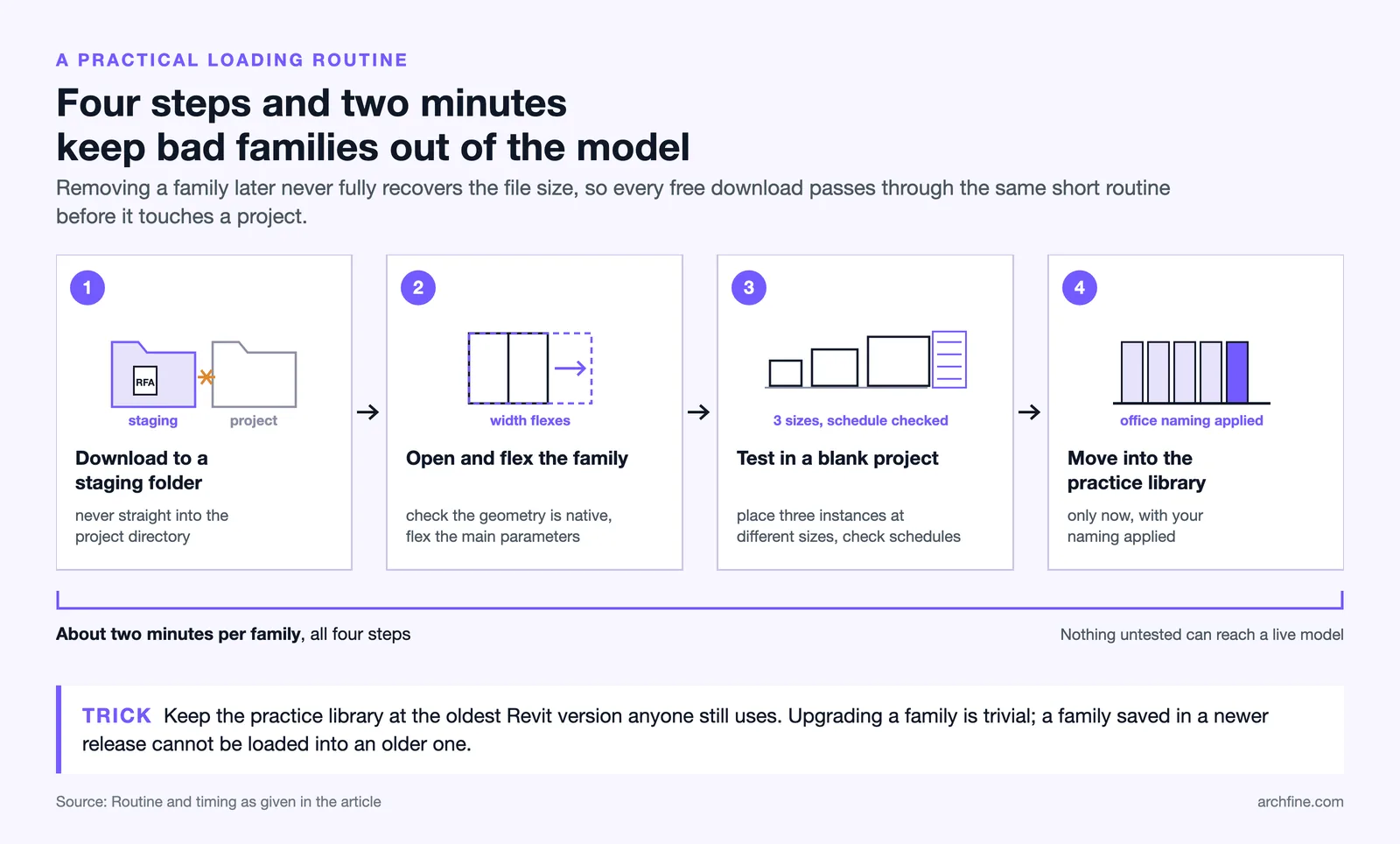
Open the family itself, check whether the geometry is native, and flex the main parameters in the family editor before loading anything.
Load into a blank project, place three instances at different sizes, and check that schedules pick them up correctly.
Only then move it into the practice library with your naming applied. Four steps, about two minutes, and it prevents the entire category of problems described above.