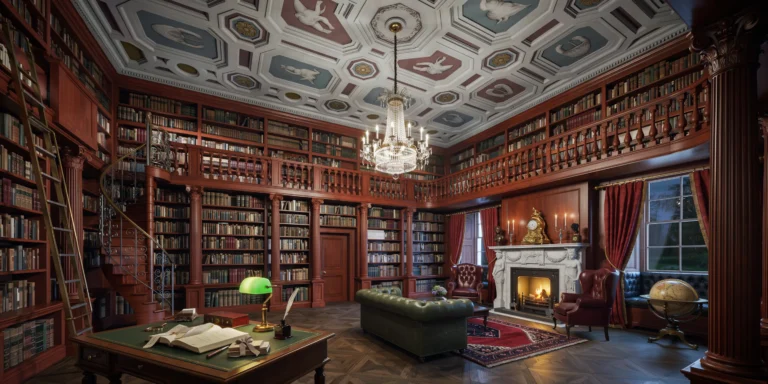
A grand neoclassical private library in an English country house, two-story room approximately 12m x 8m with a 6m ceiling height. The room occupies the full height of the building with a mezzanine gallery at the 3.5m level providing access to upper bookshelves. Bookshelves: Floor-to-ceiling custom-built shelving in solid Cuban mahogany with a deep reddish-brown French polish finish that has developed a rich warm patina over two centuries. The shelving is divided into bays by fluted pilasters with carved Ionic capitals supporting a continuous entablature at the mezzanine level. The collection totals approximately 8,000 leather-bound books in full and half leather bindings (calf, morocco, and vellum) in tones of deep brown, burgundy, forest green, and navy blue, with gilt spine lettering and tooling. Mezzanine gallery: A continuous gallery runs around three walls at the 3.5m level, accessed by a spiral staircase in the far corner (mahogany treads with wrought iron balusters in a scrollwork pattern). The gallery has a turned mahogany balustrade (90mm diameter balusters at 120mm centers, 1000mm height). A rolling brass library ladder (2.5m tall, patinated brass rails and rungs with leather-wrapped handholds) is positioned along the east wall. Ceiling: A deeply coffered ceiling with octagonal and square coffers, each featuring a hand-painted medallion in muted colors (Wedgwood blue, dusty rose, sage green, cream) on a pale blue-gray ground. Gold leaf accents on the coffer moldings. A crystal chandelier (1.2m diameter, three tiers, cut crystal drops with warm white 2200K LED flame-effect bulbs) hangs from the central coffer. Furniture: A large partners desk (1800mm x 1200mm) in mahogany with a green leather writing surface, gold-tooled border. The desk is cluttered with scholarly items: an open book with an ivory page turner, a brass magnifying glass, a stack of correspondence tied with ribbon, an inkwell with a quill pen, and a green glass-shaded brass banker's lamp (lit, warm white 2700K). A green leather Chesterfield sofa (three-seater, deep buttoned, dark green aged leather with natural cracking and patina) faces the fireplace with a Persian Heriz rug (3m x 4m, predominantly deep red with navy and cream geometric medallion pattern) beneath it. Two wing-backed reading chairs in burgundy leather flank the fireplace. Fireplace: A carved white Carrara marble fireplace surround with a neoclassical design — caryatid figures supporting the mantelpiece, with a frieze of carved laurel swags. The firebox contains a cast iron grate with a log fire burning (real flames, orange and yellow, with glowing embers). The mantelpiece displays a French ormolu clock (Louis XVI style), a pair of silver candlesticks with beeswax candles (lit), and a small bronze bust. Globe: A large antique terrestrial globe (500mm diameter) on a carved mahogany pedestal with tripod base stands near the window. Windows: Two tall arched sash windows (1400mm x 3000mm each) with deep window seats in tufted navy velvet cushions, heavy curtains in deep red damask with gold fringe tiebacks. Night sky visible through the windows. Camera angle: Standing near the library entrance doorway, looking diagonally across the room toward the fireplace and window wall. The composition captures the full height including the mezzanine gallery, chandelier, and coffered ceiling. Eye-level perspective (1.6m height). Focal length equivalent 24mm wide-angle with vertical correction. Aspect ratio 3:2. Time of day: 10 PM, fire-lit evening.