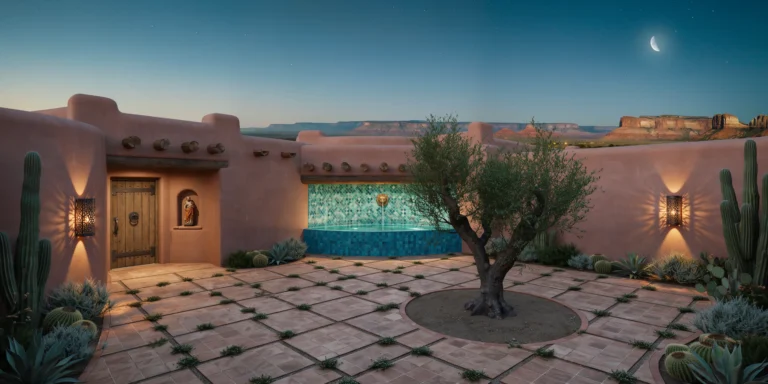
A desert courtyard house in the style of traditional Southwestern adobe architecture, set in a high desert landscape at approximately 2000m elevation. The house is a single-story L-shaped plan wrapping around a central courtyard (approximately 8m x 10m), with a total built area of approximately 180 square meters. Walls: Load-bearing adobe brick construction (400mm x 250mm x 100mm sun-dried earth bricks with straw binder) with thick walls (minimum 450mm) plastered in traditional hand-applied earth render in warm terracotta tone with natural color variation from mineral content — ranging from pale salmon to deep burnt sienna depending on sun exposure and weathering. Wall surfaces show gentle undulations from hand application, with slightly rounded corners at all edges. Parapets rise 300mm above the flat roof with rounded copings. Roof: Traditional flat roof (viga and latilla system) with peeled ponderosa pine log vigas (200mm diameter, projecting 400mm beyond the exterior wall face as decorative beam ends) spaced at 600mm centers. Latillas (peeled cedar saplings, 50mm diameter) laid in a herringbone pattern perpendicular to the vigas, supporting layers of reed matting, earth fill, and a waterproof membrane beneath a 50mm layer of compacted earth as the final roof surface. Courtyard: The central courtyard is paved with hand-laid terracotta tiles (200mm x 200mm, handmade with slight irregularities) in a simple grid pattern with wide sand-filled joints supporting small tufts of creeping thyme. A single mature olive tree (Olea europaea, approximately 4m tall, gnarled trunk) grows from an unpaved circular planting bed (2m diameter) in the center. A shallow reflecting pool (2m x 1m, 150mm deep, hand-tiled in turquoise and cobalt blue zellige mosaic in a geometric star pattern) sits at the base of the south wall, fed by a simple wall-mounted brass spout shaped like a lion's head. Entrance: A deeply recessed entrance doorway (wall thickness visible at 450mm) with a heavy mesquite wood plank door (2200mm x 1000mm, vertical planks with hand-forged iron strap hinges and a large iron ring pull handle). Above the door, a small nicho (recessed wall niche, arched top, 300mm x 400mm) holds a carved wooden santo figure. Landscape: Surrounding desert terrain with native plantings: several saguaro cacti (3-5m tall), barrel cactus clusters, agave americana with dramatic rosette forms, and desert sage providing silvery-gray ground cover. In the far distance, flat-topped mesas and layered sedimentary rock formations in bands of red, orange, and cream. Sky and atmosphere: Twilight sky transitioning from warm gold at the western horizon through deep turquoise to indigo overhead. The first stars are visible. A thin crescent moon hangs in the western sky. Wall-mounted iron lanterns with perforated geometric patterns cast intricate shadow projections on the courtyard walls and floor. Camera angle: Standing in the courtyard near the olive tree, looking toward the south wall with the reflecting pool and the entrance visible in the left wing. Eye-level perspective (1.6m height). Focal length equivalent 24mm wide-angle. Full depth of field. Aspect ratio 4:5 vertical/portrait. Time of day: civil twilight, approximately 25 minutes after sunset.