Hillside Vineyard Winery

Hillside Vineyard Winery

Mediterranean Vernacular 22 seconds ArchFine Pro 31 July 2026

Prompt Used

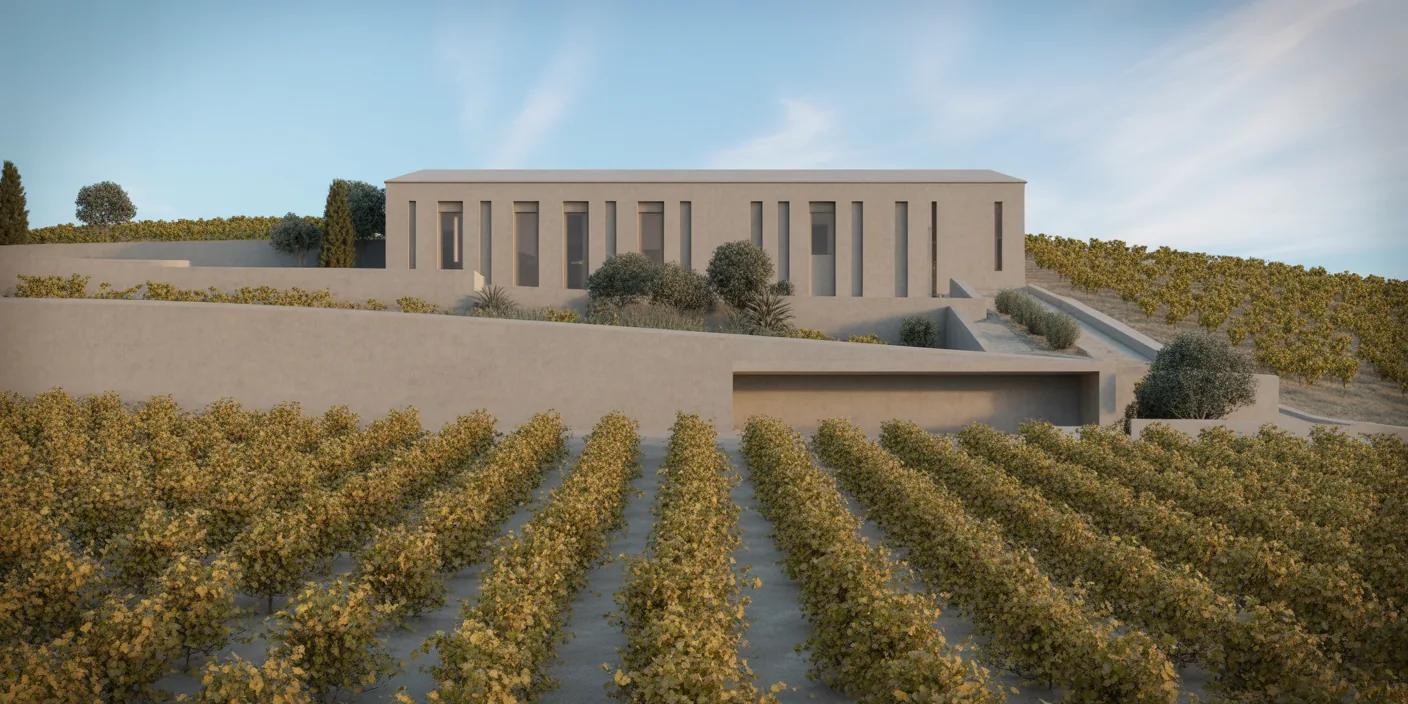
A photorealistic render of a contemporary winery building set into a south-facing hillside in Tuscany between Montalcino and Sant'Antimo, the building integrated into the slope so that only one story is visible from the vineyard approach while the full three-story production building is embedded in the hillside below. Visible exterior: From the vineyard approach (south), only the top floor — the hospitality and tasting room level — is visible above grade. This facade is a 24m long horizontal volume with a flat concrete roof and a full-height glazed south facade (floor-to-ceiling glass, 3m height, continuous over the full 24m width) framed in minimal blackened steel sections. The roof plane extends 2m as a cantilevered concrete terrace slab beyond the glass, creating a deep shade over the terrace below and framing the vineyard view. Terrace: A 24m x 5m terrace in rough-hewn local pietra serena stone (gray sandstone, 600mm x 400mm irregular flags, with wide 15mm joints in pale gray mortar). Long planting troughs (in Corten steel, 600mm wide x 500mm tall) at the terrace edge containing a row of standard olive trees (4 specimens, multi-stem, approximately 3m tall) in silver-green foliage. Stone benches integrated into the Corten planter bases. Steps down to the vineyard rows directly from the terrace, the rows of Sangiovese vines running away south toward the valley, the leaves in deep crimson and gold autumn color. Tasting room interior visible: Warm, minimal — a polished concrete floor (warm gray), a single long communal tasting table in 80mm thick white oak slab (6m long x 1.2m wide) on cast concrete trestle bases, 12 simple chairs in pale ash. Wine bottles in a custom floor-to-ceiling Corten steel racking system on the north wall. The Val d'Orcia landscape visible through the glass — cypress trees, a medieval tower on a distant hill, the amber light of the Tuscan afternoon. Landscape: The vineyard rows in deep perspective, the leaves at peak autumn color (burgundy, crimson, gold), the gnarled dark-gray vine trunks visible at base. The valley beyond showing a classic Tuscan patchwork of pale ochre plowed fields, dark cypress lines, pale limestone farmhouses. The sky a deep Mediterranean blue with a few high cirrus clouds, slightly hazier at the valley horizon. Lighting: Late afternoon golden hour, the sun approximately 20 degrees above the western horizon, the light warm amber, raking across the vine rows to create alternating stripes of warm gold and long shadow. The tasting room interior is backlit — the interior light is warmer and dimmer than the exterior, with warm amber pendant lights (hand-blown amber glass, 200mm) above the tasting table visible through the glass. Camera angle: From the vineyard at vine height (1.2m), looking north-northeast toward the building facade and terrace, the rows of vines converging in perspective on either side of the frame. Focal length equivalent 35mm. Aspect ratio 16:9. Time of day: 5:30 PM, late October, golden hour.

Before & After

Before - original sketch
Before
After - AI render
After

Contemporary Tuscan winery embedded in a hillside with full-height glazed tasting room overlooking autumn Sangiovese vines. Use it as a starting point, then turn your own sketch into a render with ArchFine AI.

Ideal for winery and agritourism hospitality projects. Upload site topography or slope sections.
Categories: Exterior

Getting Started with This Prompt

1

Grab the Prompt

Tap the copy button above and the entire prompt will be saved to your clipboard, ready to use.

2

Launch Your Renderer

Head over to Archfine AI or any compatible visualization tool you prefer working with.

3

Add Your Design

Drop in your floor plan, elevation sketch, or any reference image - then paste the prompt.

4

Render & Refine

Run the generation and review the output. Swap out a few keywords to explore completely different aesthetics.

Want a faster workflow? Archfine AI lets you skip prompt editing entirely - just upload and render.

How to Get Stronger Renders

1

Describe the Scene

Mention specific materials, time of day, weather, and camera perspective. The more context the AI has, the more realistic the output becomes.

2

Run Multiple Passes

Each generation is unique. Changing even a single adjective can shift the entire mood - so experiment freely and compare outcomes.

3

Blend Prompts Together

Borrow phrases from other entries in our collection and merge them. Hybrid prompts often deliver the most original visuals.

4

Start with a Clean Drawing

Crisp linework and high-contrast sketches give the AI a clear foundation. Blurry or cluttered inputs lead to softer, less defined renders.

Common Questions About This Prompt

Am I allowed to edit or customize this prompt?

Of course. Think of it as a foundation you can build on. Adjust the style, swap materials, change the lighting setup, or rewrite entire sections to fit your specific project needs.

Which rendering platform does this prompt work with?

It has been fine-tuned for Archfine AI, but the descriptive structure translates well to other popular AI visualization engines. You may need minor adjustments depending on the tool.

Does using this prompt cost anything?

Every prompt in our library is completely free. You can copy, adapt, and use them across personal portfolios, client presentations, or commercial marketing materials without restrictions.

What kind of input image gives the best output?

Clean line drawings with strong contrast tend to perform best. The AI reads edges, proportions, and spatial relationships from your input - so a well-drawn elevation or section will consistently outperform a rough napkin sketch.

Can I use the rendered image commercially?

Yes. Renders generated through Archfine AI on any paid plan come with full commercial usage rights. Use them in proposals, publications, social media, or anywhere else your work needs to shine.

Try this prompt yourself

Upload your own sketch and use this prompt to generate a stunning render.

Try on Archfine