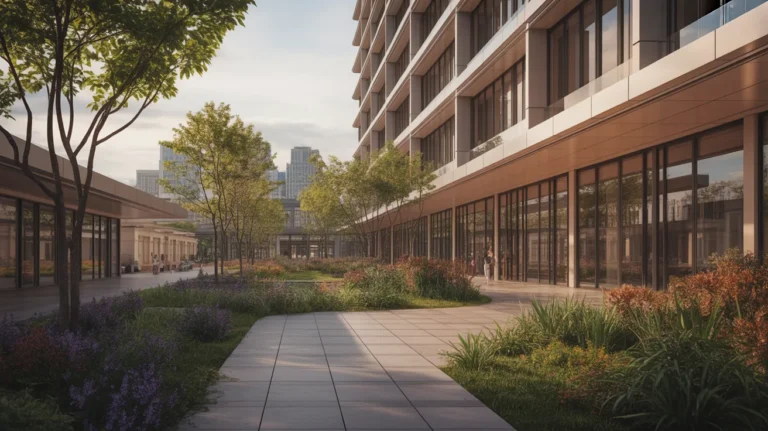
ArchFine vs Stable Diffusion architecture is a comparison between two fundamentally different approaches to AI rendering. ArchFine is a purpose-built SaaS platform where you upload an image, write a prompt, and receive a photorealistic architectural render in roughly 30 seconds. Stable Diffusion is an open-source model that requires local installation, model selection, and extension setup before producing any output.
AI rendering has become a genuine part of architectural practice. Firms are no longer debating whether to use AI for visualization — the question is which tool fits their workflow, budget, and technical capacity. ArchFine and Stable Diffusion represent two ends of that spectrum. One is built for speed and accessibility; the other offers depth and customization at the cost of setup time and technical knowledge.
This comparison covers both options across the dimensions that matter most to working architects: setup burden, output quality, workflow integration, prompt control, and cost.
What Is Stable Diffusion and Why Do Architects Use It?
Stable Diffusion is an open-source latent diffusion model released by Stability AI in 2022. Unlike proprietary AI tools, it can be downloaded and run locally on a compatible GPU, which appeals to users who want full control over their generation pipeline without ongoing subscription costs.
For architectural rendering specifically, Stable Diffusion is rarely used in its base form. The architectural workflow almost always involves ControlNet, an extension that allows users to feed structural guides — line drawings, depth maps, edge detections — into the generation process. ControlNet architecture rendering gives the model a spatial framework to follow, which is critical for maintaining building proportions, floor plans, and structural logic.
Beyond ControlNet, a standard Stable Diffusion architecture workflow typically includes:
- A base model fine-tuned for photorealistic or architectural outputs (such as Realistic Vision or archicture-specific checkpoints on CivitAI)
- img2img pipelines for transforming sketches or draft renders into photorealistic images
- Negative prompts to suppress common artifacts like warped geometry, extra windows, or distorted proportions
- LoRA (Low-Rank Adaptation) files fine-tuned on specific architectural styles
- Inpainting for editing specific zones of a generated image without regenerating the whole scene
The output ceiling of a well-configured Stable Diffusion architecture setup is genuinely high. Skilled users can produce studio-quality renders with precise material control, lighting direction, and style consistency. The tradeoff is that reaching that ceiling requires significant time, technical knowledge, and hardware investment.
💡 Pro Tip
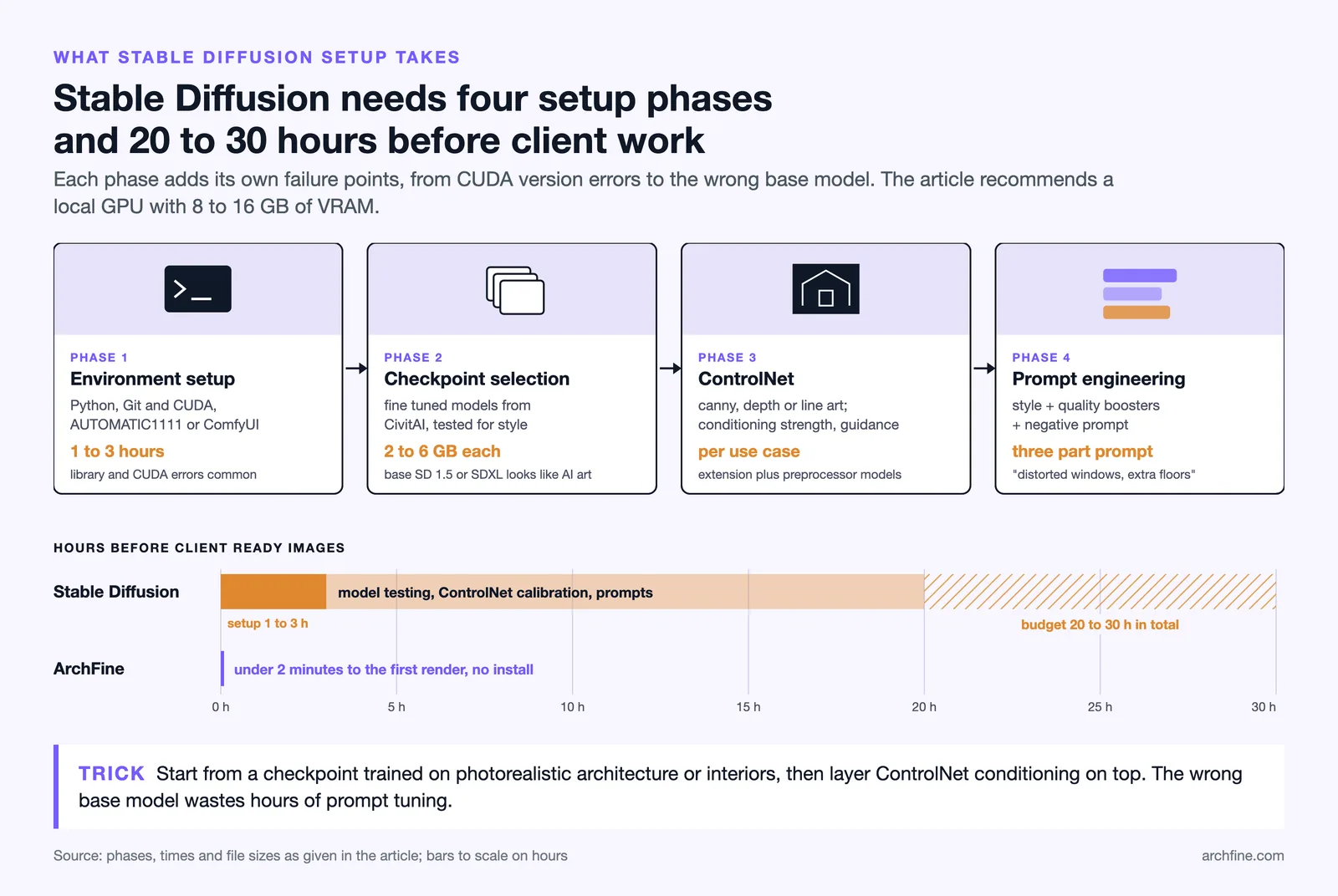
If you plan to use Stable Diffusion for architectural rendering, budget at least 20-30 hours for initial setup, model testing, and ControlNet calibration before you can reliably produce client-ready images. Most architects underestimate this ramp-up period and abandon the tool before seeing its real output potential.
What Is ArchFine and How Does It Work?
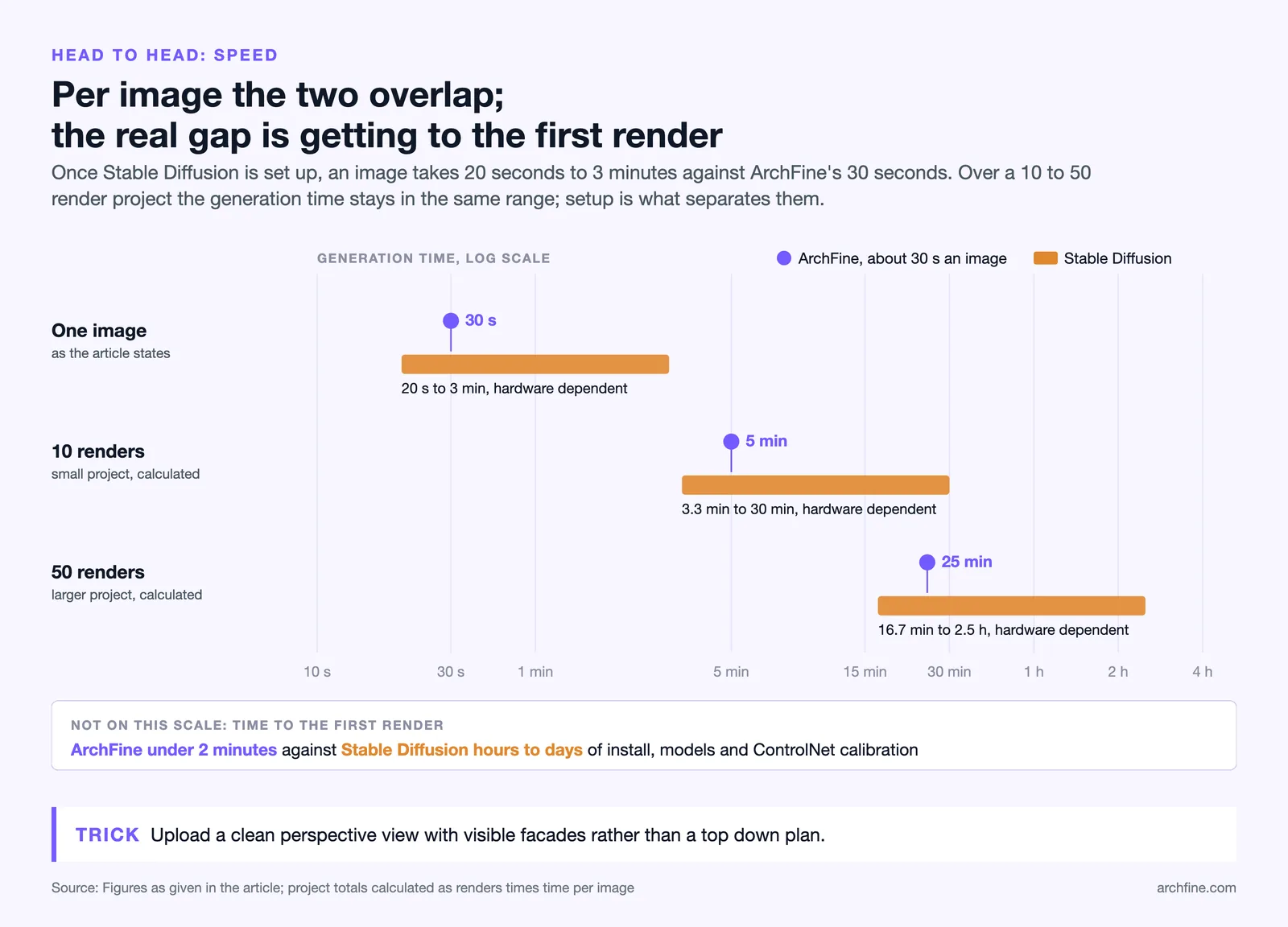
ArchFine is a cloud-based AI rendering platform built specifically for architectural visualization. Users upload a reference image — a sketch, floor plan, existing photo, or rough 3D export — add a text prompt describing the desired aesthetic, and receive a photorealistic render. The process takes approximately 30 seconds per image.
There is no local installation, no GPU requirement, and no model configuration. The platform handles all generation infrastructure server-side. This means the output quality is consistent regardless of what hardware the user has, which matters in practice since most architecture studios don’t maintain workstations with 12GB+ VRAM GPUs.
ArchFine is designed to fit directly into existing design workflows. An architect working in SketchUp, Rhino, or ArchiCAD can export a viewport, upload it to ArchFine, and iterate on material, lighting, and style variations without leaving their primary design environment for long. The chat-based interface also allows prompt refinement across iterations, so the model can build on prior outputs rather than starting fresh each time.
The platform is aimed at non-technical users — architects, interior designers, and visualization professionals who want AI rendering output without managing an AI stack. That positioning is intentional. ArchFine trades the raw configurability of open-source tools for reliability, speed, and accessibility.
📌 Did You Know?
Stable Diffusion’s base model was trained on subsets of the LAION-5B dataset, which contains over 5 billion image-text pairs scraped from the web. However, the base model has no architectural specialization — photorealistic building renders require fine-tuned checkpoints and ControlNet conditioning, both of which must be sourced, configured, and tested separately by the user.
ArchFine vs Stable Diffusion: Head-to-Head Comparison
The table below covers the key differences across setup, workflow, output quality, cost structure, and ideal user profiles.
| Feature | ArchFine | Stable Diffusion |
|---|---|---|
| Setup required | None (browser-based SaaS) | Significant (local install, models, extensions) |
| GPU required | No | Yes (8-16GB VRAM recommended) |
| Time to first render | Under 2 minutes | Hours to days (setup + calibration) |
| Architectural specialization | Built-in, purpose-trained | Requires manual model selection |
| ControlNet / structural guides | Handled internally | Manual setup and configuration |
| Output customization | Via text prompt and image reference | Deep (models, LoRAs, samplers, CFG scale) |
| Render speed (per image) | ~30 seconds | 20 sec to 3 min (hardware dependent) |
| Cost model | SaaS subscription | Free (hardware cost only) |
| Maintenance burden | None | Regular (model updates, extension compatibility) |
| Best for | Architects, designers, non-technical users | Technical users, power users, researchers |
Stable Diffusion Architecture Workflow: What It Actually Takes
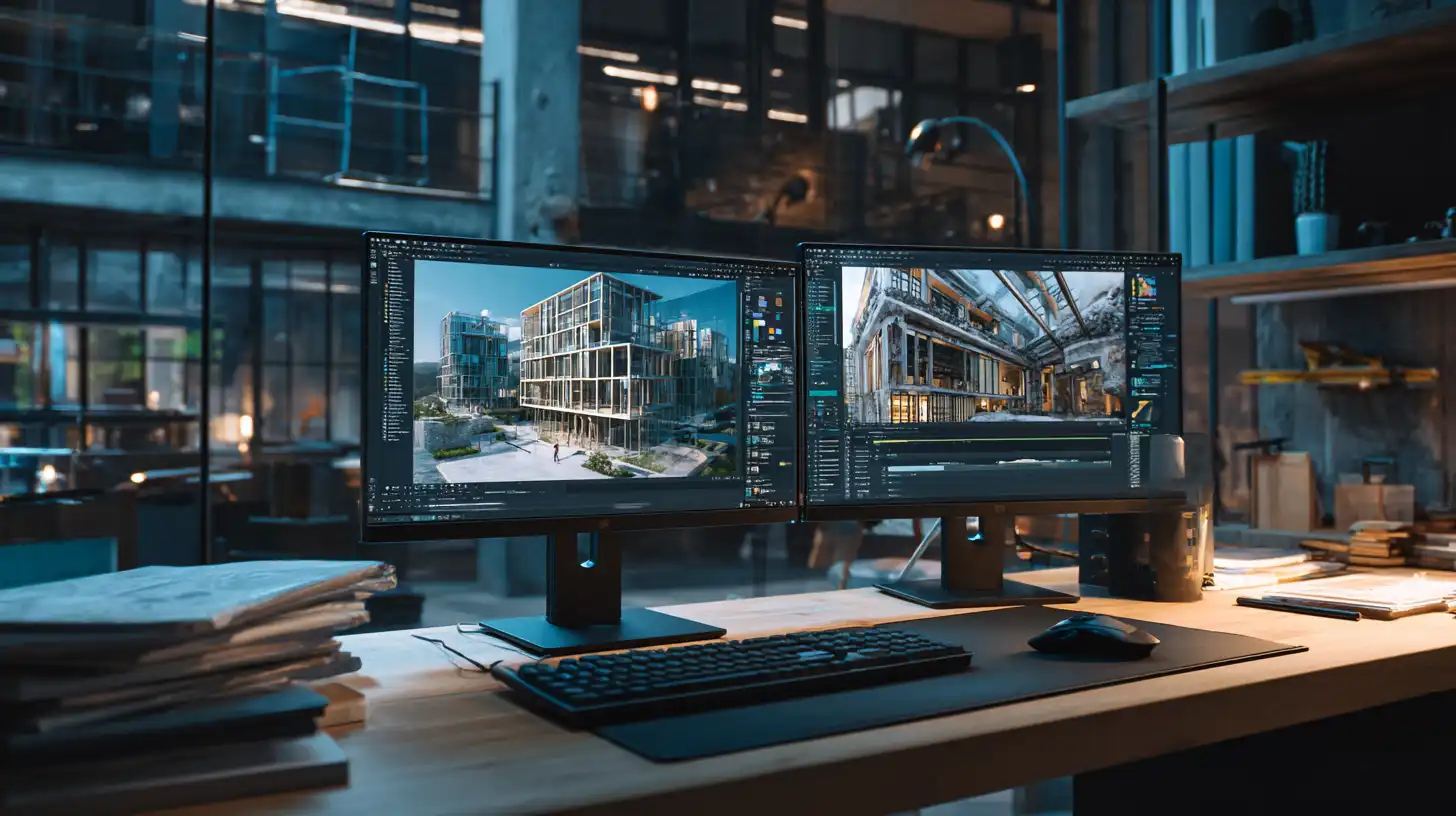
Running Stable Diffusion for architectural rendering is not a single-step process. Users typically work through AUTOMATIC1111’s WebUI or ComfyUI, both of which require Python installation, model downloads, and manual dependency management.
A typical Stable Diffusion architecture workflow breaks down into these phases:
Phase 1: Environment setup. Installing Python, Git, and CUDA (for NVIDIA GPUs) takes 1-3 hours for users unfamiliar with command-line tools. WebUI installs are relatively straightforward, but errors related to library versions, CUDA compatibility, or missing dependencies are common on first attempts.
Phase 2: Model and checkpoint selection. The base Stable Diffusion model does not produce architectural renders reliably. Users must download fine-tuned checkpoints from platforms like CivitAI, evaluate which produce the style they need, and manage file storage (each model checkpoint is typically 2-6GB).
Phase 3: ControlNet setup. Stable Diffusion ControlNet architects use canny edge detection, depth maps, or line art preprocessing to feed structural information into the model. This requires installing the ControlNet extension, downloading preprocessor models, and learning how to set conditioning strength and guidance scale parameters for each use case.
Phase 4: Prompt engineering. Stable Diffusion architecture prompts differ significantly from general-purpose prompts. Effective prompts for architectural rendering typically combine style descriptors (“photorealistic exterior, golden hour lighting, ultra-detailed”), quality boosters (“8k, sharp focus, hyperrealistic”), and negative prompts to suppress unwanted outputs (“blurry, distorted windows, warped geometry, extra floors”).
Users who invest the time to work through all four phases can produce excellent results. However, each phase introduces potential failure points, and troubleshooting consumes significant time. For a solo architect or small studio, this setup cost is non-trivial.
⚠️ Common Mistake to Avoid
A frequent error in Stable Diffusion architectural rendering is using the base SD 1.5 or SDXL model without a fine-tuned architecture checkpoint. The results look like generic AI art rather than architectural visualization. Always start with a checkpoint specifically trained on photorealistic architecture or interiors, then layer ControlNet conditioning on top. Using the wrong base model wastes hours of prompt tuning that a better checkpoint would solve in minutes.
How ArchFine Handles Structural Input Without ControlNet
One of the main reasons architects use ControlNet in Stable Diffusion workflows is structural fidelity — ensuring the AI respects the geometry of an existing design rather than hallucinating new floor plans or window arrangements. ArchFine addresses this differently.
Instead of exposing ControlNet controls to the user, ArchFine processes the uploaded reference image as a structural guide internally. The platform extracts spatial and compositional information from the input and uses it to constrain the render output. Users don’t set conditioning weights or choose preprocessors. They upload their drawing or model screenshot, write a prompt, and the platform preserves the core geometry while applying the specified aesthetic.
This is a deliberate design choice aimed at the best AI render tool for non-technical users use case. Architects working under deadline pressure don’t want to calibrate ControlNet parameters. They want to see what a design looks like in polished form, quickly, and move on to the next iteration.
The tradeoff is granularity. A power user working with Stable Diffusion ControlNet architects workflow can precisely control how much the model adheres to structural input versus how freely it generates the surrounding environment. ArchFine handles this automatically, which works well for most architectural visualization needs but may feel limiting for users who want fine-grained control over generation parameters.
💡 Pro Tip
When using ArchFine for exterior renders, upload a clean perspective view from your 3D model rather than a top-down plan. The platform extracts structural information more accurately from perspective images with visible facades, and the resulting render will preserve window placement and facade proportions more faithfully than a plan-based input.
Open-Source AI vs SaaS Rendering: Cost and Maintenance Reality
Stable Diffusion is free to download and run. That’s one of its most appealing features, especially for individual architects or students who can’t justify subscription costs. However, the true cost of running local AI rendering includes hardware, time, and ongoing maintenance.
A workstation capable of running Stable Diffusion at reasonable speed requires an NVIDIA GPU with at least 8GB VRAM — a GeForce RTX 3080 or better. At 2025 pricing, a GPU at this performance tier costs $500-900 new. The rest of the workstation configuration adds further cost. Cloud GPU rental services like RunPod or Vast.ai offer an alternative, but managing remote instances introduces its own complexity.
Beyond hardware, Stable Diffusion requires ongoing maintenance. Model checkpoints are updated regularly. Extensions like ControlNet release new preprocessors. The WebUI itself receives updates that occasionally break extension compatibility. Users who want to stay current spend several hours per month on maintenance tasks that have nothing to do with design work.
The local AI rendering vs cloud rendering comparison looks different depending on usage volume. For high-volume rendering — hundreds of images per month — local Stable Diffusion becomes cost-effective once the hardware investment is amortized. For typical architectural studio usage (10-50 renders per project), a SaaS subscription like ArchFine is usually more economical on a per-hour-of-actual-design-work basis, because it eliminates setup and maintenance overhead entirely.
⚖️ Pros & Cons at a Glance
✔️ Stable Diffusion pros: Free to use, fully customizable, runs offline, no usage limits, open ecosystem
✖️ Stable Diffusion cons: Steep setup curve, GPU hardware required, regular maintenance, no architectural optimization out of the box, time-consuming to master
Which Architects Should Use Stable Diffusion?
Stable Diffusion alternatives for architects exist across a spectrum, but Stable Diffusion itself remains the most powerful open-source option available. The question is who should actually invest the time to learn it.
Stable Diffusion for architects makes sense in these scenarios:
- You have a technical background or previous experience with machine learning tools
- You generate high volumes of renders regularly and want to eliminate per-render costs
- You need output styles that don’t match commercial SaaS defaults (hyperspecific material treatments, unusual rendering aesthetics, research-oriented outputs)
- You’re working on a project with strict data privacy requirements where cloud-based tools are not permitted
- You have access to suitable GPU hardware and time to configure the environment
For users without a technical background, Stable Diffusion tends to produce frustration before it produces useful renders. The architecture AI image generation 2025 landscape now includes enough well-designed SaaS options that most architects don’t need to manage their own AI stack to access quality renders.
Which Architects Should Use ArchFine?
ArchFine is built for architects who want AI rendering output integrated into their existing workflow without adding technical overhead. The platform fits best in these situations:
- You work in a small studio or as an independent architect where time spent on tool setup is time not spent on design
- You need renders quickly — for client presentations, competition submissions, or design review meetings
- You’re already using tools like SketchUp, Rhino, or ArchiCAD and want to stay in your design environment with minimal interruption
- You don’t have a workstation with a high-end GPU
- You want consistent, predictable output quality without calibrating generation parameters each time
The AI architecture render without setup use case describes most working architects. ArchFine’s value is not that it matches every capability of a fully configured Stable Diffusion installation — it doesn’t. Its value is that it delivers 80-90% of the output quality with 5% of the setup time, which is the right trade-off for professional architectural practice.
ArchFine vs Stable Diffusion Output: What to Expect
Direct ArchFine vs Stable Diffusion output comparison depends heavily on how well the Stable Diffusion installation is configured. A well-tuned Stable Diffusion setup with the right checkpoint, ControlNet conditioning, and carefully engineered prompts can produce exceptionally detailed renders with precise material control. But reaching that output level requires substantial expertise.
ArchFine produces consistently professional-grade renders out of the box. The platform is optimized for architectural visualization specifically, which means the default output quality for exterior facades, interior spaces, and material finishes is reliable without requiring user-side calibration. For typical architectural use cases — facade studies, interior mood boards, site context renders — ArchFine’s output is directly usable in client-facing presentations.
For architects evaluating both tools, the honest comparison is not “which produces better images at its absolute best” but rather “which produces better images in the time a working architect actually has.” By that measure, ArchFine’s consistency advantage over Stable Diffusion’s raw ceiling tends to be decisive for most studio workflows.
✅ Key Takeaways
- Stable Diffusion is powerful but requires significant setup, a compatible GPU, and ongoing maintenance — not a realistic option for most working architects without technical backgrounds.
- ArchFine is purpose-built for architectural rendering, runs in the browser, and produces photorealistic results in about 30 seconds without any local configuration.
- The ControlNet architecture rendering workflow in Stable Diffusion gives experienced users deep structural control, but requires manual calibration that ArchFine handles automatically.
- For high-volume rendering by technical users, Stable Diffusion’s free model becomes cost-effective once hardware is amortized. For typical studio use, ArchFine’s lower setup and time cost makes more practical sense.
- Most architects are better served by ArchFine’s reliability and speed. Stable Diffusion’s advantages are most relevant for power users who need maximum customization and are willing to invest the time to configure their environment correctly.
Final Comparison: Stable Diffusion vs Professional AI Render
The stable diffusion vs professional AI render question comes down to what you’re optimizing for. Stable Diffusion optimizes for customization, cost at scale, and technical control. ArchFine optimizes for speed, reliability, and ease of use for architectural workflows specifically.
Neither tool is universally better. Stable Diffusion remains the most capable open-source option for users who want to build a custom AI rendering pipeline. ArchFine is the more practical choice for architects who want professional renders integrated into daily design work without technical overhead.
For most architectural practices, especially smaller studios and solo practitioners, ArchFine’s combination of speed, output quality, and zero setup time represents the more sensible path into AI-assisted visualization. Stable Diffusion’s ceiling is higher, but only accessible to a subset of users with the time and technical background to reach it.
If you’re evaluating AI rendering tools for architectural work, try ArchFine with your own project images. The gap between knowing what AI rendering can do and seeing it on your own designs is where the decision usually gets made.
For further reading on AI tools in architectural practice, see Stability AI’s documentation, the ControlNet research repository by Lvmin Zhang, and ArchDaily’s coverage of AI tools in architecture.