ArchFine vs Lumion is a comparison between two tools that approach architectural visualization from opposite directions. ArchFine is a cloud-based AI rendering platform that generates photorealistic images from uploaded photos in seconds, with no hardware investment required. Lumion is a real-time 3D rendering environment that processes full scene models locally on a high-end workstation. Choosing between them depends on your workflow stage, budget, and team size.
What Is ArchFine and How Does It Work?
ArchFine is a browser-based SaaS platform built specifically for architectural rendering using generative AI. The workflow is straightforward: you upload a photo of a space, sketch, or existing building, add a text prompt describing the design intent, and the platform returns a photorealistic render in approximately 30 seconds. No 3D model is required, no scene setup, and no dedicated GPU on your machine.
This makes ArchFine particularly useful during early design phases, client presentations, and concept validation. Architects working on site-specific proposals can render an exterior facade from a reference photo without rebuilding the surrounding context in a 3D environment. Interior designers can restyle a room photograph to show a client multiple finish options without redoing material assignments in a modeling tool.
💡 Pro Tip
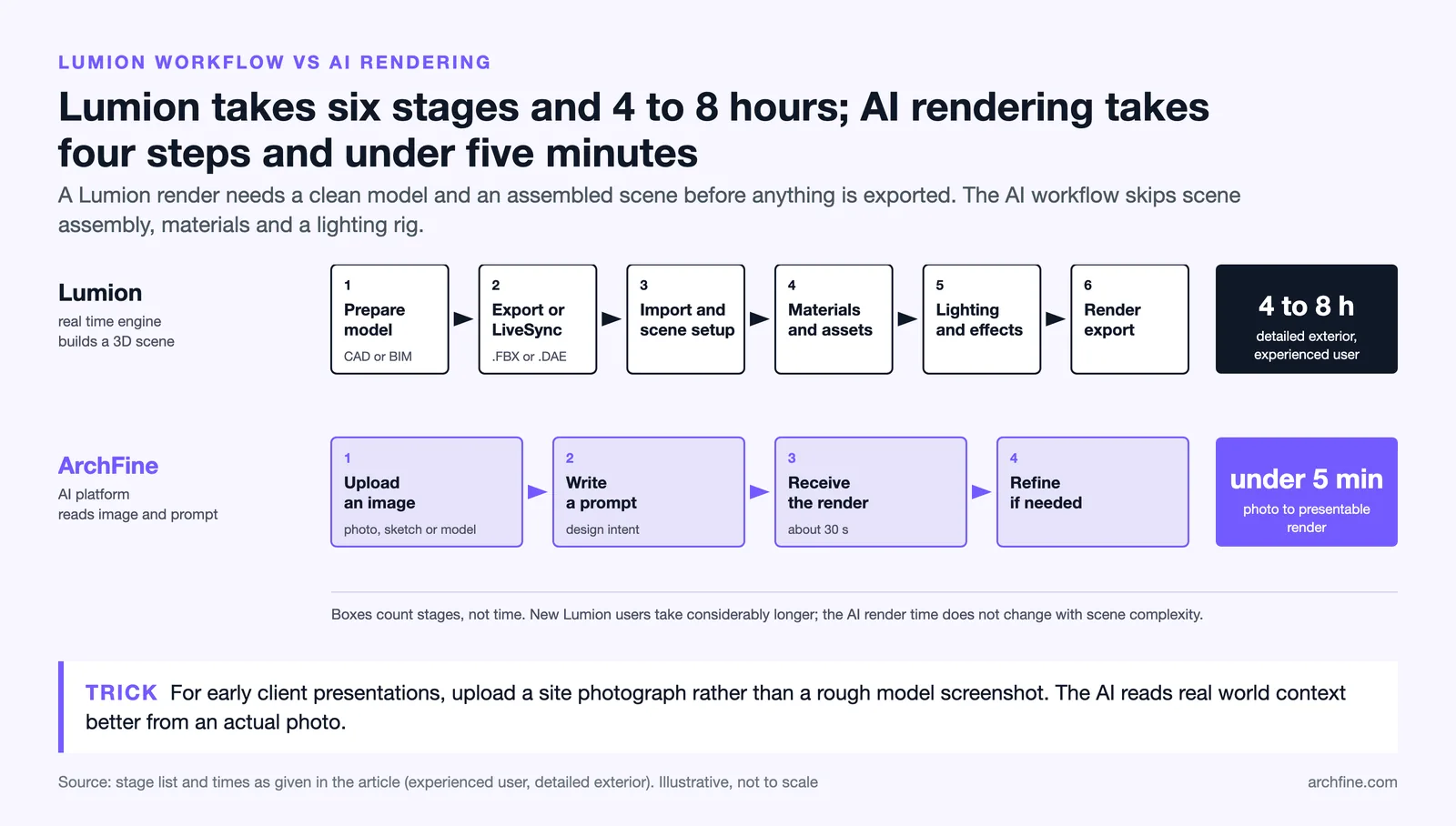
For early-stage client presentations, upload a site photograph rather than a rough model screenshot. ArchFine’s AI reads real-world context better from actual photos, which produces more convincing renders for approval meetings than gray-box model outputs.
The platform runs on cloud’s infrastructure, which means rendering capacity scales without any action on the user’s end. You pay for usage through a subscription tier, not hardware upgrades.

What Is Lumion and How Does Its Workflow Differ?
Lumion is a standalone real-time rendering application that imports 3D models from software like SketchUp, Revit, ArchiCAD, and Rhino. Once imported, architects place the model in a pre-built landscape, assign materials, adjust lighting, and add objects from an included library of trees, vehicles, people, and furniture. The scene renders in real time on screen, and final output can be a still image, video walkthrough, or 360-degree panorama.
Lumion’s core strength is scene control. You can walk through the space, adjust weather conditions, change the time of day, and add animated elements like moving people or rippling water. For final deliverables such as client presentations and planning submissions, this level of scene-building produces compelling visuals that go far beyond a single static frame.
The tradeoff is that Lumion requires a full 3D model before any of this is possible. If you are early in design or working from reference images only, Lumion is not the right tool for that stage.
📌 Did You Know?
Lumion introduced a new product structure in April 2025, splitting its offering into Lumion View (a lightweight real-time plugin for SketchUp, Revit, and ArchiCAD), Lumion Pro (the full standalone renderer), and Lumion Studio (a bundle of both). Lumion has since retired Lumion Studio (July 2026) and replaced Lumion View with Axogram (September 2026). As of October 2026, Lumion Pro costs $1,149 per year for a named user license, billed upfront.

ArchFine vs Lumion: Feature Comparison
The table below compares both tools across the criteria that matter most to architects choosing a visualization workflow.
| Feature | ArchFine | Lumion Pro |
|---|---|---|
| Input required | Photo + text prompt | Full 3D model |
| Rendering speed | ~30 seconds per image | Real-time preview; final output varies |
| Hardware requirement | Any device with a browser | High-end GPU (RTX 3070 minimum, RTX 4070+ recommended) |
| Operating system | Any OS (cloud-based) | Windows only |
| Learning curve | Minutes to first render | Weeks to months for full proficiency |
| Scene animation / walkthroughs | Not available | Yes, full video output |
| 360-degree panoramas | Not available | Yes |
| Works from photos | Yes, core feature | No |
| CAD/BIM integration | Not required | SketchUp, Revit, ArchiCAD, Rhino, AutoCAD |
| Subscription cost (annual) | Accessible entry-level pricing | Lumion Pro costs $1,149/year (named user, as of October 2026) |
| Workstation investment needed | None | $2,000–$6,000+ depending on existing hardware |
Render Quality: What to Expect from Each Tool
Lumion’s render quality at the Pro tier is well-established in professional practice. Ray-traced lighting, volumetric effects, and a library of high-resolution photogrammetric assets produce images that read as near-photographic in exterior scenes with good natural lighting. Interior renders are stronger with controlled artificial lighting setups. The visual output reflects the quality of the 3D model itself: a detailed, well-textured model renders convincingly, while a sparse model produces flat results regardless of Lumion’s effects.
ArchFine produces images that are photorealistic by AI generation standards, meaning they work well for concept communication and mood-setting in design presentations. The output is less predictable than a manually configured Lumion scene because the AI interprets the prompt and image together. For situations where precise material specifications, exact lighting angles, or specific furniture placement must be shown, Lumion gives more direct control. For situations where speed and visual plausibility matter more than pixel-level accuracy, ArchFine’s AI architectural render from photo approach delivers results within seconds.
ArchFine vs Lumion Render Quality: Which Matters for Your Use Case?
Render quality should be evaluated against purpose, not absolute standards. An early-stage concept needs to communicate intent and atmosphere, not match a photorealistic specification sheet. A planning submission or a construction client’s final approval presentation has higher accuracy requirements. ArchFine fits the former. Lumion, with investment in both model quality and tool mastery, fits the latter.
⚠️ Common Mistake to Avoid
Many architects assume Lumion will automatically produce photorealistic results from any imported model. It won’t. The quality of Lumion output is directly tied to model detail, material assignment, and scene composition. A SketchUp model with default materials imported into Lumion still looks like a default material SketchUp model. Expect several hours of scene dressing per project before reaching polished output.

How Much Does Lumion Cost? And How Does That Compare?
Lumion’s pricing structure changed significantly in April 2025. As of October 2026, the commercial offering is Lumion Pro (the full standalone renderer), sold as a named user or floating license; Lumion Studio was retired in July 2026 and Lumion View was replaced by Axogram in September 2026. According to Lumion’s official pricing page, Lumion Pro costs $1,149 per year for a named user and $1,499 per year for a floating seat that can be shared across a team. There is no monthly billing option and no perpetual license.
Beyond the subscription, running Lumion at a productive level requires a dedicated Windows workstation. Lumion’s own hardware guidelines list an NVIDIA GeForce GTX 1060 with 6 GB VRAM as a minimum example and an RTX 3060 as recommended, but real-world professional use requires an RTX 3070 at minimum, with RTX 4070 or better for complex scenes. Purchasing or upgrading a workstation adds $2,000 to $6,000 to the total investment, based on current GPU hardware pricing. This is the real Lumion subscription cost alternative that AI rendering tools remove from the equation.
ArchFine operates entirely in the browser. There is no local hardware requirement, no installation, and no Windows dependency. This is a meaningful difference for smaller practices, freelancers, or firms operating on Apple hardware where Lumion does not run at all.
Lumion Rendering Workflow vs AI Rendering: A Practical Comparison
A typical Lumion rendering workflow runs through several stages: model preparation in a CAD or BIM application, export using a Lumion LiveSync plugin or a file format like .FBX or .DAE, import and scene setup in Lumion, material and asset assignment, lighting and effects configuration, and final render export. For a detailed exterior scene, this process from clean model to finished render can take four to eight hours for an experienced user. For new users, it takes considerably longer.
The ArchFine workflow is linear and short: upload an image, write a prompt, receive the render, refine if needed. There is no scene assembly stage, no material library to browse, and no lighting rig to configure. A designer can go from a rough concept photo to a presentable AI architectural render from photo in under five minutes. The per-render speed does not change based on complexity because the AI processes the image and prompt together rather than calculating a 3D scene.
💡 Pro Tip
If you already use Lumion for final deliverables but spend significant time on early-stage client meetings, consider pairing ArchFine for concept rounds and reserving Lumion for final production renders. Many studios find that AI rendering for early iterations reduces revision cycles on the Lumion side, since clients arrive at the modeling stage with clearer direction.

Who Should Use ArchFine and Who Should Use Lumion?
ArchFine is the better fit for architects and designers who need quick visual output during design development, work primarily from photographs or sketches, operate on non-Windows hardware, have limited budgets for both software and workstations, or produce presentation visuals for early client approval rather than construction documentation.
Lumion is the better fit for studios that produce animated walkthroughs and video presentations, require precise control over every element in a scene, have established 3D modeling pipelines in SketchUp, Revit, or ArchiCAD, and need to output high-resolution panoramas for immersive client experiences. The Lumion platform has been developed for over a decade specifically around the needs of architecture firms that work at this level of production.
Is ArchFine the Best Lumion Alternative for Small Practices?
For practices with one to five people, ArchFine removes the financial and technical barriers that make Lumion difficult to justify. The annual cost of a Lumion Pro subscription alone exceeds what many small firms spend on all software combined. Adding a workstation capable of running Lumion professionally pushes the total first-year investment above $5,000 in many cases. ArchFine as a Lumion alternative AI rendering tool costs a fraction of that and produces results that are appropriate for most early-to-mid stage client communication.
Large firms with dedicated visualization teams and established Lumion workflows will find ArchFine useful as a supplementary speed tool but unlikely to replace Lumion for final production output. The tools serve different parts of the process, and in a well-structured studio, they can run in parallel.
🎓 Expert Insight
“The shift toward AI-assisted visualization is not replacing traditional rendering pipelines. It’s adding a faster front end to them.” — Senior Architect, mid-size European practice (AIA member, 12 years in practice)
This reflects how most experienced practitioners are incorporating AI rendering tools: not as a wholesale replacement for their existing pipeline, but as a way to handle high-frequency client touchpoints earlier in the process without tying up Lumion seat time on preliminary concepts.
Real-Time Rendering vs AI Rendering: The Core Technical Difference
Lumion is a real-time renderer. This means its engine calculates lighting, shadows, reflections, and scene elements continuously as you interact with the scene. The GPU on your workstation does this calculation locally. Real-time rendering lets you make direct, live adjustments to the scene and see results immediately. The final render quality is a function of your hardware’s processing capacity and the time you allow for the export.
ArchFine is a generative AI renderer. Rather than calculating a scene from geometry, it uses a trained AI model to generate a photorealistic image based on the visual input and the text description you provide. There is no geometry to maintain, no scene file to export, and no GPU on your machine doing any work. The generation happens on remote infrastructure and returns a complete image. You cannot walk through the space or change a single object’s position after the fact, but you can regenerate with a refined prompt in under a minute.
The distinction matters for understanding what architectural visualization software comparison means in practice. These are not two versions of the same tool at different price points. They are different technologies solving different problems, and each has genuine strengths the other cannot replicate.
Lumion vs Cloud-Based Rendering: Why the Delivery Model Changes Everything
Lumion’s local rendering model has historically meant that the quality of your output is capped by the hardware you own. Upgrading Lumion versions often requires a hardware upgrade as well. Running Lumion on a laptop produces noticeably slower and lower-quality results than on a desktop workstation.
Cloud-based rendering changes this relationship entirely. With ArchFine, every user runs on the same infrastructure regardless of the device in their hand. An architect on a MacBook Air and an architect on a high-end PC workstation both receive the same quality output, with the same render time. As the AI model improves, all users benefit automatically with no software update to manage.
For distributed teams or remote work environments, this is a significant operational advantage. Lumion’s floating Pro licenses address some of the team-access issues, but the hardware constraint remains local and personal. ArchFine’s free demo lets you test this directly without a credit card.
✅ Key Takeaways
- ArchFine generates renders from photos and text prompts in seconds, with no hardware requirements. Lumion builds renders from full 3D models on a local Windows workstation.
- Lumion Pro costs $1,149/year (named user, as of October 2026), plus a $2,000 to $6,000 workstation investment. ArchFine’s entry cost is substantially lower with no hardware component.
- Lumion produces animated walkthroughs, 360 panoramas, and precise scene control. ArchFine does not offer these outputs.
- ArchFine is the stronger tool for concept rounds, early client presentations, and photo-based rendering. Lumion leads on final production deliverables.
- The two tools can work in parallel: AI rendering for speed in early stages, Lumion for high-specification final output.
For a broader look at how AI is changing architectural visualization, see the overview from ArchDaily, which covers emerging tools and workflows across the profession. A technical comparison of rendering technologies is also documented in academic literature, including work published in Automation in Construction.