ArchFine vs Veras is a comparison between two distinct approaches to AI-powered architectural rendering: ArchFine operates entirely in a web browser with no software installation required, while Veras functions as a plugin that integrates directly into tools like Revit, SketchUp, and Rhino. Each serves a different kind of workflow, and the better choice depends on how and where you work.
The AI rendering market for architects has moved in two directions. One path is deep integration with existing BIM and CAD software, delivering AI renders from inside the tools architects already use. The other path is the browser: upload an image, type a prompt, get a render in seconds, no plugin or license required. ArchFine and Veras represent those two paths clearly, which makes them worth comparing directly.
This breakdown covers how each tool works, what you get for the price, and which professionals will get the most value from each.
What Is Veras AI Rendering?
Veras is an AI visualization plugin developed by EvolveLAB, now part of the Chaos ecosystem (the company behind V-Ray and Enscape). It integrates natively with Revit, SketchUp, Rhinoceros, Archicad, Vectorworks, and Autodesk Forma, reading the 3D geometry of your model and using it as a base for AI-generated renders.
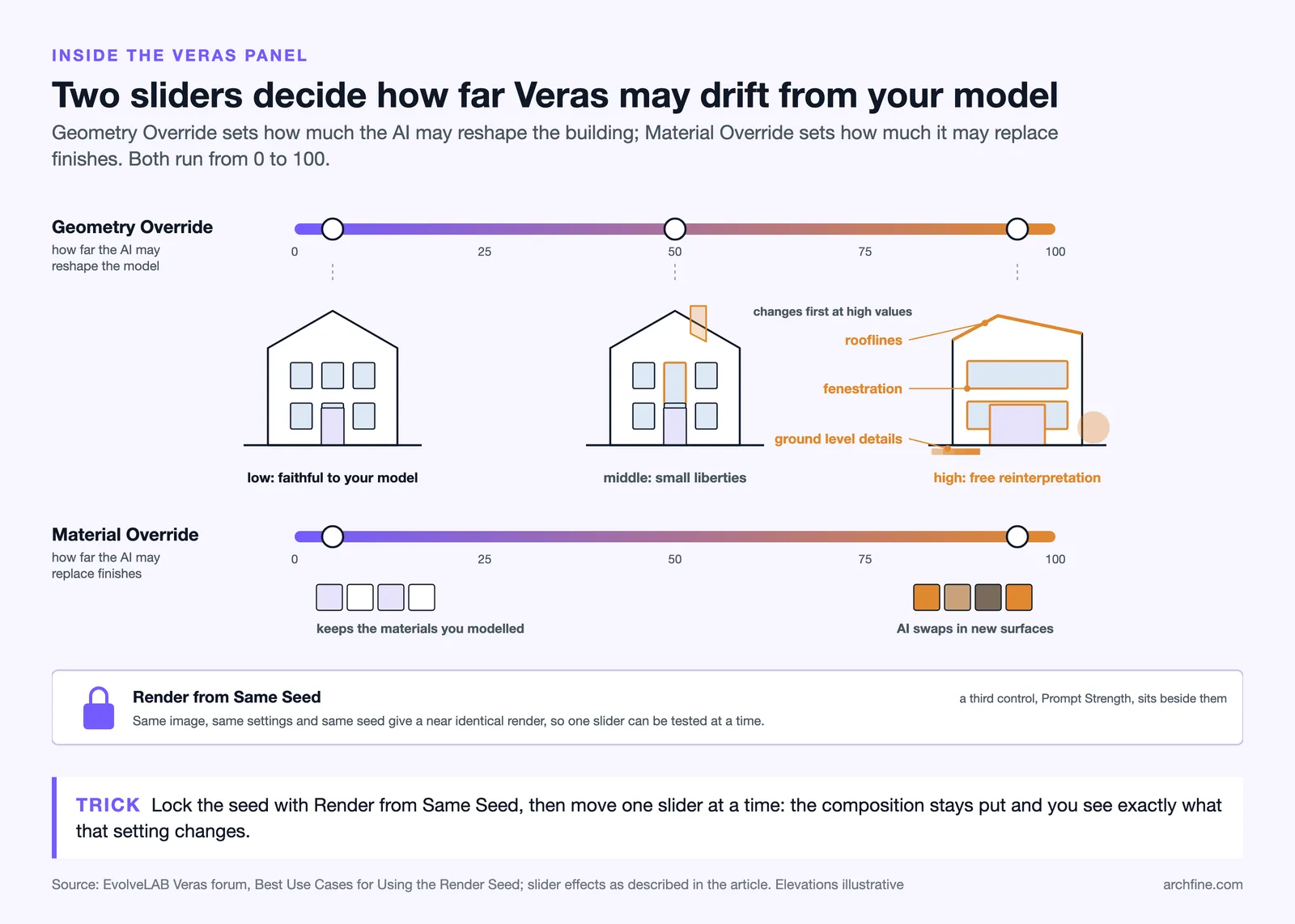
The core mechanic is a Geometry Override slider: low settings keep the render faithful to your model’s actual geometry; higher settings allow the AI to reinterpret the form more freely. A separate Material Override slider controls how much the AI replaces surface finishes. Together, these sliders let you move between tight concept validation and loose ideation without leaving your design environment.
Veras also includes a Render Selection feature for inpainting specific regions of a rendered image, a “Render from Same Seed” option for consistent iteration, and a web app version for users who want access without installing software. Renders are generated using the Nano Banana engine, with the latest version (Nano Banana 2) powering the Veras 7 release.
💡 Pro Tip
In Veras, perspective views with visible edges and active shadows in Revit consistently produce the most geometry-accurate results. Flat shaded views or plan views tend to give the AI less spatial information to work with, which increases the chance of unexpected geometry changes in the output.

What Is ArchFine?
ArchFine is a web-based AI rendering platform built specifically for architectural visualization. It runs entirely in a browser, which means no plugin installations, no software compatibility requirements, and no hardware constraints tied to GPU specs. Users upload a photo or a sketch of a space or building, add a text prompt describing the desired visual direction, and receive a photorealistic render in approximately 30 seconds.
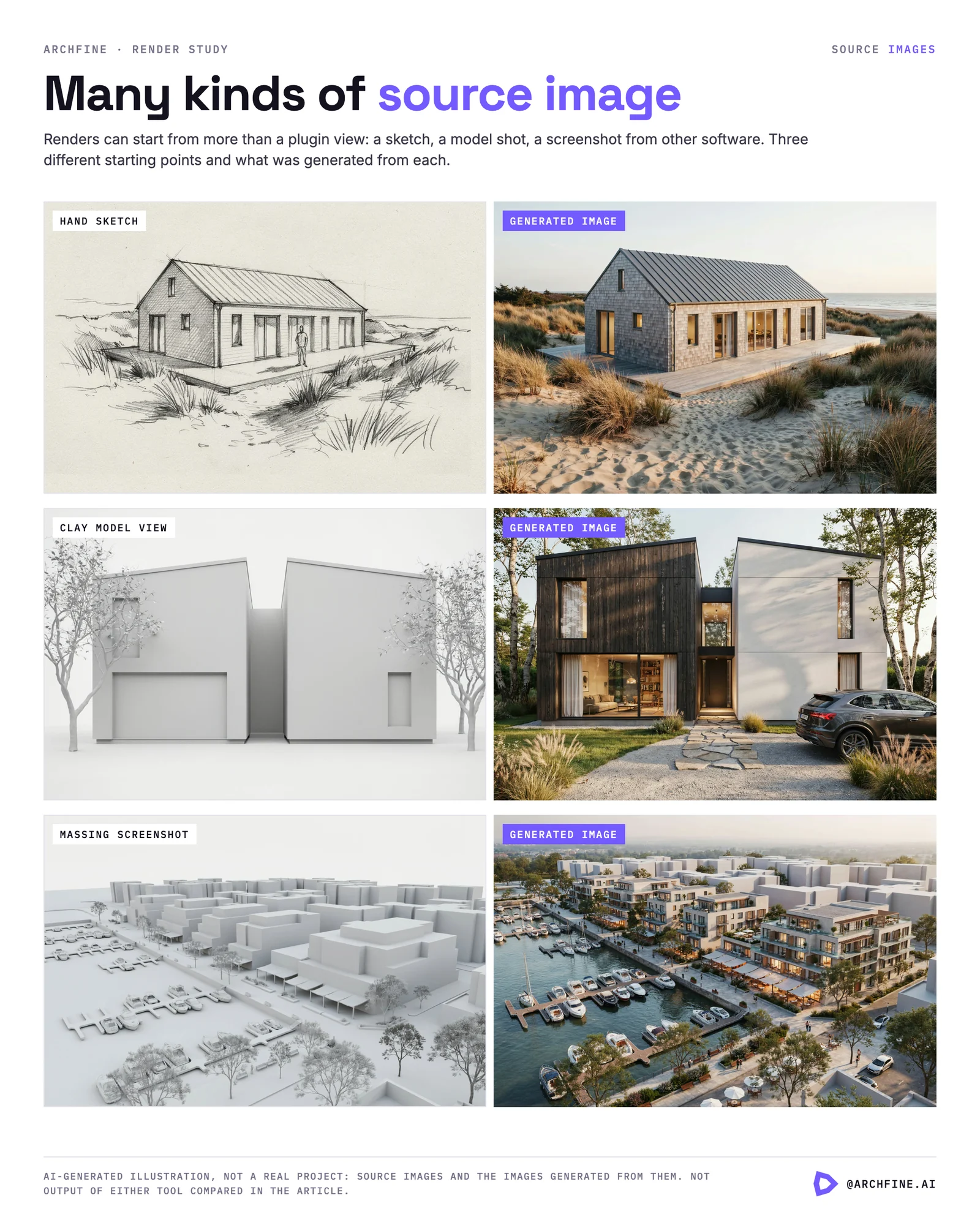
The platform is designed for architects, interior designers, and students who need fast, high-quality concept renders without committing to a complex software stack. Because it is image-to-image rather than model-dependent, ArchFine works with any source material: a smartphone photo of a physical model, a hand-drawn sketch, a screenshot from any 3D software, or a reference photograph. There is no requirement to own or operate Revit, SketchUp, or any other licensed application.
You can try ArchFine directly at app.archfine.com/demo without creating an account.
ArchFine vs Veras: Core Workflow Differences
The most fundamental difference between these two tools is where they live in your process. Veras is a plugin, which means your render workflow stays inside the CAD or BIM application. You open Revit, set a camera view, adjust the sliders, type a prompt, and generate the image without switching applications. For firms that work inside Revit or SketchUp all day, this reduces friction considerably.
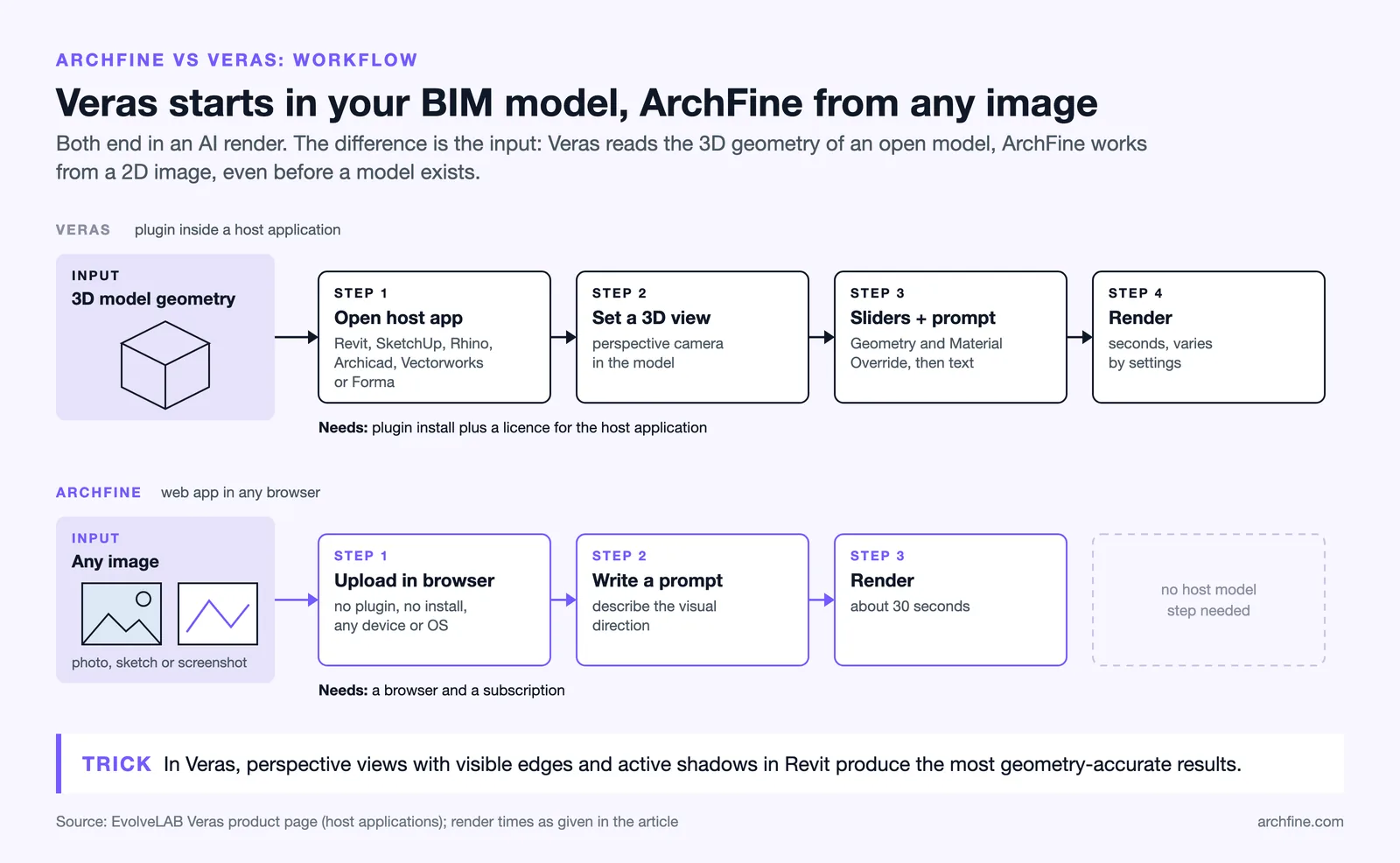
ArchFine takes the opposite approach. The input is an image, not a 3D model file. This makes it faster to start (no plugin, no model required), but it also means the AI works from 2D visual data rather than actual geometry. The tradeoff is that ArchFine is accessible from any device, any operating system, and any point in the design process, including stages where a 3D model does not yet exist.
| Feature | ArchFine | Veras |
|---|---|---|
| Deployment | Browser-based, no install | Plugin (Revit, SketchUp, Rhino, Archicad, Vectorworks) |
| Input Type | Photo, sketch, any image | 3D model view (geometry-based) |
| Setup Required | None (sign up and go) | Plugin installation + host software license |
| OS Compatibility | Any (browser-based) | Windows / Mac (depends on host app) |
| Render Speed | ~30 seconds | Seconds (varies by settings) |
| Geometry Fidelity | Image-based (visual reference) | 3D model geometry (controllable via slider) |
| Free Trial | Available (no account needed for demo) | 30 renders, 15-day trial |
| Pricing Model | Subscription (web-based) | $59/month or $348/year (fixed seat, as of October 2026) |
| BIM Integration | No | Yes (Revit, SketchUp, Rhino, Archicad, Vectorworks, Forma) |
| Animation Output | No | Yes (5-second AI animations) |
Veras SketchUp and Revit Rendering: Plugin Workflow in Practice
For Veras SketchUp rendering, the process starts inside SketchUp itself. You select a scene or camera view, open the Veras panel, set your geometry and material sliders, add a text prompt describing the desired style or finish, and click Render. The plugin reads the geometry of your active view and passes it to the AI engine, which returns an image directly in the Veras interface.
The same applies to Veras Revit rendering. Open a 3D perspective view, activate Veras from the EvolveLAB ribbon, configure the sliders, and render. Results return in the same session. Both integrations support iterating with a locked seed, so you can make prompt or slider adjustments while keeping the same underlying composition consistent across multiple renders.
This tight integration with BIM tools is Veras’s main advantage over browser-based tools. When geometry accuracy matters and you are already working inside Revit or SketchUp, Veras eliminates a significant export and re-import step.
⚠️ Common Mistake to Avoid
Many architects assume that Veras will always preserve their model geometry precisely. At higher Geometry Override settings, the AI can add, remove, or modify building elements, especially rooflines, fenestration, and ground-level details. For presentation renders where accuracy is critical, keep the Geometry Override at low values and verify results against the actual model before sharing with clients.

How Does Veras Pricing Compare to ArchFine?
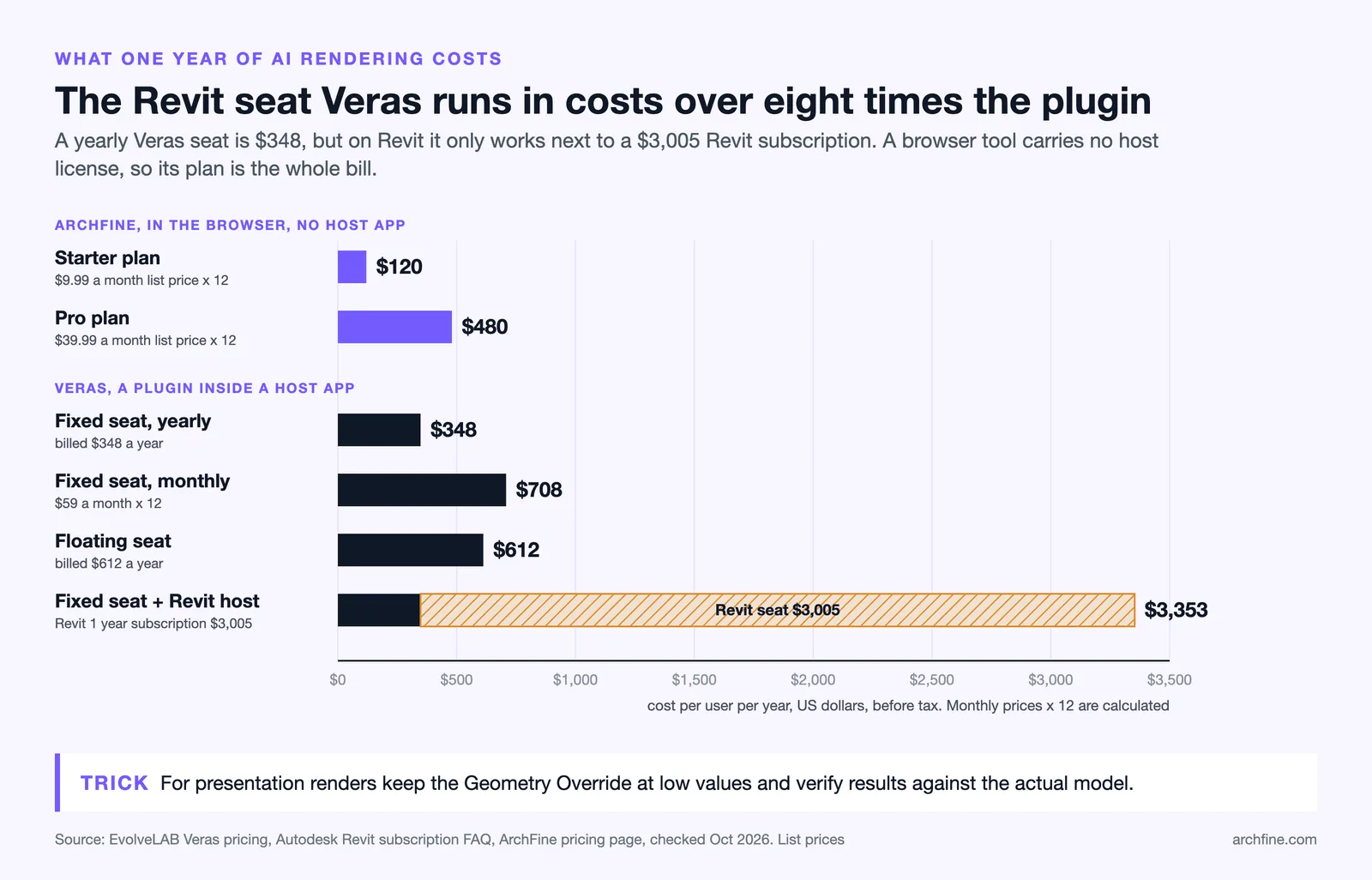
Veras operates on a per-seat subscription model now managed through Chaos. A fixed seat license (assigned to one user) runs $59 per month on a monthly basis, or $348 per year on an annual plan (about $29 per month, as of October 2026). A floating license, which allows a shared pool of seats across a team, costs approximately $612 per year. There is also an All Apps Suite at roughly $131 per month or $1,272 per year, which includes all EvolveLAB tools including Glyph, Helix, and others. An educational plan is available at a reduced rate for verified students.
ArchFine’s pricing is subscription-based and browser-delivered, meaning there is no separate seat license required for different software platforms. Because ArchFine is platform-agnostic, one subscription covers all devices and operating systems a user works across, without additional per-platform licensing.
The cost comparison also needs to account for what each tool requires beyond its own subscription. Veras requires an active license for the host application. If you use it for Veras Revit rendering, you need a Revit subscription (Autodesk’s architecture licenses start well above $2,000 per year; Revit alone is $3,005 per year as of October 2026). For Veras SketchUp rendering, you need an active SketchUp subscription. ArchFine carries no such requirement.
📌 Did You Know?
EvolveLAB, the team behind Veras, was acquired by Chaos in 2024. Chaos also owns V-Ray and Enscape, making Veras part of a broader ecosystem that includes real-time rendering and photorealistic offline rendering. This means Veras renders can feed directly into Enscape workflows for further development.

Standalone AI Render vs Plugin-Based: Which Approach Fits Your Practice?
The standalone AI render approach (like ArchFine) suits professionals who need fast concept output without being locked into a specific software environment. A student working on a hand-drawn scheme, a designer reviewing a renovation photograph, or an architect preparing early massing options from sketches can all use ArchFine without any setup beyond a browser tab.
Plugin-based tools like Veras fit firms where BIM software is already central to the workflow. If your team runs Revit on every project and needs to generate AI visualizations that stay geometrically consistent with the model, a plugin integration removes friction that an external tool would introduce.
There is also a middle ground. Veras does offer a web app that works image-to-image without requiring the desktop plugin. However, it is a secondary mode for Veras, not the primary product. ArchFine is built browser-first, which tends to produce a more refined experience for users who do not want to think about plugin management.
Who Should Use ArchFine?
ArchFine works best for architects and designers who want fast, high-quality renders from photos or sketches without managing plugin installations. It is also a strong fit for students, freelancers, and small studios where the overhead of maintaining Revit or SketchUp licenses for rendering purposes is not justified. Anyone who needs to generate renders from multiple types of source material, including site photos, physical model shots, or images from software other than the officially supported list, will find ArchFine more flexible.
Who Should Use Veras?
Veras is the better choice for BIM-heavy practices where architects work inside Revit or SketchUp all day and want AI rendering as a native part of that environment. The geometry-based approach offers a level of control that image-to-image tools cannot match at early design stages, particularly when a client needs to see how a specific massing or floor plan reads in a rendered context. Firms already subscribed to Chaos products (V-Ray, Enscape) may also benefit from the integration within that ecosystem.
💡 Pro Tip
If you work across multiple software environments (for example, Revit on some projects and SketchUp on others, or occasionally working from site photos), a web-based tool handles that variety more cleanly than a per-platform plugin. Plugin tools require a separate installation and sometimes separate licensing for each host application.
AI Architectural Visualization in 2026: Where Both Tools Stand
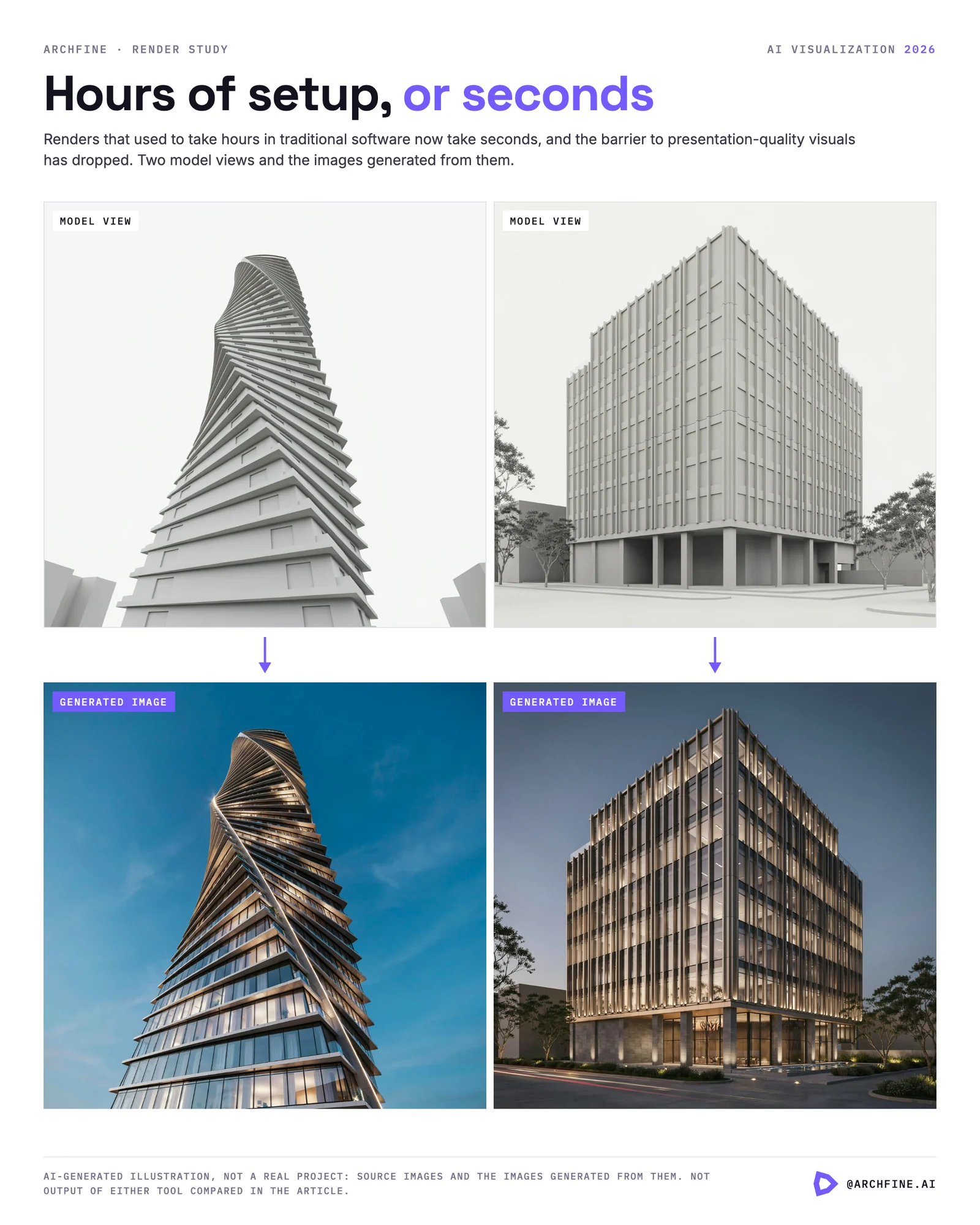
Both ArchFine and Veras reflect how AI architectural visualization has matured: renders that used to take hours in traditional software now take seconds, and the barrier to producing presentation-quality visuals has dropped significantly. The divergence is in the use case they prioritize.
Veras has deepened its BIM integration, added animation output, and expanded platform support across six major CAD and BIM tools. The Nano Banana 2 engine (powering Veras 7) delivers improved prompt fidelity and cleaner geometry adherence compared to earlier versions. For practices invested in the BIM-first workflow, Veras is a strong addition to that stack.
ArchFine’s web-first architecture means it scales differently: accessible from a tablet, a work laptop, or a studio desktop without configuration. For the architect who needs to generate client-ready concept renders from a site visit photo on the same afternoon, that accessibility is a practical advantage that plugin tools cannot easily match.
The AI rendering plugin comparison ultimately comes down to workflow investment. If your firm has already built its process around Revit or SketchUp and you want AI rendering woven into that environment, Veras fits. If you want zero-setup rendering that works from any image source, ArchFine is designed for exactly that.
✅ Key Takeaways
- ArchFine is browser-based with no installation required; Veras is a plugin for Revit, SketchUp, Rhino, Archicad, and Vectorworks.
- Veras uses actual 3D model geometry as its render base; ArchFine works from uploaded images or sketches.
- Veras pricing starts at $348/year per seat billed annually, or $59/month billed monthly (fixed license, as of October 2026); ArchFine subscription pricing does not require a separate host software license.
- Veras requires an active license for each host application; ArchFine has no such dependency.
- For BIM-integrated practices, Veras reduces workflow friction. For sketch-based, photo-based, or cross-platform workflows, ArchFine is more flexible.
- Veras offers AI animation output; ArchFine focuses on still renders.