AI landscape design rendering generates photorealistic visualizations of outdoor spaces, gardens, and site environments from photos or design inputs. Landscape architects and garden designers use these tools to show clients how a project will look across different planting stages, seasons, or lighting conditions — without building a full 3D model.
Landscape architects spend significant time producing visuals that clients can actually understand. Concept drawings and AutoCAD plans communicate process — but they rarely communicate place. What a client needs to say yes to a planting scheme is not a plan view annotated with Latin plant names. They need to see the garden.
AI landscape design rendering closes that gap directly. Upload a site photo, describe the design intent, and the tool produces a photorealistic render of the transformed space in under a minute. For designers managing multiple projects or running lean studios, this changes the economics of client presentation entirely.
This article explains how AI landscape visualization works, who is using it and why, and how tools like ArchFine are making photorealistic outdoor renders accessible without requiring 3D modeling experience.
What Is AI Landscape Design Rendering?
AI landscape design rendering is the process of generating a realistic image of an outdoor space using artificial intelligence — typically from a photograph of the existing site combined with a text prompt or style instruction. The AI interprets the spatial information in the photo, applies the requested design changes, and produces an output that shows the site as it could look after the intervention.
Traditional landscape visualization required 3D modeling software such as Lumion, SketchUp, or Vectorworks Landmark. The designer would model the terrain, place plant objects from a library, configure lighting, and render the scene — a process that could take hours or days per view. AI rendering compresses that workflow into minutes by using trained image generation models that understand how outdoor environments, vegetation, materials, and light behave together.
The result is not a stylized concept sketch. Modern AI landscape visualization produces images that read as professional site photography — with correct shadows, vegetation scale, surface reflections, and atmospheric depth.
How AI Landscape Visualization Works
The workflow for most AI landscape rendering tools follows a consistent sequence: input a photo, apply design parameters, and receive a rendered output. Each stage has variables that affect quality.
Photo Input: Existing Yard or Site
The photo you upload is the spatial foundation for the render. The AI reads the image for depth cues, surface geometry, lighting direction, and existing vegetation. A clear, well-composed site photograph gives the model the best base to work from.
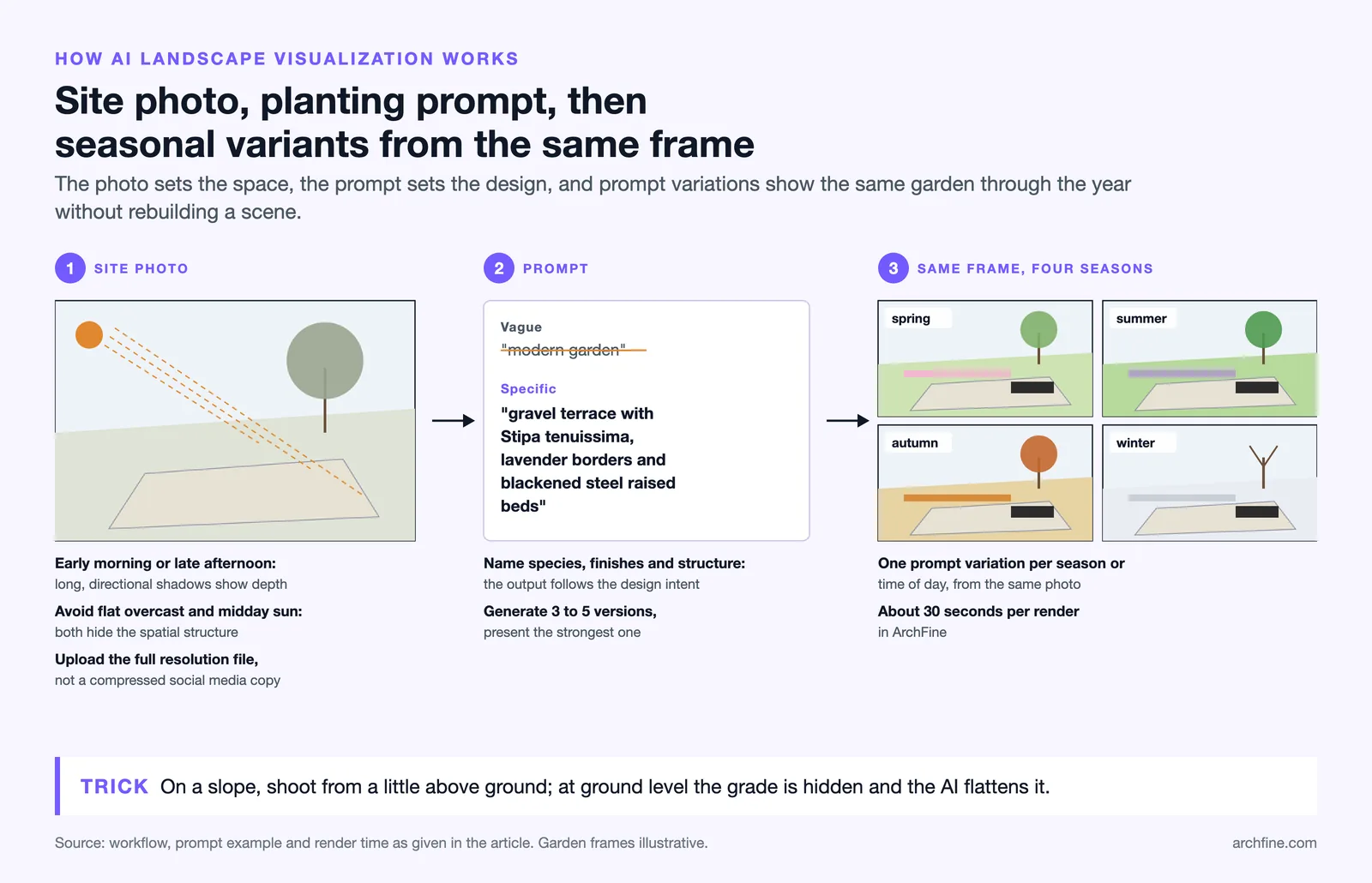
Natural light conditions matter. Overcast flat light and harsh midday sun both reduce the depth information the AI can extract. Early morning or late afternoon light — when shadows are long and directional — tends to produce the cleanest renders because the spatial structure of the site is most legible.
For site photos with uneven terrain or slopes, the angle of capture is particularly important. See the Pro Tip below.
💡 Pro Tip
For site photos with uneven terrain or slopes, capture the landscape from a slight elevation rather than standing on the ground. Ground-level shots often hide grade changes that the AI will flatten in the render, producing a visualization that looks nothing like the real topography. A slightly elevated angle gives the AI better spatial context.
Applying Planting Schemes and Materials
Once the base photo is uploaded, the designer enters a prompt describing the intended design. This can include planting palette references (ornamental grasses, clipped box hedging, flowering perennials), hard landscaping materials (limestone paving, weathered steel edging, gravel paths), water features, and furniture.
The more specific the prompt, the more targeted the output. Vague prompts like “modern garden” produce generic results. Prompts that reference species, material finishes, and spatial structure — “gravel terrace with Stipa tenuissima, lavender borders, and blackened steel raised beds” — produce outputs that closely reflect a real design intent.
Some tools allow uploading a reference image alongside the photo, which the AI uses to match a specific visual style or material palette.

Seasonal and Time-of-Day Variations
One of the most practical capabilities of AI outdoor rendering is the ability to generate the same space across different conditions. A residential garden can be shown in spring bloom, summer fullness, autumn color, and winter structure in a single session. A commercial exterior can be shown at midday for planning submissions and at dusk for sales materials.
This is not easily achievable with traditional rendering workflows, where changing season or lighting requires re-configuring the entire scene. For AI-based tools, it typically requires a prompt variation and a second render.

📊 Did You Know?
Landscape architecture is one of the fastest-growing sectors adopting AI visualization. According to the American Society of Landscape Architects, 3D visualization and digital presentation tools are now listed among the top competencies expected of emerging professionals entering the field.
Who Uses AI for Landscape Rendering?
The range of professionals using AI landscape rendering has expanded quickly. Early adoption was concentrated in architecture and landscape architecture practices. The technology is now used across a broader set of project types and client contexts.
Landscape Architects and Designers
Professional landscape architects use AI rendering primarily for client presentations and planning applications. The ability to produce photorealistic site renders at concept stage — before significant design development investment — allows practices to test client response to schemes earlier in the process.
For firms managing multiple concurrent projects, AI landscape visualization also reduces the bottleneck of visualization production. Renders that previously required a dedicated visualization team or external consultants can be produced in-house during the design process.
Real Estate Developers and Homebuilders
Real estate developers use AI outdoor rendering to produce marketing visuals for new sites before construction begins. A photorealistic render showing a landscaped public realm or amenity courtyard — generated from the site photograph or a drone image — can anchor a sales campaign before a single plant is in the ground.
Homebuilders use similar workflows for show home gardens and estate landscaping, producing consistent visual standards across a development portfolio without commissioning individual renders per plot.
Garden Designers and Residential Projects
For garden designers working on residential commissions, the client brief often begins with a reference folder of saved images. AI garden design render tools allow designers to take the client’s actual garden — photographed during the initial site visit — and show a transformed version at the first design meeting.
This changes the conversation. Rather than presenting hand sketches or planting plans to clients who find technical drawings difficult to read, the designer can present a photorealistic image of the proposed scheme on the client’s own site. The feedback cycle accelerates significantly.
⚠️ Common Mistake to Avoid
Applying AI landscape renders to photos with existing heavy vegetation often produces messy results. The AI interprets existing trees and shrubs as fixed elements and struggles to replace them with new planting schemes. For renovation projects, cropped site photos focusing on the specific zones being redesigned give significantly cleaner output.
How ArchFine Handles Outdoor Space Rendering
ArchFine is a chat-based AI rendering platform built for architects and designers. The interface accepts an uploaded image and a text prompt, then generates a photorealistic render in approximately 30 seconds. The workflow is designed to remove the technical barriers that have historically made visualization production inaccessible to smaller practices.
For landscape and outdoor space projects, ArchFine handles a range of input types:
- Residential garden photos — standard smartphone or DSLR photographs of existing gardens, lawns, or patio areas
- Commercial exterior photos — building photography with adjacent landscaped zones, plazas, or entrance forecourts
- Drone and aerial images — overhead site photography for larger plots or development schemes
- Before/after comparisons — paired renders showing existing conditions and proposed design for client or planning submissions
The ArchFine landscape rendering workflow does not require 3D modeling knowledge, software installation, or rendering configuration. Users upload, prompt, and download. For designers who need multiple variations of the same scene — different planting densities, material options, or seasonal conditions — the platform supports rapid iteration within a single session.

AI Landscape Rendering: Use Case and Input Type Matrix
| Project Type | Best Input | Key Visual Need | AI Render Fit |
|---|---|---|---|
| Residential garden | Yard photo | Planting scheme | High |
| Public park design | Site plan / aerial | Massing & greenery | Medium |
| Commercial exterior | Building photo + site | Paving, planting | High |
| Rooftop terrace | Photo | Furniture + planting | High |
| Coastal or hillside site | Drone photo | Topography | Medium |
| Before/after proposal | Before photo | Client comparison | High |
Getting Better Results from Landscape AI Renders
The quality of AI landscape visualization output is directly tied to input quality. A few consistent practices improve results significantly.
Use the highest resolution photograph available. AI rendering models extract spatial information from pixel density. A compressed social media export gives the model less to work with than the original camera file. Where possible, upload the full-resolution image from the capturing device.
Isolate the zone being redesigned. If a project involves redesigning a specific corner of a garden rather than the entire space, cropping the input photograph to that zone gives the AI a cleaner working area. This is particularly relevant for renovation projects where existing vegetation or hard landscaping in the periphery of the image is not part of the scope.
Be specific in prompts about materials and plant types. Generic prompts produce generic results. Name the materials (porcelain paving, corten steel, white gravel), reference specific plant genera where possible (Miscanthus, Salvia nemorosa, Prunus serrula), and indicate spatial structure (formal hedging, naturalistic drifts, vertical planting).
Generate multiple variations before presenting to clients. AI rendering involves probabilistic variation — two prompts that are identical will not produce identical outputs. Generating three to five versions of the same concept and selecting the strongest for presentation is standard practice for professional results.
For further context on landscape visualization standards in professional practice, the American Society of Landscape Architects maintains resources on digital presentation tools and emerging competencies in the field. Coverage of AI applications in landscape architecture is also tracked regularly by ArchDaily and Dezeen.

AI Landscape Rendering vs. Traditional Landscape Visualization Software
Understanding where AI tools fit relative to established visualization software helps designers decide where to apply each approach.
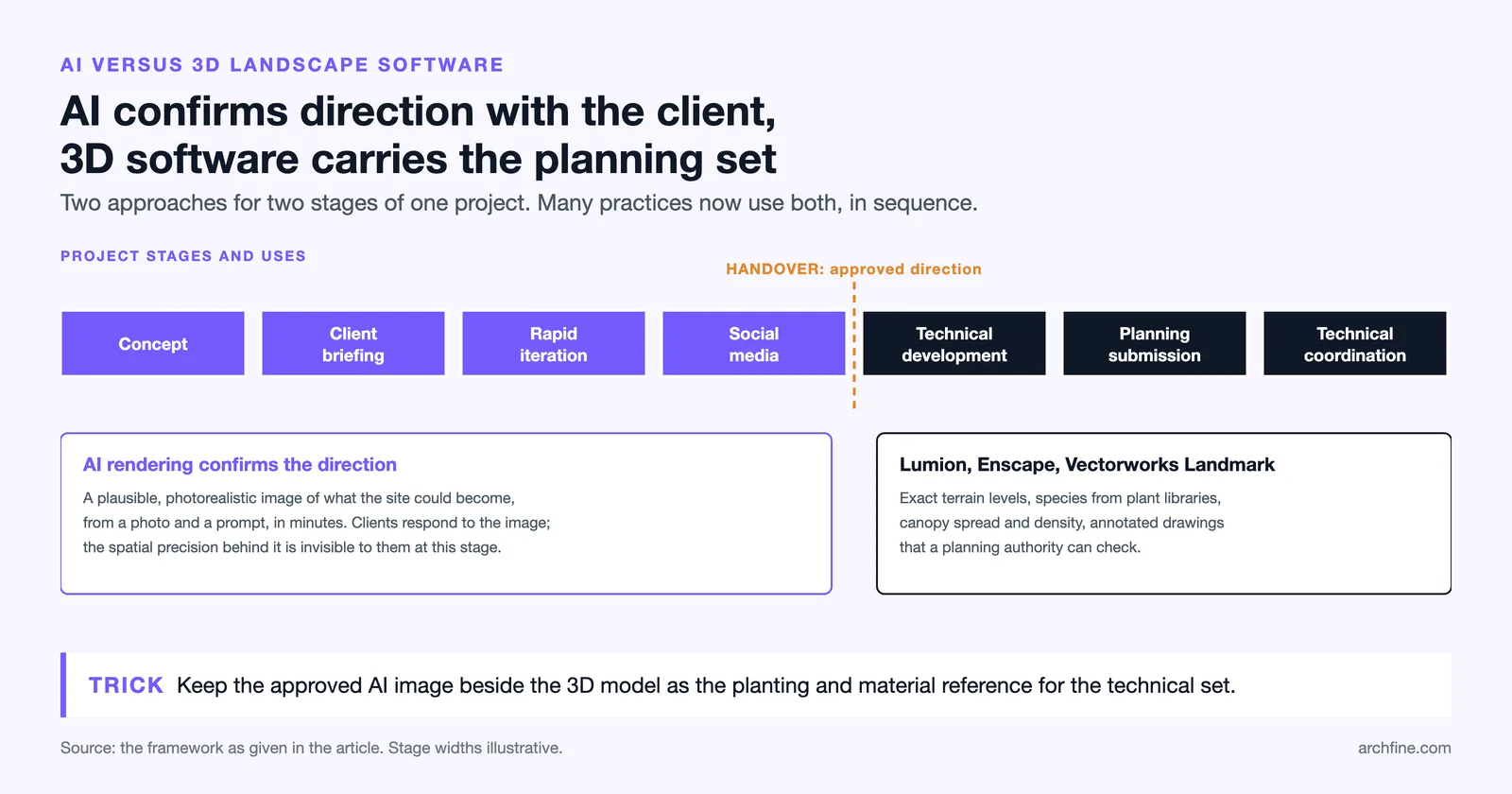
Software platforms such as Lumion, Enscape, and Vectorworks Landmark remain the standard for complex, large-scale landscape projects where precise spatial control is required. These tools allow designers to model exact terrain elevations, specify species from plant libraries, control canopy spread and density, and produce technically accurate visualizations that can be annotated for planning submissions. The investment is time and skill — complex scenes require modeling expertise and hours of production work.
AI landscape rendering operates differently. It does not produce a spatially accurate model of the site — it produces a plausible and photorealistic image of what the site could look like. For early concept presentations, client briefings, and rapid iteration scenarios, this distinction rarely matters. Clients respond to photorealistic imagery; the spatial precision of the underlying model is invisible to them.
The practical framework is straightforward: use AI rendering for concept stage, client-facing presentations, rapid iteration, and social media content. Use traditional 3D landscape software for planning submissions, technical coordination, and projects where spatial accuracy is a requirement. Many practices are now using both in sequence — AI rendering to confirm direction with the client, followed by 3D modeling for technical development.
For a broader overview of landscape architecture as a discipline, Wikipedia’s landscape architecture article provides useful foundational context on the profession and its visual communication traditions.
✅ Key Takeaways
- AI landscape design rendering generates photorealistic outdoor visuals from site photographs and text prompts, without requiring 3D modeling expertise.
- Landscape architects, garden designers, and real estate developers are the primary users — all benefit from faster, more accessible client-facing visualization.
- Input quality determines output quality: high-resolution photos, specific prompts, and clean site compositions produce significantly better results.
- Seasonal and time-of-day variations — difficult to produce in traditional software — are quick to generate with AI rendering tools, making them highly effective for client presentations.
- AI rendering and traditional landscape visualization software serve different phases of a project: AI for concept and client communication, 3D software for technical and planning accuracy.
- ArchFine provides a chat-based AI rendering workflow optimized for architects and designers, with photorealistic landscape renders produced in approximately 30 seconds.