Tidal House on Stilts

Tidal House on Stilts

Coastal Vernacular 21 seconds ArchFine Pro 21 May 2026

Prompt Used

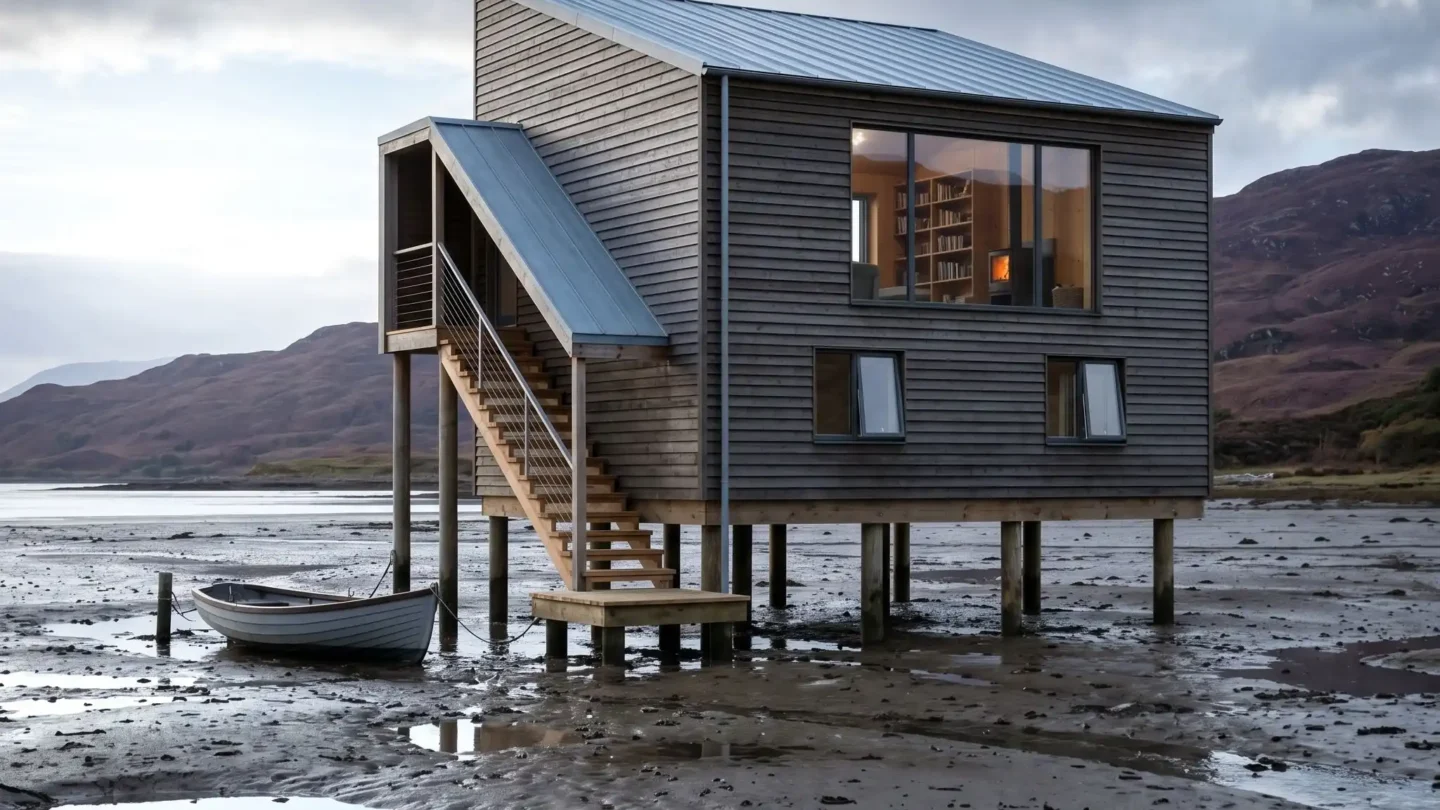
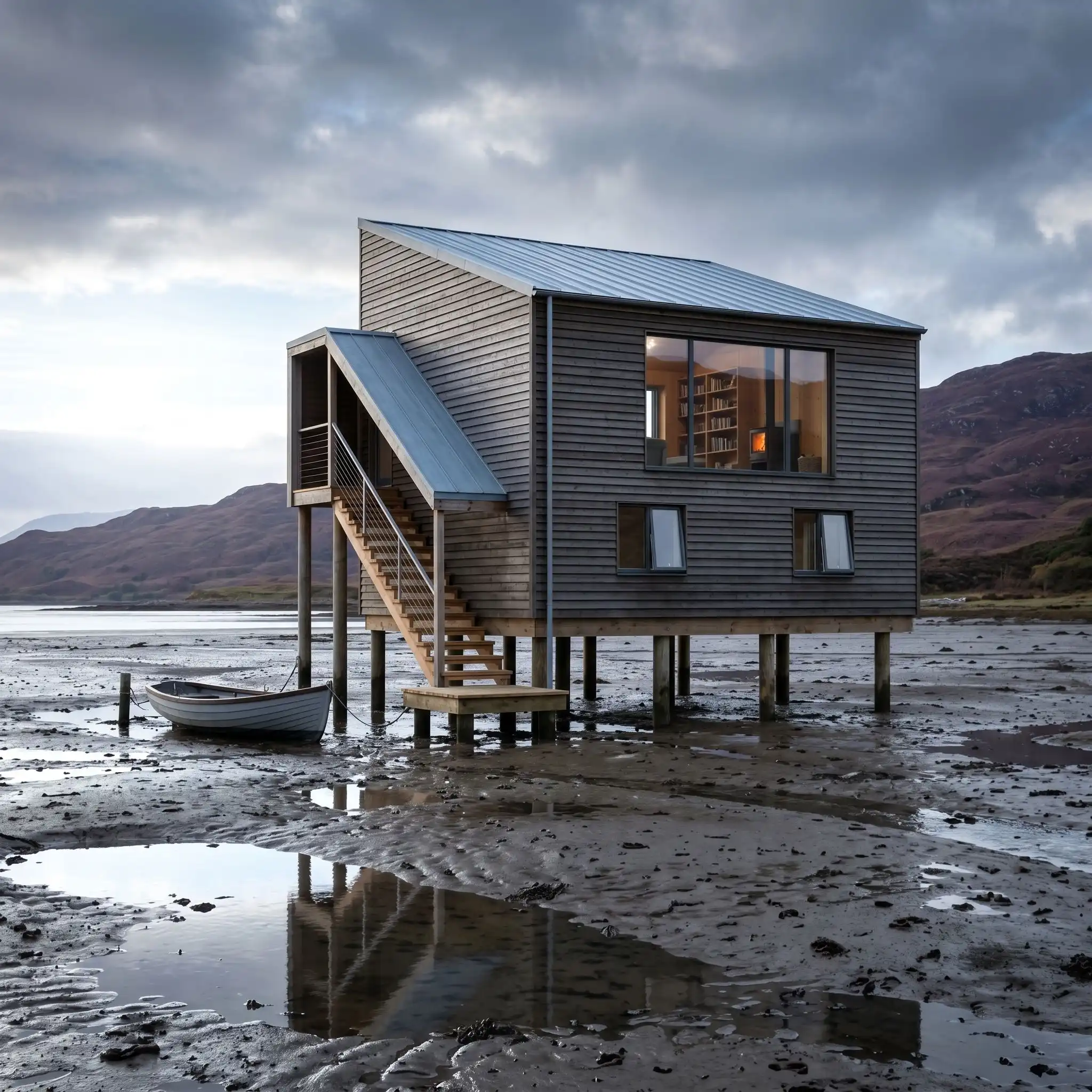
A photorealistic render of a tidal house — a remote dwelling built on timber piles over an intertidal mudflat on the west coast of Scotland, accessible only by boat at high tide or on foot across the exposed mudflat at low tide. The house is a modest two-story structure (9m x 6m floor plate) elevated 3.5m above the mudflat on eight pressure-treated larch piles (250mm diameter), the pile heads connected by a heavy timber grillage beam system. Exterior: The building is clad in horizontal larch boards (150mm width, 18mm thick, rough sawn texture) that have been treated with a single coat of Scandinavian pine tar (black-brown color) and allowed to weather — the boards now a deep silver-black on the exposed faces and remaining dark brown in protected areas. The roof is a simple mono-pitch (10 degrees, low side facing north) in standing seam zinc, pre-weathered to a soft blue-gray. A covered external stair on the south face (timber with open riser treads in larch, stainless steel cable handrail) descends from the first-floor entrance to a small timber landing platform above the mud level. Setting: The intertidal mudflat is exposed — low tide, the mud surface a rich dark gray-brown with pools of still water reflecting the sky, the surface texture of the mud showing the network of drainage channels and small ripple marks from the last tidal flow. Lugworm casts (small spiral formations) visible across the mud surface. A rowing boat (clinker-built, gray painted hull, approximately 4m length) is moored to a post at the base of the stair. Distant hills — bare Scottish highland, heather-covered, in muted purple-brown — form the horizon. Windows: The south and west facades have generous windows — the south facade has a full-width picture window on the first floor (2400mm x 1200mm, slim powder-coated aluminum frame in anthracite, fixed glass) and two smaller casement windows below. The interior glimpsed: warm timber-lined walls, a bookshelf, a woodstove with a small orange glow visible in the firebox. Sky: A dramatic Scottish west coast sky — rapidly moving clouds in deep gray and luminous white, a wide band of brilliant pale silver-blue on the western horizon where the clouds break, the light from this gap illuminating the mudflat and the building in a sharp, cool, silver-white horizontal light that contrasts with the dark cloud overhead. Camera angle: At mud level (approximately 400mm above the mud surface, as if crouching) approximately 25m from the building to the south, looking north-northeast. The full elevation of the house on its piles is visible, the mud pools in the foreground reflect the sky, and the distant hills provide a backdrop. Focal length equivalent 35mm. Aspect ratio 16:9. Time of day: 3:00 PM, October, dramatic west coast light.

Before & After

Before - original sketch
Before
After - AI render
After

Ideal for remote coastal and tidal dwelling projects. Upload site tidal survey data or OS maps for pile positioning.
Getting Started with This Prompt

1

Grab the Prompt

Tap the copy button above and the entire prompt will be saved to your clipboard, ready to use.

2

Launch Your Renderer

Head over to Archfine AI or any compatible visualization tool you prefer working with.

3

Add Your Design

Drop in your floor plan, elevation sketch, or any reference image - then paste the prompt.

4

Render & Refine

Run the generation and review the output. Swap out a few keywords to explore completely different aesthetics.

Want a faster workflow? Archfine AI lets you skip prompt editing entirely - just upload and render.

How to Get Stronger Renders

1

Describe the Scene

Mention specific materials, time of day, weather, and camera perspective. The more context the AI has, the more realistic the output becomes.

2

Run Multiple Passes

Each generation is unique. Changing even a single adjective can shift the entire mood - so experiment freely and compare outcomes.

3

Blend Prompts Together

Borrow phrases from other entries in our collection and merge them. Hybrid prompts often deliver the most original visuals.

4

Start with a Clean Drawing

Crisp linework and high-contrast sketches give the AI a clear foundation. Blurry or cluttered inputs lead to softer, less defined renders.

Common Questions About This Prompt

Am I allowed to edit or customize this prompt?

Of course. Think of it as a foundation you can build on. Adjust the style, swap materials, change the lighting setup, or rewrite entire sections to fit your specific project needs.

Which rendering platform does this prompt work with?

It has been fine-tuned for Archfine AI, but the descriptive structure translates well to other popular AI visualization engines. You may need minor adjustments depending on the tool.

Does using this prompt cost anything?

Every prompt in our library is completely free. You can copy, adapt, and use them across personal portfolios, client presentations, or commercial marketing materials without restrictions.

What kind of input image gives the best output?

Clean line drawings with strong contrast tend to perform best. The AI reads edges, proportions, and spatial relationships from your input - so a well-drawn elevation or section will consistently outperform a rough napkin sketch.

Can I use the rendered image commercially?

Yes. Renders generated through Archfine AI on any paid plan come with full commercial usage rights. Use them in proposals, publications, social media, or anywhere else your work needs to shine.

Try this prompt yourself

Upload your own sketch and use this prompt to generate a stunning render.

Try on Archfine