Passive Solar Desert House

Passive Solar Desert House

Desert Adobe 20 seconds ArchFine Pro 26 April 2026

Prompt Used

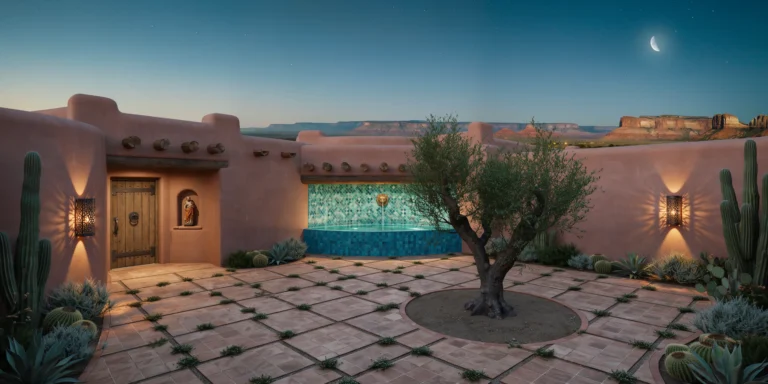
A photorealistic render of a passive solar house in the high desert of New Mexico near Taos, a single-story adobe construction (approximately 180 square meters) designed around strict passive solar principles — Trombe walls, thermal mass, and a south-facing clerestory — that make the building entirely energy-independent through design alone. Form and construction: The building plan is a single elongated east-west rectangle (24m x 8m) with a slightly asymmetric butterfly roof (the south parapet at 3.5m, the north parapet at 4.2m, the valley between them running east-west) that channels rainwater to a central cistern. The walls are adobe (stabilized sun-dried mud brick, 450mm thick, the exterior surface hand-plastered in a warm sand-tone earth plaster with visible trowel marks), the corners rounded and the parapet edge soft and organic. South facade (solar): The entire south-facing wall (24m wide) is a Trombe wall system — a 400mm air cavity behind the exterior glazing (single pane of clear glass in a slim aluminum frame, floor to ceiling, 3m height) in front of the adobe mass wall (painted matte black on the south face to maximize solar absorption). The top and bottom of the Trombe cavity are vented with simple terracotta tile louvres, visible as a horizontal band at floor and ceiling levels on the south exterior. Above the Trombe wall, a continuous clerestory strip (24m wide x 600mm tall, fixed glass in the butterfly roof valley) admits direct winter solar gain into the interior while the roof overhang (calculated at 900mm for the Taos latitude) shades the clerestory completely in summer. Interior: The single open-plan living space has a concrete slab floor with an integral radiant heating system (passive solar storage), the concrete surface stained in a warm russet-brown. The interior walls are the smooth adobe plaster, white-washed. The adobe Trombe wall visible as the south interior face — black-painted smooth plaster, warm to the touch, radiating stored solar heat. A banco (built-in adobe bench) runs the full south wall length. Handwoven Navajo-pattern rugs in natural wool colors. A kiva fireplace (beehive form, approximately 600mm diameter) in the northwest corner, its conical white plaster form smooth and sculptural. Landscape: The high desert landscape — a flat plateau of pale caliche soil, sparse juniper and piñon trees (Juniperus monosperma, approximately 3m height, gnarled forms), desert grasses in warm straw gold, and the Sangre de Cristo mountains in the distance (snow-capped above 3,500m) under the extraordinary New Mexico blue sky. A narrow acequia (traditional irrigation channel) runs east-west at the south boundary of the property, fed from the hillside above. Camera angle: Exterior three-quarter view from the southeast looking north toward the south facade and the mountains beyond, the Trombe wall glazing catching the afternoon sun, the butterfly roof profile visible, the acequia in the foreground. Focal length equivalent 35mm. Aspect ratio 16:9. Time of day: 2:00 PM, winter solstice, maximum solar gain angle.

Before & After

Before — original sketch
Before
After — AI render
After

Ideal for passive solar and earthen construction residential projects. Upload site orientation data or climate analysis.
Getting Started with This Prompt

1

Grab the Prompt

Tap the copy button above and the entire prompt will be saved to your clipboard, ready to use.

2

Launch Your Renderer

Head over to ArchFine AI or any compatible visualization tool you prefer working with.

3

Add Your Design

Drop in your floor plan, elevation sketch, or any reference image — then paste the prompt.

4

Render & Refine

Run the generation and review the output. Swap out a few keywords to explore completely different aesthetics.

Want a faster workflow? ArchFine AI lets you skip prompt editing entirely — just upload and render.

How to Get Stronger Renders

1

Describe the Scene

Mention specific materials, time of day, weather, and camera perspective. The more context the AI has, the more realistic the output becomes.

2

Run Multiple Passes

Each generation is unique. Changing even a single adjective can shift the entire mood — so experiment freely and compare outcomes.

3

Blend Prompts Together

Borrow phrases from other entries in our collection and merge them. Hybrid prompts often deliver the most original visuals.

4

Start with a Clean Drawing

Crisp linework and high-contrast sketches give the AI a clear foundation. Blurry or cluttered inputs lead to softer, less defined renders.

Common Questions About This Prompt

Am I allowed to edit or customize this prompt?

Of course. Think of it as a foundation you can build on. Adjust the style, swap materials, change the lighting setup, or rewrite entire sections to fit your specific project needs.

Which rendering platform does this prompt work with?

It has been fine-tuned for ArchFine AI, but the descriptive structure translates well to other popular AI visualization engines. You may need minor adjustments depending on the tool.

Does using this prompt cost anything?

Every prompt in our library is completely free. You can copy, adapt, and use them across personal portfolios, client presentations, or commercial marketing materials without restrictions.

What kind of input image gives the best output?

Clean line drawings with strong contrast tend to perform best. The AI reads edges, proportions, and spatial relationships from your input — so a well-drawn elevation or section will consistently outperform a rough napkin sketch.

Can I use the rendered image commercially?

Yes. Renders generated through ArchFine AI on any paid plan come with full commercial usage rights. Use them in proposals, publications, social media, or anywhere else your work needs to shine.

Try this prompt yourself

Upload your own sketch and use this prompt to generate a stunning render.

Try on ArchFine